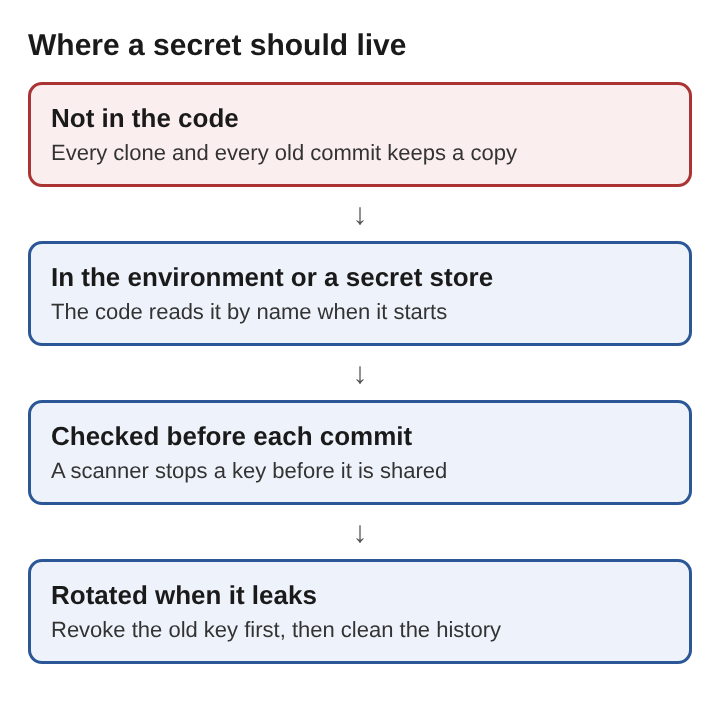
The short answer to how to keep secrets out of a web app's code is one rule. The code says what the app does. The secrets arrive from somewhere else when the app runs. API keys, database passwords and signing keys should never sit in a source file, a config file you commit, or a front end bundle. whitehatstoic is a software, security and AI safety practice, and its subject includes the weak spots that put web apps and AI systems at risk. Exposed keys are one of those weak spots. They are also among the easiest to prevent once you know where they leak.
What Is a Secret in a Web App's Code
A secret is any string that lets the holder act as your app. Ask one question about each value: if a stranger had this, could they spend your money, read your users' data, or pretend to be your server? If yes, it is a secret.
In a typical web app that list includes:
- API keys for payment, email, SMS, maps and large language model providers
- Database connection strings that carry a username and password
- Signing keys for session cookies and JSON Web Tokens
- OAuth client secrets and webhook signing secrets
- Private keys for TLS certificates and push notifications
- Cloud access keys that can create servers or read storage buckets
Some values look sensitive but are not. A public API base URL, a feature flag, or a "publishable" key that a provider designs for browser use can live in code. Developers still hard-code real keys into source code and forget them when they release it, and a 2017 scan of about 16,000 Android apps found more than 300 with embedded keys for services such as Dropbox, Twitter and Slack.
How Secrets Leak From Web App Code Into Version Control History
Here is the usual way it happens. A developer is wiring up a payment webhook late at night. To get it working, they paste the provider's secret key straight into config.js and commit. The next morning they move the key to an environment variable, delete the line, and commit again.
The key is still there. Git gives each developer a local copy of the full development history. Anyone with a copy of the repository can run git log -p and read the deleted line. Every clone, fork, CI cache and backup made in between holds it too. If the repository is private today and goes public next year, the old key goes public with it.
Version control is the main route, but not the only one. Secrets also leak through:
- Log lines that print the whole config object at startup
- Debug error pages that show environment values to the visitor
- Container image layers, where a file you deleted in a later step still exists in an earlier one
- Front end bundles, where a build tool copies a value into JavaScript that every browser downloads
Treat a secret that reached any of these places as leaked, even if you clean it up quickly.
How to Keep Secrets Out of a Web App's Code With Environment Variables
The first fix is to read secrets from environment variables instead of files in the repository. The Twelve-Factor App method puts it plainly: configuration that varies between deployments should be stored in the environment.
In a Node app, the code reads process.env.DATABASE_URL and process.env.PAYMENT_SECRET_KEY. It never contains the values. On a laptop, you keep those values in a .env file and add .env to .gitignore before the first commit. You then commit a .env.example file that lists the names with empty values, so a new developer knows what to fill in.
Two habits make this hold up:
- Fail at startup. If a required variable is missing, the app should stop with a clear message. A silent fallback to a hard-coded default is how keys creep back into code.
- Watch the browser bundle. Some build tools copy variables with a certain prefix into client JavaScript. Read your framework's rule and never give a secret that prefix.
Environment variables have limits. A child process inherits a copy of its parent's environment, so every program the app starts can read them. For a small app they are often enough. For a larger one, they are the delivery method, not the storage.
Storing Web App Secrets in a Dedicated Secret Manager
A secret manager is a service built to hold credentials. It encrypts values at rest, controls who can read each one, records every read in an audit log, and keeps old versions so you can roll back.
The app no longer gets a long list of keys pasted into its settings. It gets an identity from the platform it runs on. At startup it uses that identity to fetch only the secrets it needs. The values stay out of the repository and out of the hands of anyone who does not need them.
This is where the principle of least privilege pays off: each part may reach only what its job needs. Say your app has three parts: a web server, a payment worker and a nightly reporting job. The payment worker can read the payment key. The reporting job can read a read-only database user and nothing else. If the reporting job is compromised, the attacker does not get the payment key, because that job was never allowed to read it.
Handling Web App Secrets in Build Pipelines and Deployments
CI and deploy pipelines touch every secret at some point, so they leak often. A few rules cover most of the risk.
- Use the pipeline's secret store. Keep keys in the pipeline's own store, never in the pipeline file, and do not print them, even while debugging.
- Keep secrets out of untrusted builds. A pull request from an outside fork runs code you have not read. Do not give those builds production credentials.
- Inject at run time, not build time. A secret passed as a container build argument or copied into an image layer stays in that image. Anyone who pulls the image can extract it. Pass secrets to the running container instead.
- Prefer short-lived credentials. Many deploy platforms can hand the pipeline a token that expires within the hour. A token that dies soon after a leak does far less damage than a key that never expires.
Scanning Web App Code for Leaked Secrets Before Every Commit
People make mistakes at 2 a.m. A scanner catches them before they become history. Secret scanners look for known key formats, such as the fixed prefixes many providers put on their keys. They also flag private key headers and long strings with unusually high randomness.
Run scanning in three places:
- A pre-commit hook on each developer's machine. It checks the staged changes and blocks the commit if it finds a likely secret. The key never enters history.
- CI on every push. Hooks can be skipped or never installed. A server-side check catches what a missing or skipped hook let through.
- A one-time scan of the full history. Old commits may already hold keys that nobody noticed. Find them once, then deal with each one.
Scanners raise false alarms on sample data. Keep a short allowlist with a reason for each entry. A scanner catches slips; it does not replace keeping secrets out of the code by design.
Rotating and Revoking a Secret After It Leaks From Web App Code
When a key leaks, order matters. Many teams start by rewriting git history. That is the wrong first step, because copies already exist outside your control.
- Revoke or rotate the key at the provider. This is the only step that stops an attacker. Create a new key, then disable the old one.
- Deploy the new key through your secret manager or environment settings.
- Check the provider's logs for use of the old key between the leak and the revocation. Look for charges, sent emails or data reads you did not make.
- Clean up the source. Remove the value from the code, and rewrite history if your team decides that is useful.
- Add a scanner rule for that key format so the same slip is caught next time.
Back to the webhook example. The developer spots the key in history on Tuesday. They rotate the key at the payment provider within minutes, deploy the new one, and then read the provider's event log for the past week. Only after that do they think about history.
Design for rotation before you need it. If the app reads secrets at startup, rotation is a config change and a restart. If a provider allows two active keys, use that overlap to switch without downtime.
Frequently asked questions
Is a .env file safe to keep in a web app's repository?
No. Add .env to .gitignore before the first commit and keep it only on the machines that need it. Commit a .env.example file with the variable names and empty values instead.
Can front end code in a web app ever hold a secret safely?
No. Anything shipped to the browser can be read by anyone who opens the developer tools. Put the call that needs a secret behind your own server endpoint, and only use browser keys that the provider designed to be public and lets you restrict.
Can AI coding assistants leak secrets from a web app's code?
Yes. Prompt injection hides instructions in content a model reads, and an assistant that can read the workspace may read .env files, copy real keys into suggested code, or follow hidden instructions planted in a file and send keys somewhere they should not go. Keep production secrets out of the workspace and limit what the assistant can read and run, as covered in how to stop an LLM app from following hidden instructions.
How do you keep secrets out of a web app's code?
Read secrets from environment variables or a secret manager, never from committed files, and scan every commit for keys. When a key leaks, rotate it at the provider first and clean up the code second.