Dependency confusion is a trick that makes a package manager install a stranger's public package when your code asked for a private one with the same name. Nobody breaks into your servers. Your own build fetches the attacker's code and runs it, because the settings told it to look in more than one place and pick the newest version it could find. Weak spots in web apps and AI systems are the subject of whitehatstoic, a software, security and AI safety practice, and this one sits in the tools every team uses to build software.
What dependency confusion means
A package manager is the tool that installs, upgrades and removes software for you. Each package carries metadata: its name, a version number and a list of the other packages it needs. Since the mid 1990s, starting with CPAN, package managers have fetched those needed packages from a repository on their own, a step called dependency resolution.
Most companies write some packages they never publish. A shared billing helper or a logging wrapper lives on a private registry that only the company's machines can reach. The public registries, such as npm for JavaScript or PyPI for Python, sit alongside it. Dependency confusion happens when the resolver checks both places for the same name and cannot tell which one the developer meant.
It is one kind of supply chain attack: the attacker goes after a piece your software depends on, so the harm arrives through a normal install. The broader pattern, with poisoned packages and typosquatting, is covered in what is a software supply chain attack. Dependency confusion is narrower and needs no typing mistake at all.
How the attack picks the wrong package
The attack was first set out in full by Birsan in February 2021, who used it to get code running inside Apple, Microsoft, PayPal and more than 30 other organizations, as summed up in a 2026 paper on registry provenance. The steps are short:
- The attacker learns the name of a private package. Names leak through public code, error messages, job posts and files shipped to browsers.
- The attacker publishes a package with that exact name on the public registry, with a very high version number.
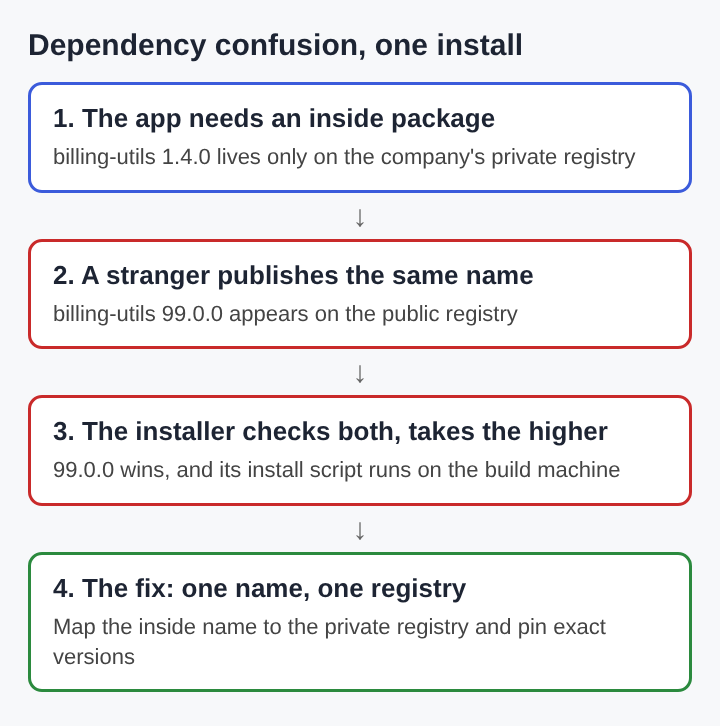
- A build machine that is set to search both the private and the public registry asks for the package. It sees two candidates and takes the higher version.
- The attacker's package installs, and any install script it carries runs with the build machine's access.
The same paper points out the gap underneath: once a package is on disk, nothing proves which registry it came from. The name and version match what the project asked for, so the install looks normal in every log.
A worked example with one private package
Take a small team with a private registry. Its web app depends on billing-utils, version 1.4.0, which exists only on that registry. To keep things simple, someone set the installer to use the public registry as well, so open source packages and inside ones come from one command.
Now follow one build:
- The project file asks for
billing-utilsat version 1.4.0 or anything newer. - On Monday, a stranger publishes
billing-utils99.0.0 on the public registry. The package does nothing useful, but its install script sends the machine's environment variables to an outside server. - On Tuesday, the build server runs a clean install. It finds 1.4.0 on the private registry and 99.0.0 on the public one. Since 99.0.0 satisfies "1.4.0 or newer" and is higher, it wins.
- The install script runs. The build server holds the deploy keys and the database password, and they leave with the script's first network request.
No line of the team's own code changed. The app might still work as before, because the fake package can copy the real one's exports. The only visible sign is a version number that jumped from 1.4.0 to 99.0.0 in the lockfile.
Change one setting and the same build is safe. If the name billing-utils is bound to the private registry, the installer never asks the public one about it, and the stranger's 99.0.0 is never seen.
Why dependency confusion keeps working
The defenses that exist are all settings, and settings drift. The registry provenance paper lists them by ecosystem: scope to registry lines in npm's .npmrc, the --index-url and --extra-index-url flags in pip, the GOPROXY variable in Go, the repositories block in Maven, package source mappings in NuGet, and inside proxies that sit between developers and the public registries. Its point is that each one fails silently when it is set wrong. A new laptop, a fresh CI image or a copied config file can quietly bring back the old search order.
The problem is common, too. A 2025 study that sorted 168 documented supply chain attacks by where they struck found that 23.8% of them exploited the build stage, and named dependency confusion and build script injection as the most frequent ways in.
Defenses that close the gap
Each fix below removes one condition the attack needs.
- Bind each inside name to one registry. Put private packages under a scope or prefix the company controls, and map that scope to the private registry in the package manager's config. In pip, prefer one
--index-urlthat points at an inside proxy over adding the public index with--extra-index-url. - Claim the names in public. Register your scope or organization on the public registry, and publish empty placeholder packages for inside names that cannot move under a scope. A name you hold cannot be taken.
- Pin and lock versions. Commit a lockfile with exact versions and checksums, and use the install command that refuses to change it in CI. A jump from 1.4.0 to 99.0.0 then fails the build instead of passing quietly.
- Route installs through one proxy. An inside proxy that decides which registry serves each name gives one place to set the rule, so a new machine cannot skip it.
- Limit what install scripts can reach. Run builds with only the secrets the step needs, and keep deploy keys out of the install stage, so a bad script finds little to send.
- Keep inside names private. Strip package names from source maps and bundles shipped to browsers, where they are easy to read.
Dependency confusion in AI projects
AI work leans on packages heavily. A single notebook can pull in dozens of libraries for data loading, model serving and evaluation, and teams often keep their own wrappers for prompts, tools and datasets on a private index. Those wrappers have names, and the same search order rules apply. A training or evaluation job that installs from both a private and a public index is open to the same swap, and such jobs often run with access to model weights, datasets and cloud keys. The registry provenance paper also argues that AI package ecosystems need proof of which registry served each artifact, not only which publisher wrote it.
Frequently asked questions
Is dependency confusion the same as typosquatting?
No. Typosquatting relies on a person mistyping a popular name. Dependency confusion uses the exact, correct name of a private package and relies on the installer's search order instead.
Which package managers can be affected?
Any that can search more than one registry for the same name. The setups named in the research include npm, pip with PyPI, Go modules, Maven, NuGet and Cargo.
Does a lockfile stop dependency confusion?
A lockfile with checksums stops it for installs that respect the lockfile. It does not help when someone adds a new dependency or regenerates the lockfile while the search order is still wrong.
How can you tell whether a build was hit?
Look in lockfiles and install logs for private package names resolved from a public registry, or versions far above any you released. Then check outbound traffic from build machines around those installs.
Dependency confusion and the trust in a package name
Dependency confusion works because a package name is treated as an identity, when on its own it is only a string that two registries can both answer to. The resolver does what it was told: find the name, take the highest version. The lasting fix is to make the question unambiguous, one inside name to one registry, with versions locked and builds that fail loudly when either changes. Teams that treat package names and registry settings as security settings, not convenience settings, remove the gap this attack depends on.
whitehatstoic
Build it right. Test it thoroughly. Keep it safe. Visit whitehatstoic.com