You put on a Bluetooth headset, start a screen recording, and your voice comes out thin and muffled, as if it went through an old phone line. Worse, the music or the call in your ears sounds flat the moment the recording starts. A Bluetooth headset microphone sounds bad for one reason, and it has little to do with which headset you bought: using its microphone switches the whole headset into a low-quality mode. Once you know that, the fix takes about a minute.
What you hear when it goes wrong
The signs are easy to spot once you know them. Your recorded voice lacks the low and high parts that make it sound like you, so it comes out narrow and boxy. The sound in your ears gets worse at the same moment, often mid-sentence, when the recorder opens the microphone. And when you stop recording, the headset can snap back to sounding normal, which makes the problem look random.
Cheap Recorder, a screen recorder that runs in Google Chrome on macOS, Windows and Linux, says it plainly in its guides: Bluetooth headsets drop to a low-quality mode when used as a microphone, and wired or USB microphones work best. Its Google Meet guide gives the Mac version of the same warning: when a Mac uses a Bluetooth headset as a microphone, it switches the headset into that low-quality mode.
Why a Bluetooth headset microphone drops in quality
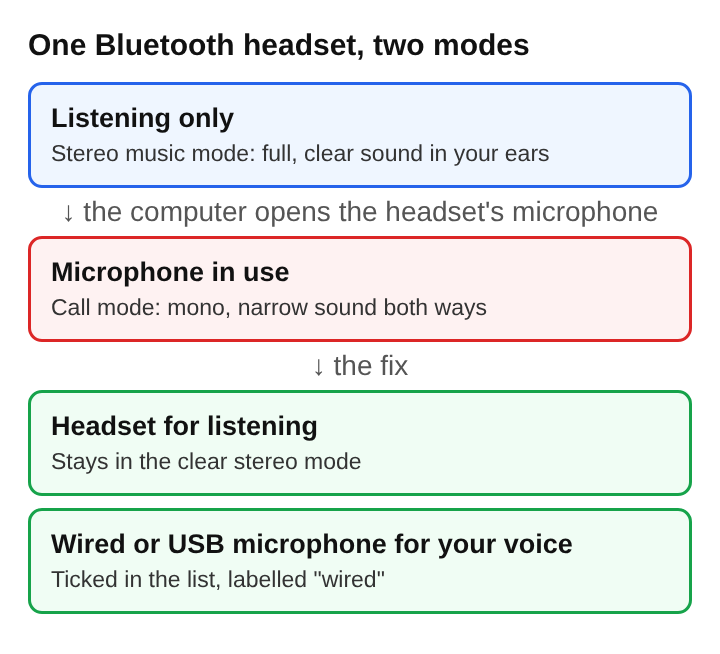
Bluetooth carries sound using separate profiles, each made for one job. The one for music, A2DP, streams audio one way in up to two channel stereo, from a laptop or phone to a wireless headset. It sends sound to your ears and nothing back.
A microphone needs sound to travel the other way too, so the headset has to change profile. Headsets usually include the headset or hands-free profiles for telephone calls, and the Headset Profile relies on audio encoded at 64 kbit/s and supports mono audio only. That is enough to understand a person on a call. It is not enough for a recording you want to sound good, and because the headset now runs one link both ways, what you hear drops to the same call quality.
So nothing is broken. The headset is doing what it was built to do: switching into call mode the moment anything asks for its microphone.
How to tell which microphone is the Bluetooth one
A computer often has several microphones at once: the laptop's own, a webcam's, a monitor's and the headset's. Your voice comes from whichever ones are ticked, and the headset's microphone can end up ticked simply because it connected last.
In the recorder's Microphone tile, open Change or add microphones. Every microphone Chrome can see is listed, and each shows "wired" or "bluetooth" beside its name. That label is the quickest check there is. If the one ticked says "bluetooth", the headset will switch into call mode as soon as you start recording. If the microphone you want is missing because you plugged it in late, press Rescan.
The recorder remembers the choice in that browser, so a fix made once stays made, until a new device changes it.
The fix: listen on the headset, speak into a wire
The answer is to split the two jobs. Keep the Bluetooth headset on for listening, where it stays in its clear stereo mode. Record your voice with a wired or USB microphone, or with the laptop's own microphone if that is all you have. Tick that microphone in the list and untick the headset's.
Keeping the headset on still matters. Headphones stop the other voices on a call from coming out of the speakers and back into the microphone, which is what makes a recorded call echo, and stopping an echo when recording a video call starts with exactly that. So the headset keeps that job, and the wired microphone takes the one the headset does badly.
A wired microphone also avoids a second Bluetooth problem. When a microphone's name appears followed by "dropped out", it disconnected during the recording, often through a Bluetooth link that lost its connection, and its sound ends at that point. A cable that is firmly plugged in does not wander out of range.
A worked example with a headset and a USB microphone
Say you are about to record a 20-minute walkthrough of a spreadsheet on a laptop, with a Bluetooth headset on and a USB microphone on the desk.
- You open Change or add microphones. The list shows the laptop's built-in microphone, the USB microphone labelled "wired" and the headset labelled "bluetooth". The headset is ticked, because it connected last.
- You untick the headset and tick the USB microphone.
- You keep the headset on, now only for listening.
- You press Start recording and talk for thirty seconds. One level bar, the USB microphone's, moves with your voice.
- You press Stop and finish and listen in the player. Your voice sounds full, and the headset sounded clear in your ears the whole time.
- You record the real walkthrough.
That thirty-second trial is worth doing every time. A sound problem is much quicker to find in a short trial than in an hour-long recording you cannot make again.
When you only have the headset
Sometimes the headset is the only microphone nearby. It will still record a voice you can understand, and that may be enough for a quick note to a colleague. Expect call quality, though, and expect your own listening to drop to the same level while it runs.
The laptop's built-in microphone is often the better of two weak choices, because it does not pull the headset out of stereo. Sit close to it, face it and keep the room quiet. Try both with a thirty-second trial each and keep the one that sounds more like you.
Frequently asked questions
Why does music in a Bluetooth headset sound worse during a recording?
The recording opened the headset's microphone, and that switches the headset from its stereo music mode to a mono call mode. Untick the headset's microphone and the sound in your ears comes back.
Is an expensive Bluetooth headset microphone better for recording?
Only a little, because the limit comes from the call mode, not the headset. A wired or USB microphone avoids that mode altogether.
How do you tell if a recording used the Bluetooth microphone?
Open the list of microphones and look at the label beside the ticked one. If it says "bluetooth", the headset was recording your voice.
Can you wear the headset and still get good sound?
Yes. Use it only for listening and record your voice with a wired or USB microphone, so the headset stays in its stereo mode.
What makes a recorded voice sound clear
Once the headset is out of the microphone job, the voice depends mostly on the microphone in front of you and where it sits. Most microphones made for speech belong to the cardioid family, commonly used for speech because they are good at rejecting sound from other directions. That means they hear best what is straight in front of them. Point the microphone at your mouth rather than at the keyboard, keep it a short, steady distance away, and a voice recorded over a cable sounds like you talking in the same room, which is exactly what a Bluetooth headset in call mode cannot give.
Cheap Recorder
Screen recording that is cheap and easy. Visit cheaprecorder.com