What is a CPU core? It is one complete processing unit inside a processor: the part that reads program instructions and carries them out, one after another. A modern processor chip usually holds several cores side by side, so it can work on separate jobs at the same time. That is what "dual-core" or "quad-core" on a spec sheet means.
In Tank City Reboot, the antivirus tank you steer guards a CPU core at the bottom of a circuit board, and twenty malware tanks try to reach it each stage. The game puts the core at the centre for a good reason: it is where a computer's actual work gets done.
What is a CPU core, one unit at a time
The reference page on multi-core processors describes each core as a central processing unit in its own right. Each one reads and executes ordinary CPU instructions, such as add, move data and branch to another part of the program.
That work follows the same loop a whole processor once did alone: fetch the next instruction, decode it, execute it and store the result. The fetch, decode and execute cycle runs inside every core. A core with one stream of instructions does one thing after another, very quickly, but still in order.
One chip, several cores
A multi-core processor puts two or more of those units on a single integrated circuit. Most often the cores sit on one die, a design called a chip multiprocessor; some designs put several dies in one package instead. Either way, the operating system sees several processors and can hand each one its own work.
The cores still work together. They may or may not share caches, and they talk to each other through links laid out as a bus, a ring, a two-dimensional mesh or a crossbar. A common layout gives each core its own small level 1 cache and lets all of them share a larger cache on the same die. Keeping the cores on one die helps: the circuits that keep their copies of data in agreement can run much faster than they could if signals had to leave the chip.
Not every core on a chip has to be the same. Homogeneous designs use identical cores. Heterogeneous designs mix them; in the big.LITTLE style, larger and smaller cores share the same instruction set, so the same program can run on either.
Why chips moved to more cores
For decades, the easy way to make a processor faster was to raise its clock speed and pack in more transistors. That path ran into physical limits. The multi-core page names one of them the power wall: power use, and so heat, climbs steeply as the operating frequency goes up.
Once gains from a faster clock slowed, chip makers turned to parallel computing instead. Rather than one core running ever faster, they put several cores on the same chip and let them share the load. In personal computers, dual-core processors became common in the late 2000s. Quad-core chips spread through higher-end systems in the early 2010s and were the norm by the mid 2010s, and six-core chips entered the mainstream in the late 2010s.
Cores, threads and parallel work
More cores only help when there is more than one thing to do at once. That can happen in two ways:
- Several programs at once. A browser, a music player and a download can each run on a different core.
- One program split into threads. A program written for multithreading divides its own work into parts that run on separate cores at the same time.
The multi-core page is plain about where the gain comes from: running instructions on separate cores at the same time raises overall speed for programs that support multithreading or other parallel techniques. A program written as a single stream of steps uses one core, however many the chip has.
Why more cores is not always faster
How much extra cores help depends on the software. The limit has a name, Amdahl's law, after the computer scientist Gene Amdahl, who presented it in 1967. It says the speedup of a whole job is held back by the part that cannot be split.
The law's page gives two clear cases. If exactly half of the work can run in parallel, the best possible speedup is 2 times, no matter how many cores you add. If 95% of the work can run in parallel, the best possible speedup is 20 times. The serial part always runs at the speed of one core, and in the end it sets the pace.
Some problems split almost perfectly. These "embarrassingly parallel" jobs can see speedups close to the number of cores. Most programs, the multi-core page notes, do not speed up that much unless programmers put in real effort to restructure them.
A worked example: one job on more cores
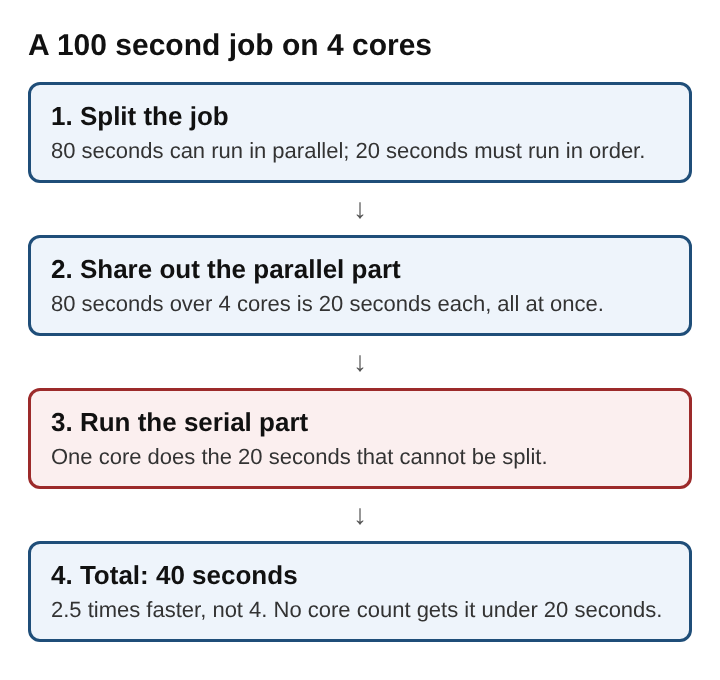
Take an invented job that takes 100 seconds on one core. Say 80 seconds of it can be split up, and 20 seconds must run in order.
- One core: 20 + 80 = 100 seconds.
- Four cores: the 80 seconds shares out to 20 seconds per core, all at once. Add the serial 20 seconds: 40 seconds in all, 2.5 times faster.
- Eight cores: 80 divided by 8 is 10 seconds. Add 20: 30 seconds, about 3.3 times faster.
- Any number of cores: the parallel part shrinks toward zero, but the serial 20 seconds stays. The job never gets below 20 seconds, so 5 times faster is the ceiling.
Doubling from four to eight cores saved 10 seconds. The first jump, from one to four, saved 60. That shrinking return is exactly what Amdahl's law predicts.
Frequently asked questions
Is a CPU core the same as a CPU?
A core is a full processing unit, so each one is a CPU in its own right. A processor is the chip as a whole, and it may hold one core or many on the same piece of silicon.
Do more cores make a computer faster?
Only for work that can run in parallel. Several programs at once, or a program split into threads, gain from extra cores; a single stream of steps runs on one core no matter how many there are.
What is the difference between a core and a thread?
A core is hardware that executes instructions. A thread is a stream of instructions from a program, and multithreaded programs hand separate threads to separate cores so they run at the same time.
Why did processors stop just raising clock speed?
Power use and heat climb steeply with operating frequency, a limit known as the power wall. Adding cores became the more practical way to get more work done per second.
What a CPU core means for real speed
A CPU core is one engine that reads and runs instructions in order. Putting several on one chip lets a computer run separate work side by side, and it became the main route to more speed once higher clock speeds hit the limits of power and heat. But a core count is not a speed figure. The gain from each extra core depends on how much of a job can be split, and the part that must run in order always sets a floor. Four cores on a well split job can feel very fast; sixteen cores on a job that runs as one stream feel no faster than one.
Tank City Reboot
The Family Computer tank classic, rebuilt inside a computer. Visit tankcityreboot.vlvd.net