What is CPU clock speed? It is the number of times per second a processor's clock sends out a pulse, and every part of the chip moves one step on each pulse. When a spec sheet says 3.5 GHz, it means 3.5 billion of those pulses every second. That number is real and it matters, but it is only half of how fast a computer feels.
In Tank City Reboot, the tank you steer guards a CPU core at the bottom of a circuit board, and one of its power-ups is named Overclock. The game's own line for it says that overclocking runs a chip faster than the clock speed it was made for. To see what that means, you first need to know what the clock is doing in there at all.
The clock that keeps a processor in step
A processor holds billions of tiny switches that must act together. If one part read a value while another part was still writing it, the result would be garbage. So the chip has a clock: a signal that flips between low and high at a fixed pace. Each flip is a tick, and on each tick the parts of the chip take their next step together.
The reference page on clock speed puts it this way: it is the frequency at which the processor's clock generator makes the pulses used to synchronize the operations of its components. It is used as a quick signal of how fast the processor is. One full tick, low to high and back, is called a cycle.
What GHz means on a spec sheet
Clock speed is measured in hertz. The hertz is the unit of frequency: one hertz is one cycle per second. It is named after Heinrich Rudolf Hertz, who first proved that electromagnetic waves exist. Big numbers get prefixes:
- kHz, kilohertz: a thousand cycles a second.
- MHz, megahertz: a million cycles a second.
- GHz, gigahertz: a billion cycles a second.
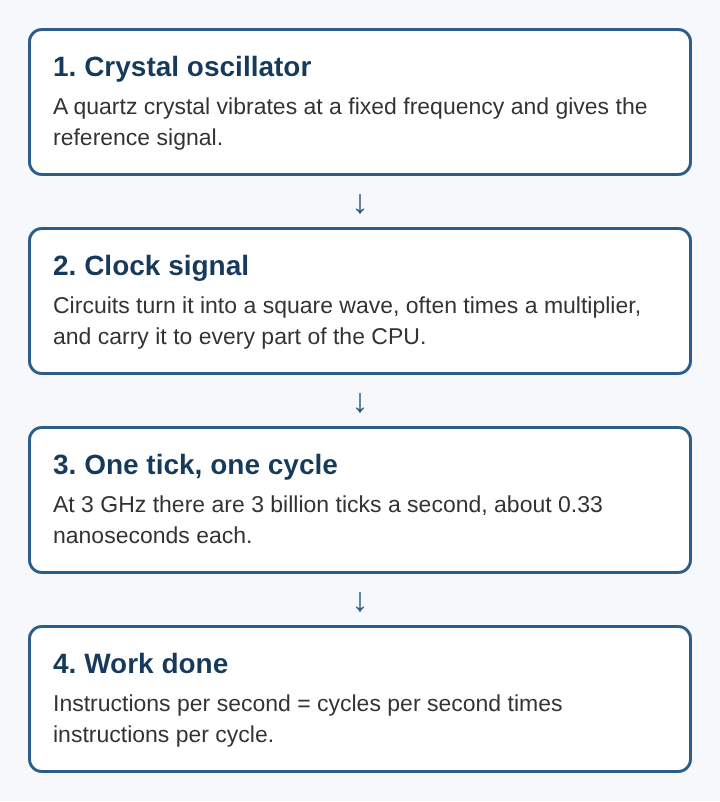
So a 3 GHz processor ticks three billion times a second. Flip that around and each tick lasts about a third of a nanosecond, around 0.33 billionths of a second.
Where the ticks come from
The pace starts with a quartz crystal. A crystal oscillator vibrates at a fixed frequency and gives a steady sine wave. Circuits turn that wave into a clean square wave, the sharp on and off shape digital logic needs. A part called a CPU multiplier can raise it to a fixed multiple of the crystal's frequency, which is how a modest crystal can drive a processor at billions of ticks a second. A clock distribution network then carries the signal to every part of the chip that needs it.
Why clock speed cannot rise forever
Every tick asks each signal line in the chip to settle into its new state, from 0 to 1 or from 1 to 0. That change takes a little time. If the next tick arrives before the lines have settled, the results are wrong. That settling time puts a ceiling on the clock.
Heat sets the other ceiling. Some energy is lost as heat each time a line changes state, and a faster clock means more changes per second, so more heat. Too much heat can damage the transistors. That is the trade the game's Overclock power-up borrows its name from, and an earlier piece on overclocking a CPU covers that trade in depth.
Clock speed is also part of how chips are sold. Makers check each processor at the end of manufacturing. Chips that pass the stricter checks get the higher label, say 3.50 GHz, and chips that only pass looser ones get a lower label, say 3.3 GHz, and sell for less. The reference page calls this binning.
How fast clocks got, and why they slowed
The history shows how far the number has climbed:
- The Z1, the first fully mechanical digital computer, ran at 1 Hz.
- ENIAC used a 100 kHz clock. Each instruction took 20 cycles, so it ran about 5,000 instructions a second.
- The Altair 8800, the first commercial personal computer, used an Intel 8080 at 2 MHz.
- The original IBM PC, around 1981, ran at 4.77 MHz.
- AMD showed a chip passing 1 GHz on 6 March 2000.
- In 2002 a Pentium 4 became the first CPU to reach 3 GHz.
After that, the climb slowed sharply. The reference page notes that clock speeds of production chips have risen much more slowly since, and that speed gains have come from other design changes. The settling and heat limits caught up. So makers found another way to go faster: do more on every tick.
Instructions per cycle, the other half of speed
The useful measure is not just how many ticks a chip makes but how much work it gets done on each one. That is called instructions per cycle, or IPC: the average number of instructions a processor finishes per clock cycle. Early CPUs worked through each instruction one step at a time. Modern ones use pipelining and superscalar designs, which overlap and run several instructions at once, so they often finish well over one instruction per cycle.
The two numbers multiply. Instructions per second equals cycles per second times instructions per cycle. That is why the clock speed page says clock speed alone is a poor way to compare different families of processors, and is most useful between chips of the same family.
A worked example with two made-up chips
Take two invented processors running the same program:
- Chip A runs at 4 GHz and averages 2 instructions per cycle. It finishes 4 billion times 2, which is 8 billion instructions a second.
- Chip B runs at 3 GHz and averages 4 instructions per cycle. It finishes 3 billion times 4, which is 12 billion instructions a second.
- Chip B has the lower GHz figure and still does half again as much work.
Real IPC is not one fixed number, though. It changes with the program being run and with how often the processor waits on memory. The same chip can average a high IPC on one task and a low one on another. That is why the reference pages point to benchmarks, real programs timed on real hardware, as a better guide than any single spec.
Frequently asked questions
Is a higher GHz always faster?
Only between chips from the same family with the same design. Across different designs, the work done per cycle can differ enough that a lower clock speed wins.
What does 3.5 GHz mean in plain numbers?
It means the processor's clock ticks 3.5 billion times a second. Each tick lasts a little under a third of a nanosecond.
Why does a faster clock make a chip hotter?
Each tick makes signal lines switch between 0 and 1, and every switch loses a little energy as heat. More ticks per second means more switches, so more heat.
Can you compare clock speeds between different kinds of chips?
Not reliably. Different instruction sets and designs do different amounts of work per cycle, so comparing even their IPC figures directly is usually meaningless.
What is CPU clock speed, in the end
CPU clock speed tells you how often a processor's parts take a step together: billions of times a second, set by a crystal and carried across the chip as a square wave. It is bounded by how fast signals can settle and how much heat the chip can shed, which is why the race for more GHz slowed in the early 2000s. The rest of the story is how much each tick achieves. Multiply the ticks by the instructions done on each one and you have a far better picture of speed than the GHz number alone can give.
Tank City Reboot
The Family Computer tank classic, rebuilt inside a computer. Visit tankcityreboot.vlvd.net