How does liquid cooling work in a computer? It moves heat away from the processor with a liquid instead of with air alone. A pump pushes the liquid through a metal block pressed on the chip, the liquid soaks up heat there, and then it flows to a radiator where fans blow the heat out into the room. The cooled liquid goes back to the chip and the loop repeats, again and again, for as long as the computer runs.
How does liquid cooling work, in short
A busy processor makes a lot of heat, and that heat has to leave the chip before the chip gets too hot to run safely. Every cooling method solves the same problem: get heat out of a tiny piece of silicon and into the air of the room. Liquid cooling just adds a step in the middle, a liquid that carries the heat to a place where it is easier to get rid of.
The game Tank City Reboot puts this idea on its map. Its malware tanks cross a circuit board toward a CPU core, through firewalls, silicon, coolant and encrypted zones. Tanks cannot cross the coolant, shots fly over it, and the game gives the real idea behind it in one line: liquid cooling carries heat away from a chip faster than air.
Why a liquid carries more heat than air
The page on computer cooling names two reasons a liquid does better than air. The first is specific heat capacity: a given amount of water soaks up much more heat than the same amount of air before it gets hotter. The second is thermal conductivity: heat moves through water more easily than through air, so it leaves the metal faster.
The page on water cooling adds why that matters in a loop. Water's unusually high specific heat capacity means a small flow of it can move a lot of heat over a distance. That is the whole trick. The liquid does not make heat vanish. It moves heat from a cramped spot on the motherboard to a big radiator with room for large fans.
In desktop PCs the most common liquid is distilled water with additives. The same source says liquid cooling is usually combined with air cooling: the hottest parts get the liquid, and the rest of the machine keeps its ordinary fans.
The parts of a cooling loop
A typical active loop has four parts, and the heat passes through them in order.
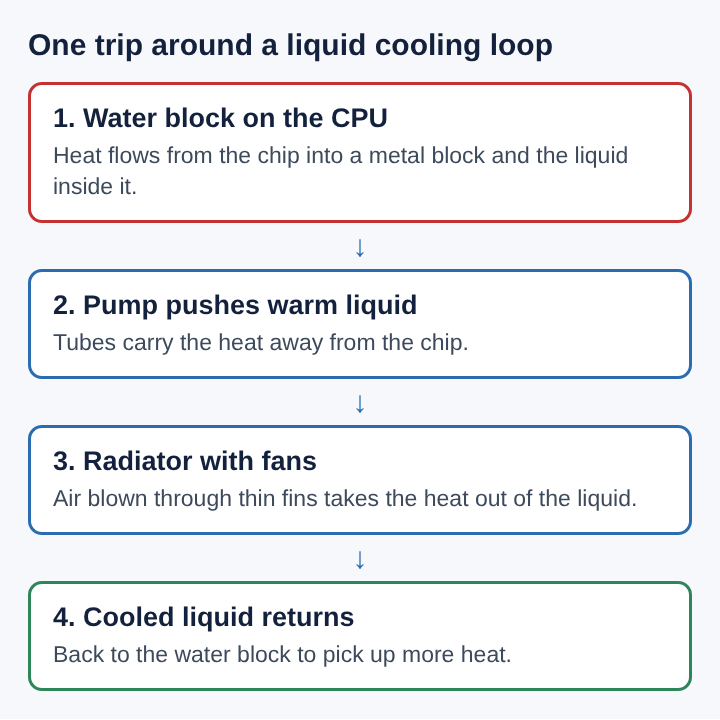
- The water block. A metal block sits on top of the processor, sometimes also on the graphics chip, memory or chipset. The liquid flows through channels inside it and picks up the chip's heat.
- The pump. It keeps the liquid moving. Without flow, the liquid in the block would just heat up and stop helping.
- The radiator. This is a heat exchanger. Fans push air through it, and the heat passes from the liquid into the air.
- The reservoir. Many loops add a small tank connected to the loop that holds extra liquid.
One small part matters before any of this. Between the chip and the block sits thermal paste. Two metal surfaces never touch perfectly, and the tiny gaps between them fill with air, which acts as insulation. The paste fills those gaps so heat can cross into the block.
A worked example: following the heat out of one desktop
Take an invented desktop with a liquid-cooled processor and a radiator mounted at the top of the case. Follow the heat, one stage at a time.
- The processor starts a heavy job and its temperature climbs. Heat crosses the thermal paste into the base of the water block.
- Liquid flowing through the block's channels warms up as it passes. Because water holds a lot of heat for each degree it warms, the liquid leaves only somewhat warmer than it came in, even though it took a large share of the chip's heat.
- The pump sends that warm liquid up a tube to the radiator. Here the fans push room air through the radiator. The air leaves warmer, and the liquid leaves cooler.
- The cooled liquid flows back down to the block and the cycle starts over.
Notice where the heat finally goes: into the air, through fans, just as in an air cooler. What the liquid changes is the place. The radiator can sit where the case pulls in cool air or pushes hot air straight out, and the computer cooling page says this freedom in where the radiator goes is one of liquid cooling's advantages. It also says liquid cooling depends less on the room's temperature than air cooling does. If the room itself is hot, though, every cooler has a harder job, because the last step always dumps heat into that air.
Custom loops and sealed all-in-one coolers
Liquid cooling started in mainframe computers. The computer cooling page describes IBM's Thermal Conduction Module, which pressed a water-cooled cold plate against chip packages and could remove up to 27 watts from a chip while keeping it around 50 degrees Celsius. The Cray-2 went further: its case was filled with Fluorinert, an inert liquid that touches the electronics directly, and that liquid was pumped out to a chilled water heat exchanger.
In home computers the practice became tied to overclocking, which raises a chip's speed and its heat along with it, as the post on what overclocking a CPU is walks through. Two kinds of setup exist today:
- Custom loops, built by hand from separate blocks, tubes, pumps, radiators and reservoirs.
- Sealed all-in-one coolers, a closed loop that comes filled. The radiator, fans and a water block with a pump built into it ship as one unit. The source credits Asetek with inventing the closed-loop cooler and says these units became popular in prebuilt desktops in the 2010s. They are simpler to fit and maintain, at a slight loss of cooling against bigger custom loops.
There are also passive liquid systems that leave out the pump or the fan. They are quieter, but they shed heat less efficiently, so they need much more liquid and a larger reservoir to give it time to cool.
The downsides of liquid cooling
The computer cooling page is plain about the costs. A loop is more complex than a heatsink and a fan, and an air-cooled heatsink is generally much simpler to build, install and maintain. Pumps often spin fast and can be noisy, even when the radiator fans run slowly.
The biggest risk is a leak. Water and its additives can damage the electronics they touch, and checking for and fixing leaks makes a loop less reliable. The same page notes that the liquid-cooled high-end versions of the Power Mac G5, an early attempt at liquid cooling in personal computers for general use, were troubled by coolant leaks.
Extreme cooling is a different matter again. Liquid nitrogen boils at minus 196 degrees Celsius, and the page says it is used for short overclocking sessions, generally only for benchmarking, because steady use can damage parts and careless handling can cause frostbite.
Frequently asked questions
Does liquid cooling put water on the chip?
No. In a normal loop the liquid stays sealed inside the block, tubes and radiator, and only metal touches the chip. Immersion cooling, as in the Cray-2, is the exception, and it uses an inert liquid rather than water.
Is liquid cooling quieter than air cooling?
Often the radiator fans can run slower, which lowers their noise. The pump adds a sound of its own, and pumps often run at high speed.
What liquid goes in a computer cooling loop?
In desktop PCs it is most often distilled water with additives. Sealed all-in-one coolers come already filled.
Do laptops use liquid cooling?
Laptops and small computers often rely on heat pipes, hollow tubes in which a liquid boils at the hot end and condenses at the cool end. That is a liquid at work too, sealed inside the pipe with no pump.
Where liquid cooling fits in how computers shed heat
Almost every computer ends with the same step: heat leaves into the room's air. Air cooling does that right at the chip, with a heatsink and a fan. Liquid cooling picks the heat up at the chip and carries it to a radiator where there is more room to release it. That extra step is why it handles hot, fast chips well, why IBM and Cray used it long before home computers did, and why leaks and extra complexity are its main risks. The water block, the pump and the radiator are just a way to move heat from where it is made to where it can go.
Tank City Reboot
The Family Computer tank classic, rebuilt inside a computer. Visit tankcityreboot.vlvd.net