What is overclocking a CPU? It is running a processor faster than the speed its maker set for it, so it does more work each second. The gain is real but small, and it costs heat, power and risk. To see why, you need to know what the clock inside a chip actually does.
The browser game Tank City Reboot borrows the idea for a power-up called Overclock, which upgrades the cannon: faster shots, then two shots, then shots that break silicon. Its short line for the real idea is that overclocking runs a chip faster than the clock speed it was made for. Silicon walls in the game stop every shot until the cannon is fully overclocked, and coolant pools stand for the real idea that liquid cooling carries heat away from a chip faster than air. Those three pieces, speed, silicon and cooling, are what real overclocking comes down to.
What is overclocking a CPU, in plain terms
Wikipedia's page on overclocking defines it as increasing the clock rate of a semiconductor device, such as a processor, beyond the speed marked on it, which can raise its performance. The same page warns in its opening lines that overclocked parts may live shorter lives, become unstable, and in extreme cases be damaged for good.
Speed is not only the clock. How fast a processor gets real work done also depends on its design, the software it runs, and the size and speed of its memory. All else being equal, a faster clock can make a chip faster, though not always. A program that spends most of its time waiting on memory or the disk barely notices a higher clock.
The most common reason people overclock, by the same page's account, is to raise frame rates in video games. Others do it to keep an older machine useful a little longer, or simply as a hobby, competing in speed contests with other enthusiasts.
The clock inside a processor
A processor has a clock generator that sends out a steady stream of electrical pulses. Wikipedia's page on clock rate explains that these pulses keep the parts of the chip in step with each other, and that the rate is measured in hertz, pulses per second. Early personal computers ran at a few megahertz; modern processors are sold by the gigahertz, billions of pulses per second.
One limit applies to every overclock. After each pulse, the signal lines inside the chip need a moment to settle into their new state, each one switching from 0 to 1 or from 1 to 0. If the next pulse arrives before they have settled, the results are wrong. Every switch also wastes a little energy as heat, so the more pulses per second, the more heat the chip makes. Too much heat can damage the transistors themselves.
So an overclock squeezes two things at once: the time each step has to finish, and the room the chip has to shed its heat.
Why chips often have room to spare
If a faster clock breaks things, why does overclocking ever work? The answer is in how chips are made and sorted. The clock rate page describes a practice called binning: chip makers check each processor at the end of manufacturing, at the temperature and voltage that give the worst performance, and label it with the highest clock rate it reliably meets. A chip that passes at 3.5 GHz is marked 3.5 GHz; one that only passes at 3.3 GHz is marked 3.3 GHz.
The overclocking page adds that the speed marked on a chip is also chosen to suit the maker's market. When a batch comes out better than expected, some faster chips get marked as slower parts anyway. That margin is the room an overclocker is reaching for. It is never certain: one chip of a model may have plenty, and the next may have almost none.
Makers also shape how much room you get. Many motherboards come with overclocking settings in the BIOS, while some processors have their multiplier locked so the clock cannot easily be raised.
Voltage, heat and the cooling that has to keep up
A chip pushed past its marked speed often needs more voltage to stay stable, because a stronger signal helps each line settle in time. The overclocking page is direct about the cost in heat: raising the frequency usually raises heat output in a roughly straight line, while raising the voltage raises it roughly with the square of the change. Voltage is the costly setting.
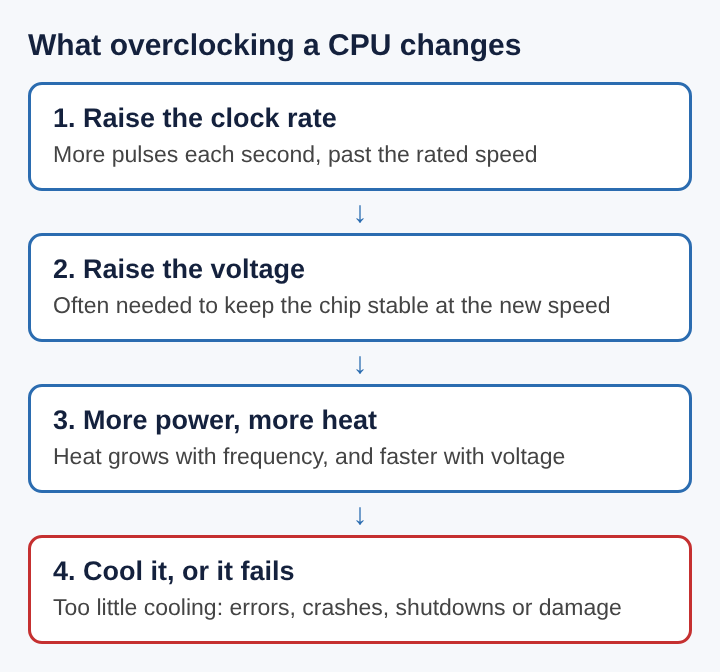
The stock cooler that ships with a processor is built for the heat it makes at its marked speed. An overclocked part may need more and stronger fans, a larger heat sink, heat pipes, or water cooling, which moves heat away through a liquid loop. Faster fans also bring noise, which the same page lists as a real drawback.
At the far end sit record attempts that cool a chip with dry ice, liquid nitrogen or even liquid helium. These are one-off experiments, not a way to run a daily machine, since the coolant boils away and water can condense on cold parts. The current CPU frequency record on the page, set in May 2026, is just over 9.2 GHz.
A worked example: 3.5 GHz pushed to 3.8 GHz
Here is an invented example, using the rules of thumb from the overclocking page and simple arithmetic. Say a processor is marked 3.5 GHz and you raise it to 3.8 GHz.
- Pulses per second. 3.8 divided by 3.5 is about 1.086, so the chip now gets about 8.6% more pulses each second.
- Time per step. At 3.5 GHz each pulse lasts about 0.286 billionths of a second; at 3.8 GHz it lasts about 0.263. Every signal line now has about 8% less time to settle.
- Heat from the clock. If heat grows in a straight line with frequency, the chip makes about 8.6% more heat from the clock change alone.
- Heat from the voltage. Suppose it needs 5% more voltage to stay stable. Since heat grows roughly with the square of voltage, 1.05 times 1.05 is about 1.10, so about 10% more heat from that change.
- Both together. 1.086 times 1.10 is about 1.19. The chip now makes roughly 19% more heat for, at best, 8.6% more speed.
That gap is the heart of the trade. The speed gain is capped by the clock change and often smaller in practice, while the heat grows faster than the speed, and the cooler has to carry all of it away.
Is overclocking a CPU safe? The real risks
Overclocking is usually not dangerous to you, but it carries real risk to the machine and to your data. The overclocking page lists the main ones.
- Instability. A chip running outside the conditions its maker set may work wrongly, with sudden shutdowns and reboots from overheating or too much voltage or current.
- Silent errors. Some failures are undetected errors that quietly corrupt data. They may be blamed on bugs in programs, drivers or the operating system, and never traced back to the overclock.
- More crashes. A large 2011 field study of consumer PCs and laptops found four to 20 times more system crashes caused by CPU failure on overclocked machines, over eight months.
- Lasting damage. An overclock can harm a part enough that it misbehaves even after it is set back to normal, without dying outright.
- Warranty. Many makers do not cover damage from overclocking, though some allow it inside a set safety margin.
Overclockers often say a stability run proves a machine is fine. The page points out that no private person can fully check every function of a processor, and some chips pass a stability run yet still fail in other programs. Pentium architect Bob Colwell, quoted on the overclocking page, called the practice an uncontrolled experiment in running a system better than its worst case.
Underclocking, the opposite trade
The same idea works in reverse. The overclocking page describes underclocking as lowering a chip's clock below its default, giving up some speed in return for less power and less heat. That allows a smaller heat sink or slower, quieter fans. Phones and laptops do this on their own to stretch battery life, and some drop their clock automatically when they run on battery.
Seen side by side, the two practices show what the clock rate really is: a setting that trades speed against heat, power and safety margin. Makers choose a setting they can promise for every chip they sell. Overclocking moves it toward speed and takes on the risk the maker left out.
Frequently asked questions
Does overclocking a CPU make every program faster?
No. A faster clock helps work that keeps the processor busy, but a program that mostly waits on memory, the disk or the network gains little or nothing.
Why does overclocking need more voltage?
At a higher clock each signal line has less time to settle before the next pulse. Extra voltage often helps the chip stay stable at that pace, but it raises heat roughly with the square of the change.
Can overclocking damage a CPU permanently?
Yes, in some cases. Excess heat can damage transistors, and an overclocked part can be harmed enough to misbehave even after it is set back to its marked speed.
What is the difference between overclocking and underclocking a CPU?
Overclocking raises the clock above the marked speed for more performance and more heat. Underclocking lowers it below the default for less power, less heat and quieter cooling, at some cost in speed.
Tank City Reboot
The Family Computer tank classic, rebuilt inside a computer. Visit tankcityreboot.vlvd.net