What is CPU cache memory, in short
What is CPU cache memory? It is a small, very fast store of copies that sits right next to the processor core, so the processor can get most of the data it needs without waiting on main memory. Every time a program reads a number, the processor looks in the cache first. Most of the time the number is already there.
The browser game Tank City Reboot puts a CPU core at the bottom of a circuit board and has an antivirus tank guard it, and each stage opens with a true fact about how computers work. The cache helps explain why a real CPU core can work so quickly: the core is fast, but the memory it reads from is not, and the cache closes most of that gap.
Why a processor needs a cache at all
A processor works through a program one instruction at a time: fetch it, decode it, carry it out. The fetch, decode, execute cycle runs at the speed of the processor's clock, as the piece on CPU clock speed sets out. Many of those instructions need data: a number to add, a value to compare, a place to store a result.
That data lives in main memory, the computer's RAM. The trouble is distance and design. According to Wikipedia's page on the CPU cache, main memory may be tens to hundreds of times slower to reach than the cache. If the processor went to main memory for every read, it would spend most of its time waiting. The cache exists to reduce the average time, and the energy, that a memory read takes.
The same page says the cache is usually built from SRAM, a kind of memory that needs several transistors to hold a single bit. That makes it quick but bulky, and in modern processors the cache is often the largest part of the chip by area. So a cache is always a trade: big enough to hold the data a program is busy with, small enough to fit next to the core.
Hits, misses and cache lines
A cache does not copy single bytes. Data moves between main memory and the cache in blocks of a fixed size called cache lines, or cache blocks. Each entry in the cache holds the copied line plus a tag, the memory address the line came from, so the cache can tell which part of memory it is holding.
When the processor needs a memory location, it checks the cache for an entry with the matching tag. If the entry is there, that is a cache hit, and the processor reads or writes the copy straight away. If it is not there, that is a cache miss: the cache makes a new entry, fetches the whole line from memory, and only then hands the data over.
A cache is always full sooner or later, so a miss usually means something has to go. The cache evicts an existing entry to make room, and the rule it uses to choose which entry leaves is called the replacement policy. One such rule, least recently used, throws out the line that has gone unused the longest, on the bet that it is the least likely to be needed again.
L1, L2 and L3: the levels of the cache
Most processors do not have one cache but a stack of them, called levels: L1, L2, often L3, and on a few chips even L4. Each level is a step further from the core, larger and slower than the one before.
- L1 sits as close to the core as possible, which makes it the fastest. It is usually split in two: one cache for instructions and one for data.
- L2 is further away and slower, but it can be made much larger without crowding the design of the core.
- L3 is generally shared among all the cores on the chip, one pool that any core can draw from.
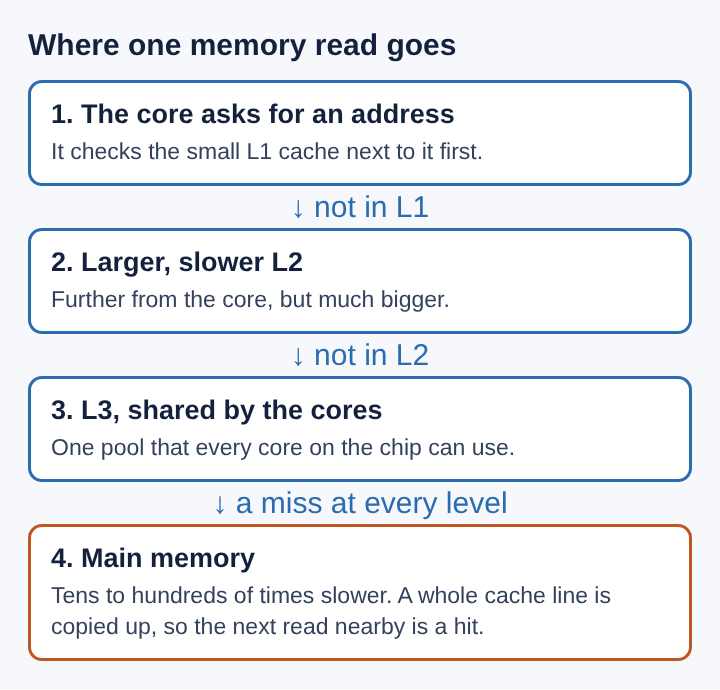
The levels came in stages. The CPU cache page names the Atlas 2 and the IBM System/360 Model 85 in the 1960s as early machines with a cache, at first a single level. Splitting L1 into instruction and data caches began with the IBM 801 in 1976 and became common in the late 1980s.
Why programs reuse the same memory
A small cache only pays off because programs are predictable in one useful way. Computer science calls it locality of reference: the tendency of a processor to touch the same set of memory locations again and again over a short span of time. It comes in two kinds.
- Temporal locality: a location that was just used is likely to be used again soon. A loop counter or a running total is read on every pass.
- Spatial locality: when one location is used, nearby locations are likely to be used soon. The items of a list, the letters of a word and the next instructions of a program all sit side by side in memory.
Temporal locality is why the cache keeps recent data. Spatial locality is why it fetches a whole line on a miss instead of a single value: the neighbours arrive in the same trip, and the program will probably want them next.
A worked example: adding up a list
Here is a made-up case, with round numbers chosen for the example rather than taken from any real chip. A program adds up a list of 64 numbers stored one after another in memory, and each cache line holds 16 of them.
- The program asks for number 1. The cache does not have it: a miss. The cache fetches the line holding numbers 1 to 16 and hands over number 1.
- The program asks for numbers 2 to 16. All of them came in with that first line, so all 15 are hits.
- Number 17 is a miss, and it brings in 17 to 32. The pattern repeats for 33 and for 49.
- The running total and the loop counter are used on every pass, so they stay in the cache the whole time.
That is 4 misses in 64 reads of the list, so 60 of the 64 reads, about 94%, are answered by the cache. Only the 4 misses pay the long trip to main memory.
Now change one thing: the program jumps around the list in a scattered order, a few lines apart each time. Each line may be evicted before the program comes back to it, so far more reads become misses, even though the work is the same 64 additions. The locality page gives a real version of this: in C, a grid of numbers is stored row by row, so walking along each row in order uses the cache well and cuts down misses, while walking down the columns jumps across memory.
Frequently asked questions
Is CPU cache the same as RAM?
No. RAM is main memory, large and much slower to reach. The cache is a small store on the processor chip that keeps copies of the parts of RAM a program is using right now.
Why not make the whole memory out of cache?
Cache memory uses several transistors for every bit, so it takes a lot of chip area. Some chips use a denser kind of memory called eDRAM to fit more cache, but it is slower than SRAM.
What happens on a cache miss?
The processor waits while the line holding the address is fetched from the next level, or from main memory if every level misses. To make room, the cache evicts an older entry, chosen by its replacement policy.
Does a bigger cache always make a computer faster?
Not always. A bigger cache can hold more of a program's working data, but the cache takes chip area, and the levels further from the core are slower. That is why chips pair a small, quick L1 with larger, slower L2 and L3 levels.
What CPU cache memory decides, in the end
CPU cache memory is the reason a processor's clock speed means anything in practice. Without it, a core that runs an instruction on every few ticks of its clock would sit idle while main memory answered. With it, most reads are hits, served from a small store of fast copies right beside the core.
The cache works on a bet about how programs behave: what was used recently will be used again, and what sits next to it will be wanted soon. When a program keeps that bet, by reusing its data and reading memory in order, the cache answers almost every request. When it breaks the bet, by scattering its reads across memory, the same processor slows down, waiting on misses that the cache could not predict.
Tank City Reboot
The Family Computer tank classic, rebuilt inside a computer. Visit tankcityreboot.vlvd.net