What does the CPU do, in one line
What does the CPU do? It reads a program one instruction at a time and carries each one out, again and again, for as long as the computer is on. The central processing unit is the main processor in a computer, and every app, game and web page you use is, at bottom, a long list of small instructions that it works through in order.
The browser game Tank City Reboot puts this part at the centre of its map: your antivirus tank guards the CPU core at the bottom of a circuit board while malware tanks try to reach it. The game picks that spot for a reason. If the processor stops doing its job, nothing else in the machine does anything at all.
A program is a list of numbers
A program sitting in memory does not look like words. It is a row of numbers. Each number is an instruction, and the Wikipedia page on the central processing unit describes the CPU's basic work as executing a sequence of stored instructions, called a program, that are kept in the computer's memory.
Which numbers mean what is fixed by the chip itself. Hardwired into every CPU is a set of basic operations it can perform, called its instruction set. Typical entries are:
- add or subtract two numbers
- compare two numbers
- copy a number from memory into the chip, or from the chip back to memory
- jump to a different part of the program
Each instruction is written as a unique pattern of bits called an opcode. A processor from one family will not understand the opcodes of another, which is why a program built for one kind of chip will not simply run on a different kind.
The list of operations is short and plain. A CPU cannot "open a photo" or "play a sound" in one step. It can only add, compare, move and jump. Everything bigger is made by stringing millions of those small steps together.
The fetch, decode and execute cycle
Nearly all CPUs follow the same three steps for every instruction: fetch, decode and execute. Together they are called the instruction cycle, and once one instruction is done, the cycle starts over with the next.
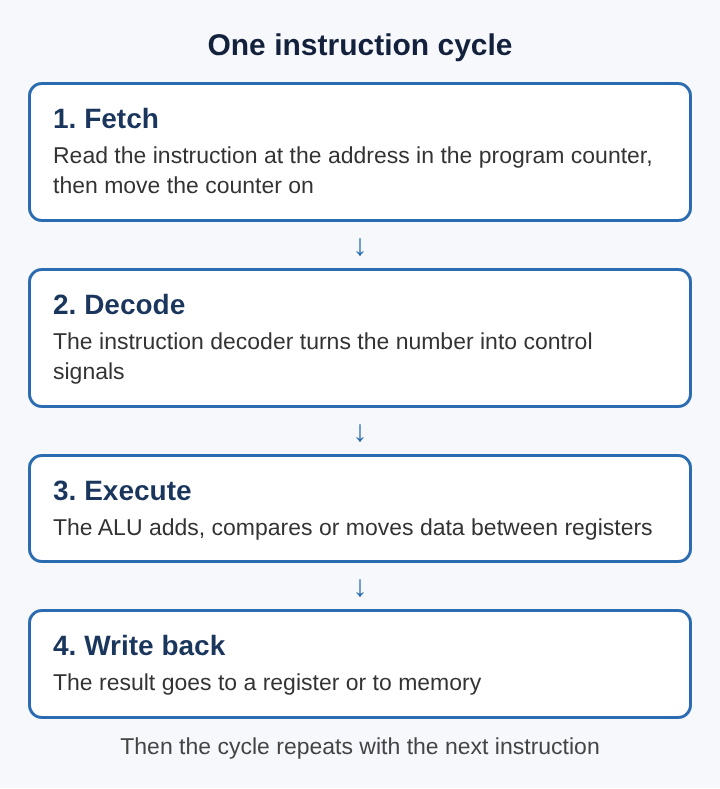
Fetch. The CPU keeps a small register called the program counter, which holds the memory address of the next instruction. (On Intel x86 chips it is called the instruction pointer.) The CPU reads the instruction stored at that address and then moves the counter on to the next one.
Decode. The instruction is still just a number. A circuit called the instruction decoder turns it into signals that switch on the parts of the chip the instruction needs. The chip's instruction set defines how each number is read.
Execute. The switched-on parts do the work. An arithmetic or logic operation runs, or data is read from or written to memory, and the result lands in a register or in memory.
The step that stores the result is often drawn as its own fourth stage, write back, which is how the diagram shows it. Then the loop repeats.
The three parts that do the work
Inside the chip, three groups of circuits share the job.
The control unit directs everything else. It tells memory, the arithmetic unit and the input and output devices how to respond to each instruction, and it does that with timing and control signals. It decides what moves where, and when.
The arithmetic logic unit, or ALU, is the part that calculates. The Wikipedia page on the ALU describes it as a digital circuit that does arithmetic and bitwise operations on whole binary numbers. Its inputs are the numbers to work on, called operands, plus a code that says which operation to perform. Its output is the result, and often some status information too, such as whether the answer came out as zero.
Registers are a handful of tiny, very fast storage slots right inside the processor. The ALU takes its inputs from them and puts its answers back into them. The program counter is one of these registers.
These three pieces were once separate boards. The first commercially available microprocessor, the Intel 4004 of 1971, was one of the first chips aimed at consumers to put the ALU, the control unit and the registers together on a single piece of silicon.
A worked example: adding two numbers
Here is one instruction followed from start to finish. The numbers and the instruction are invented for the example, but the steps are the ones the sources describe.
Say a register called A holds 7, a register called B holds 5, and the program counter holds address 100. At address 100 sits the instruction "add A and B, put the answer in A".
- Fetch. The CPU reads address 100 and gets the instruction's number. The program counter moves on to 101.
- Decode. The instruction decoder recognises the opcode for "add" and sends signals that switch on registers A and B and the adding circuits of the ALU.
- Execute. On the next clock pulse, 7 and 5 flow out of the two registers into the ALU, and 12 appears at its output.
- Write back. The 12 is stored in register A, replacing the 7.
Then the CPU fetches whatever sits at address 101 and starts again. Every larger task, from drawing a screen to saving a file, is a long chain of these small cycles, each one this plain.
The clock pulse in step 3 is what keeps the parts in time with each other. How many of those pulses a chip gets each second is its clock speed, covered in what CPU clock speed is and what GHz means.
How jumps make loops and choices
If the program counter only ever moved forward by one, a program could never repeat anything or make a choice. Jump instructions fix that.
A jump does not produce a number. Instead it changes the program counter itself, so the next fetch comes from somewhere else in the program. Jumps are what make loops, conditional code and functions possible.
A conditional jump only happens when its condition holds. In the example, the program could compare A with 20 and jump back to address 100 while A is still smaller. That small pair of instructions, compare and then jump, is how a computer repeats a task or picks between two paths. Every "if" and every "repeat" in a program you have ever used turns into this pattern by the time the CPU sees it.
Why the CPU keeps waiting on memory
Fetching instructions and data from main memory takes far longer than the work the ALU does with them. To cut that wait, most modern fast CPUs carry a CPU cache, a smaller memory close to the cores that lowers the average cost, in time or energy, of reaching data from main memory. When the next instruction is already in the cache, the fetch step finishes much sooner.
Modern chips also run more than one instruction cycle at once. Many of them contain more than one ALU, and a single chip can hold several complete CPUs, which is what a multi-core processor is. Each core runs its own fetch, decode and execute loop, so several parts of a program, or several programs, can move forward at the same time.
None of that changes the basic job. A faster or bigger processor still fetches, decodes and executes. It simply does more of those loops, closer together.
Frequently asked questions
What does the CPU do in simple terms?
It reads a program's instructions from memory one at a time and carries each one out. Each instruction is something small, such as adding two numbers, comparing them or jumping to another part of the program.
What is the difference between the CPU and memory?
Memory holds the program and its data. The CPU reads instructions and data from memory, works on them in its own registers, and writes results back.
What is the ALU in a CPU?
The arithmetic logic unit is the circuit that does the calculating: arithmetic and bitwise operations on binary numbers. The control unit tells it which operation to run on which numbers.
Is a CPU core the same as a CPU?
A core is a complete processor on a chip that can hold several of them. A chip with more than one is called a multi-core processor, and each core runs its own instruction cycle.
What the CPU does, all the time
Strip away the speed figures and the core counts, and a CPU does one thing on repeat. It looks up the address in its program counter, fetches the instruction there, decodes it into signals, lets the ALU or the memory circuits act on it, and stores the result. Then it moves on.
Every program is that loop, run over and over across a short list of plain operations. Knowing it makes the rest of a computer easier to read: memory feeds the loop, the clock paces it, caches shorten its waits, and extra cores run more copies of it side by side.
Tank City Reboot
The Family Computer tank classic, rebuilt inside a computer. Visit tankcityreboot.vlvd.net