Why a screen recording has no sound
You press Stop, play the file back, and the picture is fine but the room is silent. Or your own voice is there and the other people on the call are not. When a screen recording has no sound, or only part of it, the cause is nearly always one setting, and the fastest way to find it is to work out which sound is missing before you touch anything.
A screencast is a recording of what a computer screen shows, often with spoken narration on top. The picture and the sound reach the file by different routes, so one can work while the other fails. The checks here follow Cheap Recorder, a screen recorder that runs in Google Chrome and saves one MP4 to a folder on your own computer.
Three kinds of sound, three separate settings
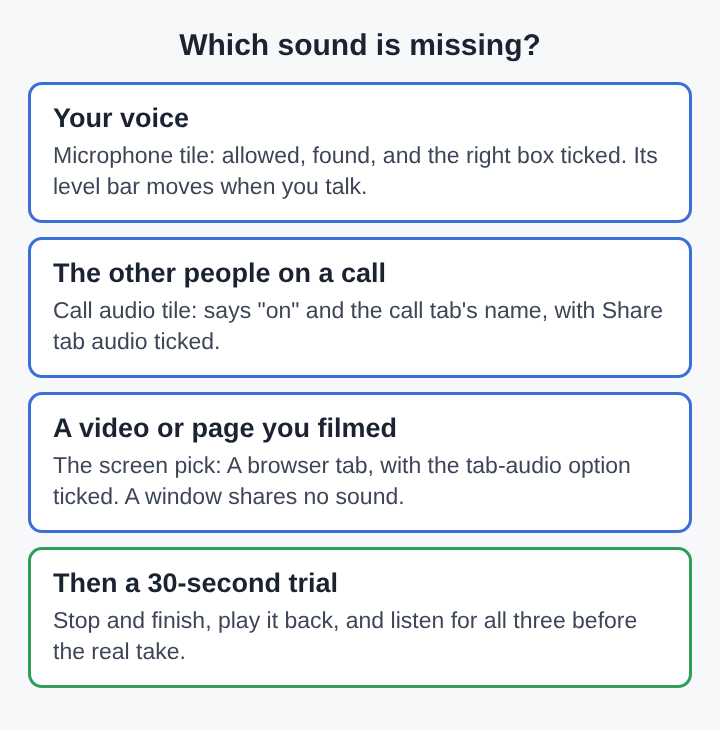
A recording in Chrome can take sound from up to three places, and each one has its own switch:
- Your voice comes from the microphones ticked in the Microphone tile.
- The other people on a call come from the Call audio tile, through a shared Chrome tab.
- The sound of what you are filming, such as a video playing in a tab, comes with the screen pick, but only when Chrome shares that sound.
So "no sound" is really three different faults. Play the recording in the player on the page and note which of the three you can hear. A file with your voice but no call has a different fix from a file with nothing at all.
When your own voice is missing
Start with the small line of text in the Microphone tile. It tells you the state in plain words:
- "allow the microphone to record your voice" means Chrome has not been given access. Press Allow microphone and camera. If you blocked it earlier, allow the microphone again in Chrome's site settings for the page, then reload.
- "no microphone found" means Chrome cannot see one. Plug it in and press Rescan.
- "none selected" means every box is unticked.
If the tile looks fine and your voice is still missing, the wrong microphone is probably ticked. A webcam, a monitor and a headset can each carry a microphone of their own, and the one ticked may not be the one you speak into. Open Change or add microphones and tick the right one. The choice is remembered in that browser, so a wrong pick tends to repeat until you fix it.
Then watch the level bars. Each ticked microphone has a bar that moves with its sound while you record. If yours stays still while you talk, the problem sits outside the browser: check the microphone's own mute switch and your computer's sound settings.
When the other people on the call are silent
Call voices never come through your microphone on purpose. They come from the tab the call runs in, and Chrome only hands a page the sound of another tab when that tab is shared with its tab-audio option ticked.
Look at the Call audio tile before the call starts. It should say "on" followed by the tab's name. If it says "not captured", press Pick the call tab and choose it. If it says "that tab had no audio", you shared a window or the whole screen, or left the box unticked. Pick the call's tab from the tab list and tick Share tab audio.
The same setup is walked through for one meeting app in how to record a Microsoft Teams meeting in Chrome. If the voices are there but doubled or echoing, that is a different fault with its own fixes, covered in how to stop an echo when recording a video call.
When a video or web page plays silently
This is the most common surprise, because the picture records perfectly. The sound of a video, a slideshow or a web page arrives with the screen pick, and how you picked the screen decides whether any sound comes with it:
- A browser tab, with the tab-audio option ticked in Chrome's sharing window, carries the tab's sound.
- A window carries no sound. Chrome does not hand over a window's audio.
- The whole screen on a Mac carries no sound either.
Sound from other programs on your computer cannot be recorded this way at all. If a clip lives in a desktop player, play it in a Chrome tab instead and share that tab. And leave the tab open for the whole recording: if it closes, Chrome stops sharing its sound from that moment.
A worked example: a silent product demo
Say you recorded a four-minute demo of a spreadsheet. You talked over it, and at one point you played a short training video in another tab. On playback you hear yourself clearly, but the video's part is silent.
- Name the missing sound. Your voice is there, so the Microphone tile is fine. There was no call. The missing sound is the video, which belongs to the screen pick.
- Recall how the screen was picked. You chose A window so the bookmarks bar would stay out of shot. A window shares no sound, which explains the gap.
- Change one thing. Put the spreadsheet and the video in the same window as two tabs, choose A browser tab, pick the video tab and tick the tab-audio option. If you need both tabs on screen, film the spreadsheet tab and accept that the video will play silently, or narrate what it shows.
- Run a 30-second trial. Press Start recording, say a sentence, play five seconds of the video, then press Stop and finish.
- Listen in the player. You should hear both your voice and the video. Only then record the real demo.
The trial is the step that saves the most time. A sound problem takes seconds to find in a 30-second file and can cost a whole afternoon when it turns up at the end of an hour.
Messages that explain a gap partway through
Sometimes the sound starts fine and stops. The recorder shows a message at that point, and each one names the cause:
- "Meeting audio sharing stopped." The call tab's sharing ended, so the other people are silent from then on. Picking the tab again does not add it to a recording that is already running. Stop, pick it again and start a new recording.
- A microphone's name followed by "dropped out". The microphone disconnected, often a loose USB cable or a Bluetooth link. Its sound ends at that point. Reconnect it and start again if you need it.
- "Bluetooth microphone selected". A warning, not a fault. On a Mac, a Bluetooth headset used as a microphone switches into a low-quality mode.
That last one has a reason in how Bluetooth carries sound. The Bluetooth profiles for good listening, such as A2DP, stream stereo audio in one direction only. Most headsets also carry the hands-free profile, made for phone calls, which carries a single mono audio channel. The fix is to use the headset to listen and a wired or USB microphone to speak.
Frequently asked questions
Why is a GIF made from a recording silent?
The GIF format holds a series of images for animation and has no place for sound. Convert to MP4, MOV or WebM when the video needs its audio.
Why will a player not open the files in Separate sources?
The per-source files saved there are WebM, which some players do not open. Use the MP4 beside that folder, or open the WebM files in an audio editor.
How can the microphone be checked on its own?
Turn the webcam off and do not pick a screen. The recording is then an M4A sound file, which lets you hear the microphone with nothing else in the way.
Can sound from a desktop app be recorded?
Not through the browser. Chrome shares sound from its own tabs, so play the clip in a Chrome tab and share that tab with its audio.
Silence in a screen recording points to what was shared
A silent recording is rarely a broken file. It is a record of what the browser was allowed to hear: the microphones you ticked, the tab you shared for the call, and the way you picked the screen. Ask which of the three sounds is missing, look at the one setting that feeds it, and listen to a 30-second trial before anything long. The gap in the sound almost always matches a gap in what was shared.
Cheap Recorder
Screen recording that is cheap and easy. Visit cheaprecorder.com