If you build or run a web app, sooner or later someone asks whether it covers the OWASP Top 10. So what is the OWASP Top 10? It is a short list of the most critical security risks for web applications, written by an open community and updated every few years. People who probe web apps for weak spots, such as whitehatstoic, a software, security and AI safety practice, use it as a shared vocabulary. The list does not tell you whether your app is safe. It tells you which kinds of mistakes are the most critical, so you know where to look first.
What is the OWASP Top 10 and who writes it
OWASP stands for the Open Worldwide Application Security Project. It is an online community that publishes open-source material on web application security, and a non-profit, the OWASP Foundation, leads it. Mark Curphey started it on 9 September 2001. Until 2023 the W stood for Web; in February of that year the board voted to change it to Worldwide.
The Top 10 is the community's best-known publication. Each entry is a category of risk, not a single bug. A category groups many specific weaknesses that share a cause, such as an app trusting input it should not, or letting a user reach data that belongs to someone else.
The point of grouping is focus. A developer cannot memorize thousands of individual flaws, but ten families of mistakes fit in one head, and each family suggests a question to ask about real code.
How the list has changed since 2003
The first edition came out in 2003. New editions followed in 2004, 2007, 2010, 2013, 2017, 2021 and 2025. Each one updates the categories as the way software is built changes.
The 2025 edition added new categories, including software supply chain failures. That change follows a real shift. Modern apps often pull in code written by other people: libraries, packages, build tools and outside services. A supply chain attack goes after the less secure parts of that chain instead of the app itself, and it can happen in software or hardware. Your own code can be careful while a package it depends on is not.
Because the list moves, a claim like "we cover the OWASP Top 10" means little without the year. A team that checked against the 2017 edition never looked at a category that only arrived in 2025.
Reading one category of web application risk
Each category is easier to use once you turn it into a question about your own app. Access control is a good place to start, because the mistake is simple and the damage can be large.
One classic form is the insecure direct object reference, or IDOR. An app signs a user in, then serves records by an identifier in the address, such as /document/1234, without checking that the record belongs to that user. Anyone who changes the number can read other people's records. Even long, random identifiers do not fix it: if an attacker finds an identifier somewhere else and the server never checks access, the record is still exposed. IDOR was considered serious enough to appear on the OWASP Top 10 for many years.
So the question this category asks is plain: for every request that reads or changes data, does the server check that this user is allowed to touch this record?
A worked example: one category, one app
Take a small invoicing app. Each customer signs in and sees their own invoices at an address like /invoices/5012. Here is how to turn the access control category into a real check, step by step.
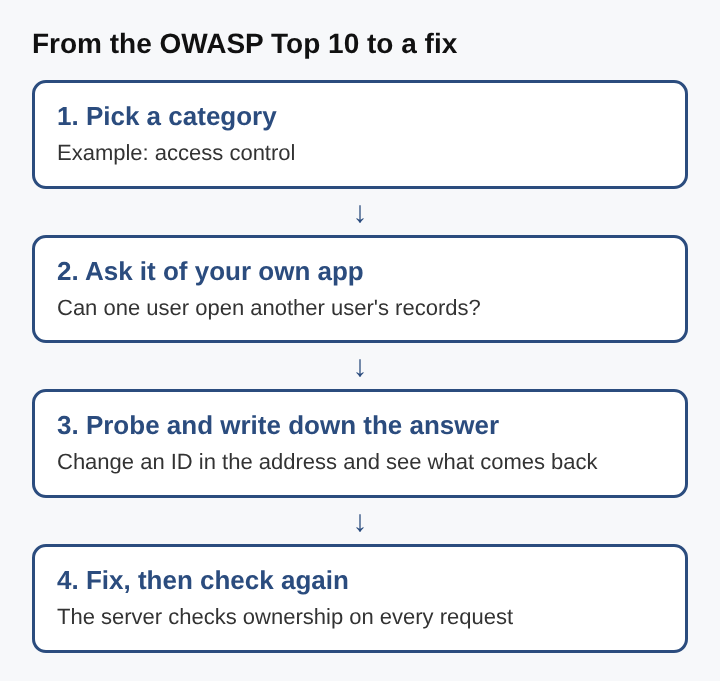
- Pick a category. Start with access control.
- Ask it of your own app. Can a signed-in customer open an invoice that belongs to a different customer?
- Probe and write down the answer. Sign in with two accounts you control. As customer A, open invoice 5012. As customer B, paste the same address. If B sees A's invoice, you have found the weak spot. Write down the address, the two accounts and what came back.
- Fix, then check again. Make the server load the invoice only when its owner matches the signed-in user, and answer "not found" otherwise. Then repeat step 3 and confirm B now sees nothing.
Notice what made this work. You used only your own accounts and your own data. You asked one narrow question, wrote down the evidence and repeated the check after the fix. Every category on the list can be worked the same way: name the risk, phrase it as a question about one feature, probe it safely, fix the cause and check again.
Where familiar attacks fit on the list
Many attacks you have heard of sit inside one of the list's categories rather than having an entry of their own.
- SQL injection. SQL injection slips database commands into an entry field, so the app runs them. It works when input is not filtered or not strictly typed. There is a longer walk through it in what is SQL injection and how to prevent it.
- Cross-site scripting. Cross-site scripting lets an attacker inject scripts into pages other users view. Both it and SQL injection come from the same root cause, untrusted input treated as code, which is why the list groups such flaws together. The three kinds are set out in what is cross-site scripting.
- Server-side request forgery. With server-side request forgery, an attacker makes your server send requests to internal systems it should never reach. In 2019 an SSRF exploit at Capital One exposed a cloud credential and led to a breach affecting about 100 million people in the United States.
- Cross-site request forgery. A forged request rides on a user's signed-in browser. It is covered in what is cross-site request forgery.
Knowing the category behind an attack helps more than knowing the attack's name. Fix the cause, and you close every variant that shares it.
Why rules and teams point to the list
The Top 10 is not a law or a certification, but many rulebooks and organizations refer to it, including MITRE, the PCI DSS rules for card payments, the US Defense Information Systems Agency's STIG guides and the US Federal Trade Commission. That is a large part of why it shows up in contracts, security questionnaires and job descriptions.
For a team, the practical value is a common language. A developer, a security lead and an outside checker can all say "access control" or "injection" and mean the same family of problems. Conversations get shorter and fixes get aimed at causes rather than symptoms.
The same idea now reaches AI. In May 2023 OWASP started a Gen AI Security Project to document the most critical risks of large language model apps, such as hidden instructions inside the text a model reads. That class of risk is covered in how to stop an LLM app from following hidden instructions.
What the list does not do
The Top 10 is a starting point, not a finish line. It names the most critical risks across web apps; it does not know your app. A weak spot specific to your business logic, such as letting a discount code be used twice, may fit no category neatly and still cost you money.
It is also not a checklist you tick once. Code changes every week, new dependencies arrive, and a fix in one place can open a gap somewhere else. A check that passed last spring says nothing about a feature shipped yesterday.
Finally, the list ranks categories, not your priorities. A small internal tool and a public payments site face the same categories with very different stakes. Use the list to decide what to look at, then use what you know about your own data and users to decide what to fix first.
Frequently asked questions
How often is the OWASP Top 10 updated?
Every few years. Editions came out in 2003, 2004, 2007, 2010, 2013, 2017, 2021 and 2025.
Is the OWASP Top 10 a rule you must follow?
No. It is guidance from an open community, though rulebooks such as PCI DSS and bodies such as the US Federal Trade Commission refer to it.
Does covering the Top 10 make an app secure?
No. It covers the most critical categories of risk, but your own app can have weak spots the list does not name, especially in its business rules.
Is there a version of the list for AI apps?
OWASP started a Gen AI Security Project in May 2023 to document the most critical risks of large language model apps, separate from the web app list.
Web application security risk keeps moving
The OWASP Top 10 is a snapshot of where web apps fail most often, taken again every few years as the way software is built changes. The categories that stay on it, such as access control and injection, stay because the same root mistakes keep reappearing in new code. The ones that arrive, such as supply chain failures, mark a shift in where the weak points now sit. Reading the list well means reading each category as a question about real features, and asking it again whenever the code, its dependencies or its users change.