People usually ask how does multi-factor authentication work right after a login page wants a code, a tap or a key on top of the password. The short answer is that the service asks for two or more separate kinds of proof, so an attacker has to steal every one of them instead of just one. Login is one of the first places weak spots show up in a web app or an AI platform, and software security is the wider field of whitehatstoic, a software, security and AI safety practice. The details of the factors and the flow decide whether the extra step stops attacks or only slows down honest users.
What Multi-Factor Authentication Is
Multi-factor authentication (MFA) is a login method that requires proof from at least two different categories before it grants access. A password on its own is one factor. Passwords leak in data breaches, get reused across sites and get typed into fake pages. Once a password is out, anyone holding it can log in.
MFA changes that. A stolen password is no longer enough, because the attacker also needs something they cannot get from a breach dump. The important word is different. A password plus a security question is still two things the user knows, so it counts as one factor used twice. Both can be phished in the same form.
The Three Factor Types in Multi-Factor Authentication
Factors fall into three groups:
- Something the user knows: a password, a PIN or a passphrase.
- Something the user has: a phone with an authenticator app, a phone number that receives texts, a hardware security key or a smart card.
- Something the user is: a fingerprint, a face scan or another biometric.
Biometrics on a phone or laptop usually work locally. The fingerprint never leaves the device. It opens a secret stored on the device, and that secret is what the server checks. So a face scan on a phone is often a biometric guarding a possession factor, not a biometric sent to the website.
Some systems also weigh signals such as location, device type or time of day. These help a server decide when to ask for more proof, but they are risk signals, not factors a user presents.
How Does Multi-Factor Authentication Work in a Login Flow
Take a concrete case. You sign into the cloud dashboard that runs your company's app. Here is what happens on the server side:
- You enter your email and password. The server checks the password hash.
- The password matches, but the server does not issue a full session. It records a partial state that says "first factor passed, second factor pending."
- The server asks for the second factor: a six digit code, a push approval or a security key tap.
- You provide it. The server verifies it, marks the code as used and upgrades the session to fully signed in.
- The server sets a session cookie. From here on, the cookie is what proves you are you.
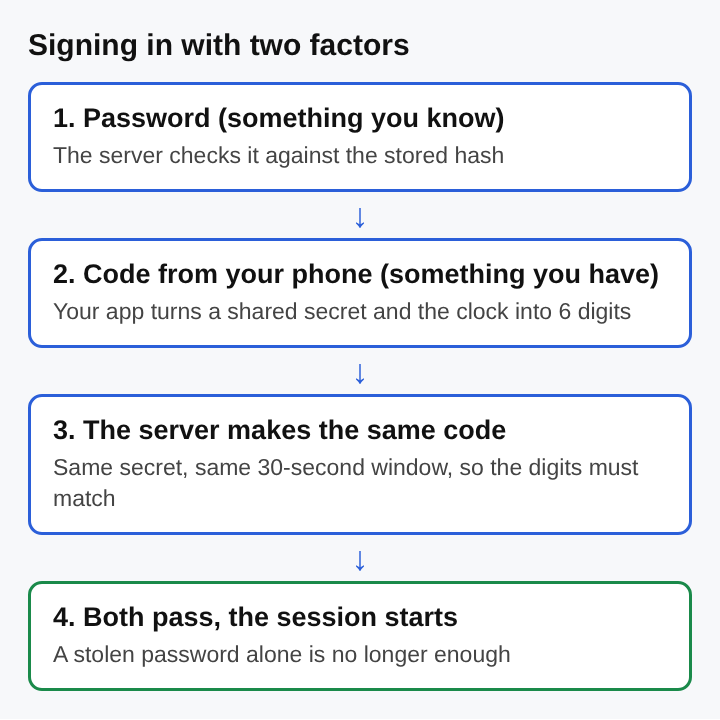
Step 2 is where many real bugs live. If any protected page or API route accepts the partial state, an attacker with only the password can skip step 3 by going straight to that route. Every protected endpoint has to check for the full state, not just "some session exists." This is a form of broken access control, and it is easy to miss when the MFA screen was added after the rest of the app was built.
Step 5 matters too. MFA protects the moment of login. After that, the session cookie carries all the trust. If the cookie is stolen, the attacker is inside without ever seeing a second factor prompt, which is why session hijacking remains a live risk on accounts that use MFA.
One-Time Codes, Push Prompts and Hardware Keys in Multi-Factor Authentication
One-time codes
Authenticator apps use time-based one-time passwords (TOTP). When the user scans the setup QR code, the app and the server store the same secret. Each side combines that secret with the current time, usually in 30 second steps, and produces a short code. The server accepts the code if it matches its own result for the current window, often allowing one window either side for clock drift.
Codes sent by text message work differently. The server picks a random code and sends it to a phone number. The possession factor here is the phone number, which is weaker than a physical device, because a number can be moved to another SIM.
Push prompts
A push prompt sends a notification to an app on a registered phone, and the user taps approve or deny. It is easy to use. Its weakness is that a tired or confused user may approve a login they did not start. Better designs show a number on the login screen and ask the user to type that number into the app, which ties the approval to the session in front of them.
Hardware keys
A hardware security key holds a private key that never leaves the device. The server sends a challenge, the key signs it, and the server checks the signature with the public key it stored at setup. There is no code to read out or type, which removes a whole class of attacks.
How Attackers Bypass Multi-Factor Authentication
MFA raises the cost of an attack. It does not end attacks. Common routes around it include:
- Real-time phishing proxies. A fake login page relays everything the user types to the real site in real time, including the one-time code. This is a man-in-the-middle attack, and it captures the session cookie the real site returns.
- Push fatigue. The attacker has the password and triggers push prompts again and again until the user taps approve to make them stop.
- SIM swapping. In a SIM swap scam, the attacker convinces a mobile carrier to move the victim's number to a new SIM, then receives the text codes.
- Weak recovery. If "lost my phone" resets MFA after a single email link, the recovery flow is the real login, and it has one factor.
- Help desk social engineering. A caller poses as an employee and asks support to remove MFA from the account.
Developers add their own gaps. Watch for codes with no cap on wrong guesses, codes that stay valid after use, a second step that is only enforced in front-end JavaScript, and a "remember this device" cookie that never expires or is not bound to the device. Finding these with permission and inside an agreed scope is ordinary ethical hacking work.
Phishing-Resistant Multi-Factor Authentication with FIDO2 and Passkeys
The fix for real-time phishing is to make the second factor aware of which site it is talking to. FIDO2 does this. Its browser side is WebAuthn, a W3C specification that lets websites register and use public key credentials.
At setup, the user's device creates a new key pair for that one site. The browser records the site's origin, such as dashboard.example.com. At login, the browser tells the device which origin is asking. A fake page at dashboard-example.co is a different origin, so the device has no key for it and nothing useful gets signed. The user cannot be tricked into handing over the credential because the user never handles it.
Passkeys, the common name for WebAuthn credentials, can sync across a user's devices through their platform account. They can replace the password entirely, since the device check (a PIN or biometric) plus the stored key already covers two factors. The tradeoff is recovery. If the sync account is lost or taken over, the passkeys go with it, so the recovery path deserves the same care as the login itself.
Multi-Factor Authentication for AI Platforms and Developer Accounts
Developer and AI platform accounts hold more power than most user accounts. One login can change production code, rotate secrets, read logs full of user data, edit a model's system prompt or swap a fine-tuning dataset. A compromised account in a build pipeline is a direct path to a software supply chain attack.
Three points apply here:
- API keys skip MFA. A key is a single secret. Anyone who finds it in a repo or a log can call the model or the cloud API with no prompt at all. Scope keys tightly, set expiry dates and rotate them.
- Ask again for sensitive actions. Re-prompt for a hardware key or passkey before creating new API keys, changing who has admin rights or deleting a project, even inside a valid session.
- AI agents act inside sessions. An agent that browses or calls tools while logged in carries the user's full session. If text on a web page or in a document steers it through prompt injection, MFA does nothing, because the login already happened. Give agents narrow credentials and require a human approval with a fresh second factor for high-impact steps.
For an AI platform, the second factor at login is the starting point. The scope of every credential that comes after it decides how much damage one mistake can do.
Frequently asked questions
Is two-factor authentication the same as multi-factor authentication?
Two-factor authentication is the most common kind of MFA, with exactly two factors. MFA is the wider term and covers two or more factors from different categories.
Is SMS a safe second factor?
SMS codes are much better than a password alone, but they are the weakest common option. They can be phished in real time and intercepted through SIM swapping, so authenticator apps, hardware keys or passkeys give stronger protection.
What happens when a second factor is lost?
The user falls back to a recovery method such as one-time backup codes, a second registered key or an identity check by support. That path should be as hard to abuse as the normal login, or attackers will use it instead.
How does multi-factor authentication work?
After the password is checked, the server holds the login in a pending state and asks for a second proof from a different category, such as a code from a phone or a signature from a security key. Only when that second proof checks out does the server issue a full session.
whitehatstoic
Build it right. Test it thoroughly. Keep it safe. Visit whitehatstoic.com