If you are asking what is broken access control in a web app, the short answer is this: the app lets a user see or do something their account should not allow. A customer opens another customer's invoice. A regular user reaches an admin page. A signed-in account edits a record it does not own. The app knows who the user is, but it never checks what that user may do. People who work on weak spots in software, such as whitehatstoic, a software, security and AI safety practice, meet this flaw again and again, because it hides in ordinary code that looks finished.
What is broken access control in a web app?
Access control is the act of deciding whether a subject should be granted or denied access to a resource. In a web app, that decision runs on every request and covers three things: who is asking, which record they want, and what they want to do with it. A user may read their own orders. A manager may approve refunds. Only an admin may delete accounts.
Access control is "broken" when one of those rules is missing, wrong, or enforced in the wrong place. The most common version is a rule that exists only in the screen. The app hides the "Delete user" button from regular users, but the server still accepts the delete request from anyone who sends it. Hiding a button is a design choice. It is not a security control.
The key point: every check that matters has to run on the server, on every request, before the app touches the data.
Authentication answers who, authorization answers what
These two words get mixed up, and the mix-up causes many access control bugs.
- Authentication answers "Who are you?" It is the login, the password, the session cookie, the token.
- Authorization answers "What may you do?" Authorization sets the rights each subject has through an access policy, then decides whether this subject may reach this resource. That second step is where access control lives.
Many apps get authentication right and then trust any request that arrives with a valid session. That is the gap. A stolen session is an authentication problem, covered in the piece on session hijacking. Broken access control is different: the attacker uses their own valid account, logged in the normal way, and asks for things that belong to someone else.
Common shapes of the flaw
Most access control flaws are forms of privilege escalation, where an account ends up with rights it was never given. That comes in two directions, and a few patterns cause most cases.
- Horizontal escalation. A user reaches data that belongs to another user at the same level. Customer A reads Customer B's messages.
- Vertical escalation. A user reaches functions meant for a higher role. A regular account calls an admin endpoint and it works.
- Checks on the page, not the API. The page checks the role, but the API behind it does not. Anyone who finds the API address can call it.
- Roles stored in the browser. The role sits in a cookie, a hidden form field or local storage, and the server trusts it. Changing
role=usertorole=adminis enough. - Mass assignment. An update endpoint saves every field in the request body. A user sends
"is_admin": truealong with a new name, and the server saves both. - Open by default. New routes are open unless someone remembers to lock them. One forgotten route is enough.
A worked example: one changed invoice number
An insecure direct object reference, often shortened to IDOR, is the easiest of these flaws to find. It happens when the app takes an ID from the request, fetches that record, and never checks who owns it. The flaw was serious enough to sit for many years on the OWASP Top 10 list of web app risks.
Follow it step by step. You log in to a billing app as user 17 and open your own invoice. The browser calls GET /api/invoices/1042. You change the number to 1043 and send the request again.
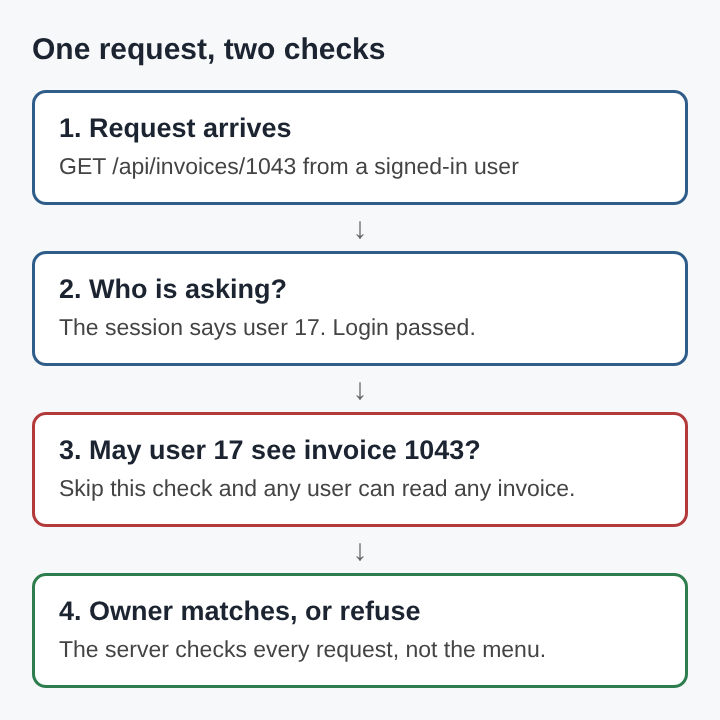
If the server returns someone else's invoice, the app has an IDOR. It confirmed you were logged in. It never asked whether invoice 1043 was yours. With numbers in a row, a short script can walk through every invoice in the database.
Switching to long random IDs makes guessing harder, but it does not fix the bug. IDs leak through emails, shared links, logs and other API responses, and a missing check stays missing however hard the ID is to guess. The fix is an ownership check on the server, every time.
The same idea applies to pages and files. Requesting paths the app never links to, such as /admin or /export.csv, is called forced browsing. A page that is not linked anywhere is still public if the server serves it to anyone who asks.
Finding broken access control before an attacker does
Automated scanners struggle here because they do not know the app's rules. A scanner cannot tell that user 17 should not see invoice 1043. Finding these bugs takes someone who knows who should be allowed to do what.
- Write down the rules. List every route and endpoint, and next to each one write which roles may call it and whose data it may touch.
- Make two accounts per role. Pairs are what reveal horizontal access.
- Record the requests of account A, with the browser's developer tools.
- Replay them as account B, then with no session at all. Any request that returns A's data or changes A's records is a finding.
- Change every ID and every method. Try
PUTandDELETEwhere you only sawGET. A check is often present on one method and missing on another. - Add fields to update requests, such as
roleorowner_id, and see whether the server saves them.
Keep the list of rules from step one. It becomes the basis for automated checks later.
How to prevent broken access control
Prevention is mostly about where and how the checks are written.
- Deny by default. Every route stays closed until a rule opens it, so a forgotten route fails closed.
- Enforce on the server, in one place. Put authorization in shared middleware or a policy layer. Checks scattered across handlers get skipped.
- Scope queries to the user. Instead of fetching invoice 1043 and then checking the owner, fetch "invoice 1043 where the owner is the current user". A record that is not theirs is simply not found.
- Give the least rights that work. The principle of least privilege says each user, service and key should reach only what it needs for its job. That limits the damage when a check does fail.
- Allow only named fields. An update endpoint accepts the fields a user may change and ignores the rest.
- Read roles from the server. Take the role from the server-side session or a signed token whose signature and expiry are checked, never from a form or a plain cookie.
- Watch the refusals. A burst of refused requests from one account is often someone walking through IDs.
- Turn the rules into automated checks. For each endpoint, a check in the build confirms that the wrong account gets a 403 or 404.
Broken access control belongs to a wider list of web app risks, set out in the piece on the OWASP Top 10. The fixes are not complex. They need to be applied everywhere, every time.
Frequently asked questions
Is broken access control the same as a stolen login?
No. A stolen login is an authentication problem: someone else is acting as you. Broken access control lets an attacker use their own honest login to reach records and actions that were never theirs.
Can a web application firewall stop broken access control?
Mostly no. A firewall sees a well formed request from a valid session, and it has no way to know that the user does not own the record they asked for. The check has to live in the app's own code.
How does broken access control affect AI agents?
An AI agent that calls APIs with a user's token is only as safe as the access rules behind those APIs. Through indirect prompt injection, an attacker can steer the agent into a confused deputy that misuses its rights on the attacker's behalf, so narrow rights and server-side checks matter even more.
What is broken access control in a web app, in one sentence?
It is any case where the server lets a user read, change or delete something their role or ownership should not allow, and the fix is a server-side check on every request that ties each action to the current user's rights.
whitehatstoic
Build it right. Test it thoroughly. Keep it safe. Visit whitehatstoic.com