If you are asking what is clickjacking and how to prevent it, the short answer is this: clickjacking is an attack where a hostile page loads your web app inside a hidden frame and tricks a visitor into clicking a button on your app that they cannot see. You prevent it by telling the browser which sites may frame your pages, mainly with the frame-ancestors directive of Content Security Policy. Clickjacking is one of the web app weak spots that fall under software security, the area covered by whitehatstoic, a software, security and AI safety practice.
What is clickjacking and how to prevent it: why the attack works
Clickjacking, also called a UI redress attack, abuses one plain fact about the web: any page can load another page inside an <iframe> unless the framed page says no. When your app loads inside that frame, the visitor's browser still sends their cookies. So if they are logged in to your app, the framed copy is logged in too.
The attacker never sees your app's data and never runs code on your domain. They only control the page around the frame. That is enough, because a click on the framed page is a real click by a real, logged-in user. Your server sees a normal request with a valid session and has no reason to refuse it.
The attack works because the user decides what to click based on what they see, and the attacker decides what they see.
How a clickjacking attack is built: hidden frames, opacity and layered buttons
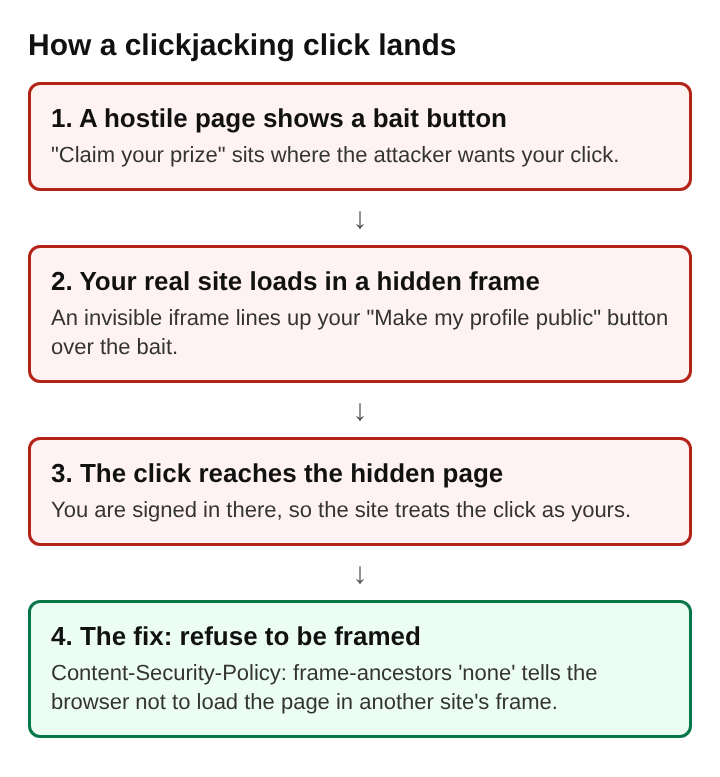
Say your app has an account settings page at /settings with a "Make my profile public" button. An attacker builds a page that reads "Click here to claim your prize" with a large button in the middle. Then they take three steps.
- Frame the target. They add an iframe that loads your
/settingspage. - Hide it. They set the iframe's CSS
opacityto 0, so it is fully transparent, and give it a higherz-indexso it sits on top of everything else. - Line up the buttons. They move the iframe with CSS positioning until your "Make my profile public" button sits exactly over their "Claim your prize" button.
The visitor sees the prize button. Their click lands on your button. Your app changes the setting, because as far as it can tell, the user asked for it.
Some attacks need more than one click. A two-step action, such as "Delete" followed by "Are you sure?", can be matched by a fake game or a fake form that asks for two clicks in two places. The attacker moves the hidden frame between clicks or places both buttons in the right spots ahead of time.
Kinds of clickjacking: likejacking, cursorjacking and drag and drop
The basic trick has several variants that share a name scheme.
- Likejacking. The hidden button is a social media "Like" or "Share" button, so the victim spreads the attacker's page to their own contacts without knowing it.
- Cursorjacking. The attacker changes how the cursor looks and where it seems to be, so the user aims at a harmless spot while the real pointer sits over a sensitive button.
- Drag and drop. Instead of a click, the attacker asks the user to drag a harmless looking object, and the drag selects content on the hidden page.
Each one relies on the same condition: your page agreed to load inside someone else's frame.
What clickjacking can do: changed settings, unwanted payments and granted permissions
The damage depends on what a single click or a short sequence of clicks can do inside your app. Look at your own app and list the actions that finish with one button press. Common ones include:
- Changed settings. Turning a private profile public, turning off two-factor login, or changing the email address that receives password resets.
- Unwanted payments. Confirming a one-click order, a transfer, or an upgrade on an account that already has a card saved.
- Granted permissions. Approving an OAuth request that gives a third-party app access to the user's data, or allowing the camera, microphone or location for your origin.
- Deleted data. Removing files, messages or a whole account.
The root cause is a setting: the server lets any site frame its pages. The fix is a setting too, which is why it is worth making before anyone finds the gap.
How to prevent clickjacking with the CSP frame-ancestors directive
Content Security Policy is an HTTP response header that tells the browser which sources a page may load and how it may be used. Its frame-ancestors directive controls which origins may embed your page in a frame. You pick one of three settings.
Content-Security-Policy: frame-ancestors 'none'blocks all framing. Use this for any page that should never sit inside another page, which is most of them.Content-Security-Policy: frame-ancestors 'self'allows framing only by pages on your own origin. Use this if your app frames its own pages, for example a preview pane.Content-Security-Policy: frame-ancestors 'self' https://partner.example.comallows your own origin plus a named list. Use this only when a known partner must embed a specific page.
Two details catch people out. First, the header must appear on every HTML response, not just the home page. Set it once in your server, framework middleware or reverse proxy so new routes get it without anyone remembering. Second, if you already send a Content-Security-Policy header, add frame-ancestors to that same policy rather than sending a second header that might conflict.
X-Frame-Options and SameSite cookies as extra clickjacking defenses
X-Frame-Options is the older header for the same job, first added in Internet Explorer 8 in 2009 and written up as RFC 7034 in 2013. Its two common values are DENY, which blocks all framing, and SAMEORIGIN, which allows framing only by your own origin. frame-ancestors was made to replace it, and when a page sends both, the browser should prefer frame-ancestors. Sending both still helps, because old browsers that do not read CSP will fall back to X-Frame-Options. Keep the two in agreement: frame-ancestors 'none' pairs with DENY, and 'self' pairs with SAMEORIGIN.
SameSite cookies add a second layer. A session cookie set with SameSite=Lax or SameSite=Strict is not sent when your page loads inside a frame on another site. The framed copy of your app then shows a logged-out page, so the hidden button does nothing useful. Do not rely on this alone: any action that works without a login, or any cookie set to SameSite=None for a real cross-site need, is still exposed.
For the most sensitive actions, ask for something a hidden click cannot supply. Re-entering a password, typing a confirmation word, or approving a second factor all break a clickjacking attack, since the attacker cannot see or fill those fields.
How to check a web app for clickjacking weak spots
You can check your own app in a few minutes.
- Read the headers. Run
curl -I https://your-app.example.com/settings, or open the browser's developer tools and look at the response headers. Look forContent-Security-Policywithframe-ancestors, and forX-Frame-Options. - Try to frame it. Save a local HTML file containing
<iframe src="https://your-app.example.com/settings"></iframe>and open it. If your page appears, it can be framed. If the browser shows a refusal message in the frame and logs an error in the console, the header is working. - Cover every route. Repeat for pages behind the login, error pages, older routes, admin areas and any page served by a different service or CDN. A gap often hides on a page set up separately from the main app.
- Check the logged-in case. Log in, then load your framing file again. This shows whether SameSite settings keep the framed copy logged out.
- Go over one-click actions. List every action that completes with a single click and decide which ones need a confirmation step.
Frequently asked questions
Does clickjacking still work in modern browsers?
Yes, against any page that does not send frame-ancestors or X-Frame-Options. Modern browsers enforce these headers, but they do not block framing unless a page asks.
Is frame-busting JavaScript enough to stop clickjacking?
No. Scripts that check whether the page is framed, sometimes called a framekiller, can be defeated, for example by an iframe sandbox attribute that blocks the script from moving the top window. Use the response headers as the real defense.
Can clickjacking target AI chat interfaces or browser agents?
A chat app that lets a user approve tool actions with one click can be framed like any other page, so its approval buttons need the same headers. Browser agents that click on pages can also be misled by layered or hidden page elements, a problem that overlaps with hidden instructions aimed at LLM apps.
Which pages need clickjacking protection?
Every page that a logged-in user can act on: settings, payments, permissions, account deletion and any form. The simplest approach is to send frame-ancestors 'none' on all HTML responses and loosen it only for the pages that must be embedded.
Clickjacking alongside cross-site scripting and cross-site request forgery
Clickjacking is often confused with two other browser attacks. Cross-site request forgery sends a request to your app from another site without the user touching your page. CSRF tokens stop it, but they do nothing against clickjacking, because in a clickjacking attack the request comes from your own page, token included, after a real click.
Cross-site scripting runs the attacker's code inside your page. Clickjacking never does that. It only places your page where the user cannot see it. Each attack needs its own fix: output encoding and a script policy for XSS, tokens and SameSite cookies for CSRF, and frame-ancestors with X-Frame-Options for clickjacking. A web app that covers all three closes the main ways a hostile site can act through a user's browser.
whitehatstoic
Build it right. Test it thoroughly. Keep it safe. Visit whitehatstoic.com