A tracking pixel is an image so small you never see it, placed in a web page or an email so that someone learns you opened it. If you have asked "what is a tracking pixel", the short answer is this: the picture does nothing, but the request your browser sends to fetch it carries enough about you to be written down. Some ad services are built to avoid that. vlvd ads, for one, shows ads with no cookies and no visitor id at all.
What is a tracking pixel, in plain terms
A tracking pixel is one kind of web beacon. The same thing goes by many names: web bug, tracking bug, pixel tag, 1 by 1 GIF, clear GIF or spy pixel. Each name points at the same idea: a hidden element whose only job is to let a third party check that you reached some content.
The first beacons were plain image files. The image could be a single pixel, the same colour as the background, or fully transparent. You cannot see it on the page. Your browser still has to fetch it, and that fetch is the whole point.
Most of the time the party reading the result is not the site you are on. Beacons are typically placed by third parties, such as advertisers and companies that measure site traffic, to watch what people do across a site.
How one hidden image reports a visit
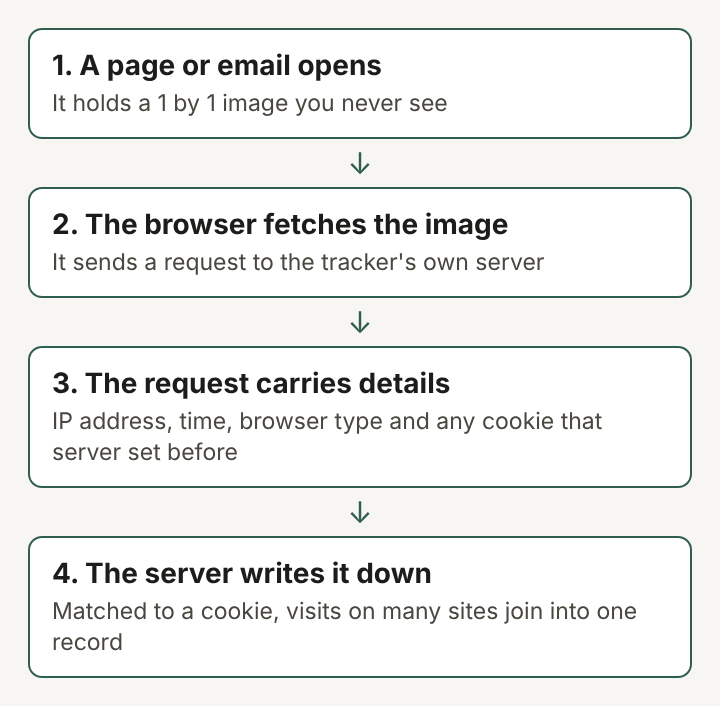
When a page loads, your browser reads its code and downloads every image it names. A tracking pixel is named in the code with an address on the tracker's server, not the site's own server. So your browser sends a request straight to the tracker.
That request is not empty. It usually carries:
- your IP address, which hints at your network and rough location;
- the time of the request;
- the type of browser or mail app you use;
- any cookie that same server set on an earlier visit.
The server can store all of it and attach it to a session id or a tracking token. From then on, each new request with the same cookie adds a line to the same record.
Why the cookie turns a count into a profile
On its own, a pixel request says "someone at this address opened this page at this time". That is a page count with some extra detail. The cookie is what links one visit to the next.
The web beacon page on Wikipedia gives a clear case. A company that runs many websites can keep all their images on one server. Every page on every site then asks that one server for a pixel. Because the same cookie comes back each time, the company can recognize one person across all those sites and build a single record of where they went.
This is why the same tracker sitting on thousands of unrelated pages matters more than any one pixel. The spread of the server across many sites is what turns small requests into a history of your browsing.
Tracking pixels in email
Pixels are just as common in email. Email tracking usually works the same way: the message holds a tiny image with an address unique to you. When your mail app shows the message and downloads the image, the sender's server logs the time it was opened and your IP address.
That record is weaker than it sounds. An image can load without anyone reading the words, and a reader who blocks images can read every line without the pixel ever firing. So an open in a sender's report is a sign, not proof, that a person read the email.
Many mail apps let you stop images from loading until you ask for them. With that setting on, a pixel has nothing to report until you choose to show the pictures.
Beyond the single pixel
The one pixel image is the oldest form, but it is no longer the only one. Almost any element that makes your browser contact another server can work as a beacon: a visible banner, a share button, a script, a style file or a frame. A share button that loads from a social network can report your visit even if you never press it.
Browsers also gained a built-in way to send this kind of signal. In 2017 the World Wide Web Consortium (W3C) published a candidate specification for a Beacon interface that page code can use to send a small report to a server, often as you leave a page. The name changed. The job is the same: tell a server that something happened.
A worked example you can follow
Take an invented reader, Ana, on an invented recipe site. The page holds a recipe, three photos and one hidden pixel from an ad network.
- Ana opens the recipe. Her browser downloads the photos from the recipe site and the pixel from the ad network's server.
- The pixel request carries her IP address, the time, her browser type and a cookie the ad network set last week on a travel site.
- The ad network now knows the same browser read a travel page last week and a recipe page today. Neither site told it that directly; the pixel and the cookie did.
- Tomorrow Ana opens a newsletter. A pixel in it loads from a different server, which logs that her copy was opened at 8:02 in the morning.
Now change one thing. Suppose the ad on the recipe page came from a service that sets no cookie and gives no visitor id. vlvd ads works this way: a site tells it only the site's own name, the kind of ad and which ads were already shown in that visit, so the same ad is not shown twice. It counts views and clicks per ad, per site, per day, as numbers only, and loads every ad, picture included, from its own address, so the advertiser never sees who looked. Ana's visit becomes one more view in a daily count, with nothing to link it to the travel site.
Frequently asked questions
Is a tracking pixel the same as a cookie?
No. A cookie is a small piece of data stored in your browser. A tracking pixel is an image that makes your browser contact a server, and it becomes far more revealing when that server can also read a cookie it set before.
Can you see a tracking pixel on a page?
Usually not. It is often one pixel in size and either transparent or the colour of the background, so it only shows up in the page's code or in a list of the requests your browser made.
How do you block tracking pixels in email?
Turn off automatic image loading in your mail app. Images then load only when you ask, so a pixel cannot report the open unless you choose to show the pictures.
Does a tracking pixel know your name?
Not by itself. It sends an IP address, a time, a browser type and any matching cookie; a name comes in only if that cookie or the address in the image was tied to an account or an email list.
What a tracking pixel tells, and what it cannot
A tracking pixel is a request dressed as an image. It tells a server that a page or email was opened, when, from which network and with which browser. Paired with a cookie and placed on many sites, it tells that server where the same browser has been. Without the cookie, and without a server shared across many sites, it shrinks back to one dot that counts a visit and knows nothing more.