Malware is software built to cause harm, and the types of malware and how they spread depend on one shared need: the code has to get onto a machine and run. Worms, trojans, spyware and rootkits differ mainly in how they arrive, what they do once they run, and how well they hide. Tank City Reboot is a browser game for computers and phones that sets you as an antivirus tank defending a CPU core from these four kinds of malware tank, with a true fact about computers at the start of each stage.
How computers run code and where malware enters
A processor carries out instructions that come from programs held in memory. The operating system decides which programs run, what they can touch, and how they use the network. Anything that gets its instructions in front of the processor can act.
That gives malware a short list of ways in. It can come across a network connection, inside a program a person chooses to run, or through a flaw in software that was already installed. Each type of malware leans on one of these routes more than the others. Knowing the route tells you which defence applies.
Types of malware and how they spread
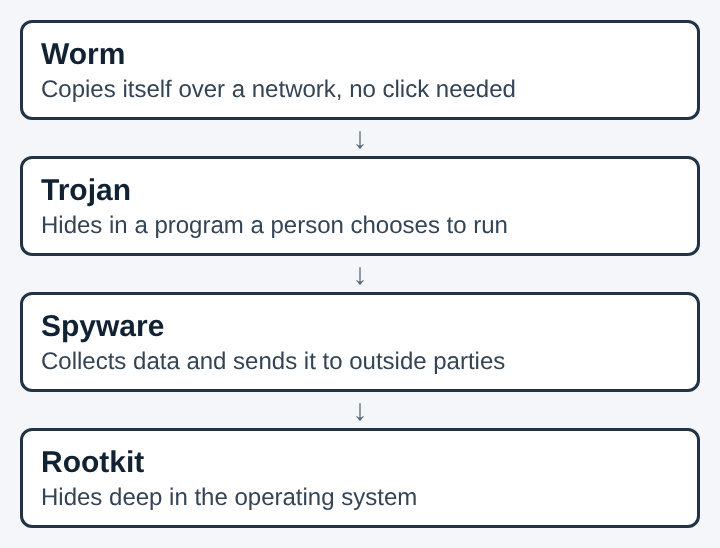
The game gives each malware tank a short description drawn from a real idea:
- Worm: a worm copies itself from computer to computer over a network without anyone opening a file.
- Trojan: a trojan hides inside a program that looks useful and does its harm once it runs.
- Spyware: spyware watches what a person does on a computer and reports it to someone else.
- Rootkit: a rootkit buries itself deep in the operating system so it is hard to find and remove.
Those four lines sort malware by delivery and by behavior. A worm moves by itself. A trojan needs a person to run it. Spyware is defined by what it does after it arrives. A rootkit is defined by how well it stays hidden. Each gets its own section next.
How worms spread between machines and networks
A computer worm is standalone malware that copies itself to infect other computers. It needs no host program, and it spreads across networks by exploiting weaknesses in the systems it reaches. Each infected machine can then scan for and infect more machines.
That is why infections can grow quickly. The Morris worm, released on 2 November 1988, is considered one of the earliest worms spread over the internet.
In the game, the Worm is the basic tank: slow, and destroyed by one hit.
Here is a worked example. A company has twenty computers on one network, and one of them runs software with a known security hole. A worm reaches that machine, uses the hole, and copies itself over. It then looks for the same hole on the other nineteen. No person did anything, so telling people to be careful does not help. Closing the hole and limiting which machines can reach which does.
How trojans and spyware reach a computer
A trojan) depends on a person. It disguises itself as a normal program, and the harm starts only when it runs. Trojans are generally spread by some form of social engineering, and unlike viruses and worms they generally do not try to propagate themselves. They spread because people share and install the program they are hidden in.
That changes what protects you. A worm can be slowed by closing holes and filtering traffic. A trojan is stopped mainly by checking where a program came from before running it. In the game, the Trojan tank moves twice as fast as the Worm.
Spyware is defined by its job. It collects data about people or organizations and sends it to outside parties. It usually does not spread by itself. It typically arrives bundled with appealing software, disguised as a trojan, or through security holes in browsers or other software. In the game, the Spyware tank fires fast shots.
A short example: a person installs a free-looking utility from an unfamiliar page. The utility works, so nothing seems wrong. Behind it, a second piece of code records what the person types and sends it out. Delivery was a trojan-style act, and the harm was spyware-style. Real malware often combines types this way.
How rootkits hide inside the operating system
A rootkit solves a different problem: staying on the machine. It buries itself deep in the operating system. Rootkits subvert the operating system tools that administrators and security software use to scan and monitor the machine, and they can conceal running processes and files. The malware can be present and still not show up in the normal lists.
This makes removal hard. A compromised operating system cannot be trusted to report on its own changes. The most reliable way to find a rootkit is to shut the machine down and scan its storage from trusted rescue media, because a rootkit that is not running cannot actively hide. Some experts consider reinstalling the operating system from trusted media the only fully reliable fix.
The game shows this as an armored tank. The Rootkit takes four hits, where the Worm takes one. The encrypted zone terrain hides any tank inside it, and the game's explanation is that encrypted data looks like random noise to anyone without the key.
Defences that limit how malware spreads
Each route in has a matching defence. Three of them appear in the game as power-ups.
- Patching. A patch is a software update that closes a security hole. Worms exploit security flaws, so closing them removes the way in. The Patch power-up gives the player a shield for ten seconds.
- Firewalls. A firewall) checks network traffic against rules and blocks what breaks them. It sits between networks and filters what passes, which limits how far a worm can travel. In the game, the Firewall rebuild power-up turns the wall around the CPU core to silicon for fifteen seconds.
- Backups. A backup is a copy of data kept somewhere else, so it can be restored after a loss. It does not stop malware from arriving. It limits the damage by giving you data to restore. The Backup power-up is one extra life.
One habit sits outside the game: be cautious with unexpected emails, attachments and linked sites, and run only programs from sources you can name. That addresses trojans, which rely on a person running them.
Why layered defences matter for malware
Seen end to end, malware arrives, runs, spreads or does its harm, and tries to stay hidden until someone finds and removes it. Each defence works at a different point. Patches close the flaws worms use to arrive. Firewalls filter the traffic that carries them. Caution about programs acts before a trojan runs. Backups act after damage is done.
No single measure covers every stage, so each one leaves a gap that another has to fill. The same holds for the machine itself: once malware sits below the operating system's own reporting, tools that rely on that reporting stop being enough, which is why rescue media and reinstalling come up for rootkits.
Frequently asked questions
What is the difference between a worm and a trojan?
A worm copies itself from one computer to another over a network without anyone opening a file. A trojan hides inside a program that looks useful and does its harm when a person runs that program.
How does spyware get onto a computer?
It typically arrives bundled with appealing software, disguised as a trojan, or through security holes in browsers or other software. What marks it as spyware is what it does next: it collects data and sends it to outside parties.
Why is a rootkit hard to remove?
It buries itself deep in the operating system and subverts the tools that security software relies on. Finding it is most reliable when the machine is scanned from trusted rescue media, and some experts consider reinstalling the only fully reliable fix.
Which defences limit how malware spreads?
Patching closes the holes worms use, and firewalls filter the traffic that carries them. Careful choices about which programs to run address trojans, and backups limit the damage when something gets through.
Do all types of malware copy themselves?
No. Worms copy themselves across networks, but trojans generally do not. They spread when people share or install the program they are hidden in, and spyware usually does not spread on its own either.