What is a rootkit and why is it hard to remove? A rootkit is software that keeps privileged access to a computer while hiding that it is there. It is hard to remove because it sits at or below the level of the tools you would use to find it. Those tools ask the system what is running, and the rootkit controls the answer.
What is a rootkit and why is it hard to remove: how it works inside a computer
The word combines "root", the all-powerful administrator account on Unix-style systems, with "kit", a set of tools. A rootkit does two jobs. It holds high privileges so it can do what it wants, and it hides itself and whatever else the attacker has installed. The code that steals data or opens a back door is often separate. The rootkit's role is to keep that code out of sight.
The browser game Tank City Reboot covers this area of computer security. In it, the Rootkit is the armored malware tank and takes four hits, where a worm takes one. The game describes a rootkit as malware that buries itself deep in the operating system so it is hard to find and remove.
An attacker installs a rootkit after getting root or administrator access. That means something else usually does the early work, such as a trojan the user ran or a software flaw that lets the attacker raise their privileges. The Wikipedia entry on rootkits covers the main variants and the history in more detail.
Where a rootkit hides: user mode, kernel mode, firmware and bootkits
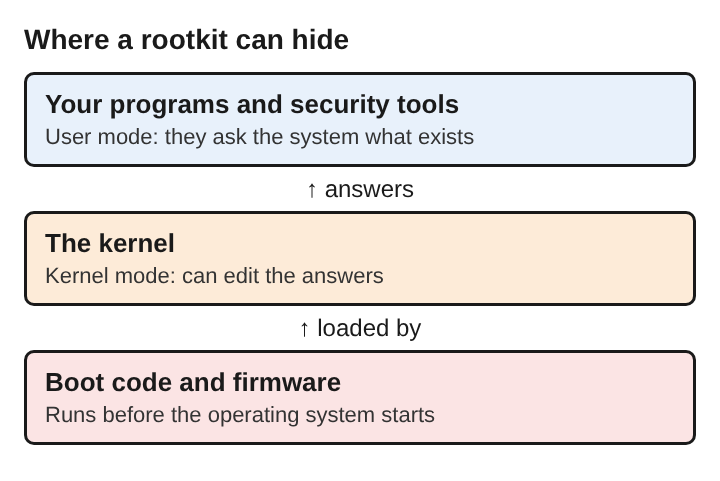
Where a rootkit lives decides how hard it is to catch. Processors enforce privilege levels, often drawn as protection rings. Ordinary programs run in the outer ring, called user mode. The core of the operating system, the kernel, runs in the innermost ring, called kernel mode, with full access to memory and hardware.
- User-mode rootkits replace or alter programs and libraries that ordinary software uses. They run at the same level as ordinary software, security tools included.
- Kernel-mode rootkits run with the same authority as the operating system. They can change how the kernel itself answers questions, so nothing running above the kernel can be trusted.
- Bootkits infect the code that runs when the machine starts, before the operating system loads. They can load the rootkit every time the computer boots.
- Firmware rootkits live in the chip-level software that runs before any operating system, such as the system firmware on the motherboard or the firmware inside a device. One documented case survived a disk replacement and an operating system reinstall, because the disk is not where it was stored.
The deeper the rootkit goes, the less the system above it can be believed.
How a rootkit conceals processes, files and network activity
Most concealment works by interception. When a program asks the operating system for a list of running processes, the request passes through system calls and kernel routines. A rootkit that has altered those routines can remove its own entries from the answer before it is returned.
The same method hides files. A directory listing is built from data the system reads, and the rootkit filters out names it wants to keep secret. Another approach edits the kernel's own records, such as the list of processes, so the hidden process is never listed at all. A rootkit can also turn off anti-malware software, and on a compromised system that software is as exposed as everything else.
Consider a worked example. You run a scan and it reports a clean machine. Yet your router shows the computer sending data to an address you do not recognize, all night. The scan was not wrong in its own terms. It asked the operating system what files and processes exist, and a compromised operating system left the malicious ones out.
The best-known public case is the 2005 copy-protection scandal involving music CDs. Software installed from the discs hid its own files from the user. The software was meant as copy protection, not as an attack. It still configured the operating system to hide its existence, and for that reason both programs were classed as rootkits.
How a rootkit differs from worms, trojans and spyware
These terms describe different things, and they combine freely. They answer different questions:
- A worm copies itself from computer to computer over a network without anyone opening a file. It is about spreading.
- A trojan hides inside a program that looks useful and does its harm once it runs. It is about getting in.
- Spyware watches what a person does on a computer and reports it to someone else. It is about what the malware does.
- A rootkit hides itself and other malware deep in the operating system. It is about staying unseen.
One attack can use all four. A trojan delivers the code, a rootkit hides it, spyware collects the data, and a worm part spreads it to other machines. For a wider look at how these families move between machines, see types of malware and how they spread between computers.
Why a rootkit is hard to remove
Several problems stack up.
- The tools cannot see it. A cleaner running inside the infected system relies on that system's answers. If the kernel hides the rootkit, the cleaner never finds it.
- It can defend itself. A rootkit can disable or turn off anti-malware software, so the tool you hoped would remove it may already be silenced.
- It can live outside the files you can reach. A bootkit sits in the startup code, and a firmware rootkit sits in a chip. Deleting files or reinstalling programs does not reach either.
- Manual removal is extremely difficult. The Wikipedia entry says so for a typical computer user.
- You cannot be sure it is gone. Once an attacker has held full control, any file on the machine could have been altered. Some experts hold that reinstalling the operating system from trusted media is the only reliable way to remove a kernel rootkit.
That is why the advice for a confirmed kernel-level infection is often not a cleanup. Copy off only the data you need, check it from a separate clean machine and reinstall the operating system from trusted media. For a firmware infection, removal may need hardware replacement or specialized equipment.
How a rootkit is detected
Detection works by getting an answer from somewhere the rootkit does not control.
- Scanning from outside. Booting from an alternative trusted medium means the infected operating system is not running and cannot hide anything. The scanner reads the disk directly.
- Cross-view comparison. This is called difference-based detection. A tool compares raw data it can trust with the results the system's own calls return, and a difference points to something hiding.
- Integrity checks. Comparing system files and boot code to known-good fingerprints shows what was altered.
- Memory analysis. A dump of memory can be examined on another machine, because memory has to hold the rootkit for it to run.
- Network monitoring. Logs from a packet analyzer, a firewall or an intrusion prevention system count as behavioral evidence. In the earlier example, the router's record of the night-time traffic is that kind of evidence.
Defences against a rootkit
Because removal is so costly, the better work happens before infection. Each defence targets a step the rootkit needs.
- Apply patches. A patch is a software update that closes a security hole. An attacker can use a flaw to raise their privileges, so closing it removes one way to the access a rootkit needs.
- Use ordinary accounts for daily work. A rootkit is installed with root or administrator access. A trojan run from an ordinary account has less to work with.
- Be careful what you run. Since trojans so often deliver rootkits, avoiding unknown programs cuts off the common route.
- Protect the boot process. UEFI Secure Boot prevents the loading of drivers or boot loaders that are not signed with an acceptable digital signature. That is a check on the startup code a bootkit would need to replace.
- Use a firewall. A firewall checks network traffic against rules and blocks what breaks them. Its logs are also behavioral evidence of what a machine is sending.
- Keep backups elsewhere. A backup is a copy of data kept somewhere else, so it can be restored after a loss. With a rootkit it is what makes a reinstall bearable.
Frequently asked questions
Can antivirus software remove a rootkit?
Not reliably. A scan run from a trusted boot medium can find what a scan inside the running system misses. A rootkit in the kernel, the boot code or the firmware is hard to clean reliably from inside the running system, and antivirus software on a compromised system is as exposed as the rest.
How do you know if a computer has a rootkit?
Often you do not, which is the point of one. Signs include security tools that stop working, unexplained traffic in firewall or network logs, and scans that disagree when run from a trusted boot medium.
Does reinstalling the operating system remove a rootkit?
Often, for a rootkit in the operating system: some experts call it the only reliable way to remove a kernel rootkit. A firmware rootkit can survive a reinstall, so removal may need hardware replacement or specialized equipment.
Is a rootkit a virus?
Not exactly. A virus or worm is defined by how it spreads, while a rootkit is defined by how it hides. A single attack can include both.