How does encryption keep data private? It scrambles readable data with a secret value called a key, so that anyone who gets the scrambled copy without the key sees nothing useful. That one property is why a stolen laptop, a copied backup or a recorded network connection does not have to mean exposed data. Malware that cannot read the scrambled copy goes after the key instead.
How does encryption keep data private?
Encryption does not hide data or stop anyone from getting a copy. It makes the copy useless. A thief who takes an encrypted file holds the file, but cannot read it.
The same idea shows up in Tank City Reboot, a browser game for computers and phones where you defend a CPU core from malware tanks. One of its terrain types is an encrypted zone, and the game gives the real idea behind it: encrypted data looks like random noise to anyone without the key. What that sentence protects, and what it leaves open, is the rest of the subject.
Privacy from encryption depends on two things: the strength of the scrambling method and the secrecy of the key. If either one fails, the privacy goes with it.
Plaintext, ciphertext and keys
Three terms cover most of the subject.
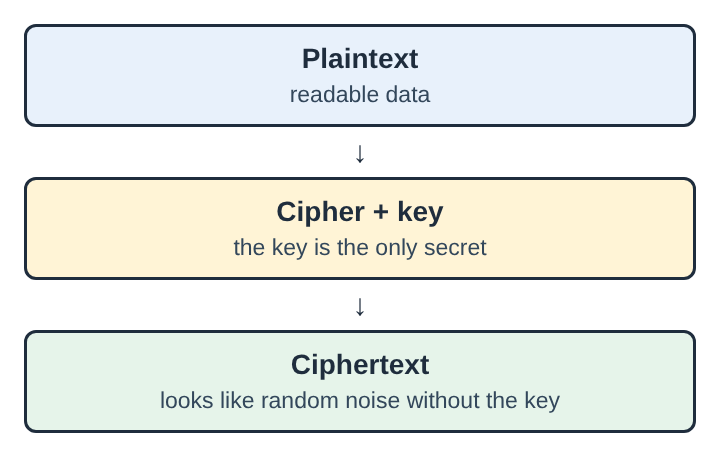
- Plaintext is the data in readable form: a document, a password list, a message.
- Ciphertext is what comes out after encryption. It looks like random bytes.
- The key is the secret value that controls the scrambling and the unscrambling.
The scrambling method is called a cipher, and a key is what it needs to work. For a well-designed modern scheme, decrypting ciphertext without the key should be computationally infeasible. If you encrypt a file of saved passwords and someone copies it, they have ciphertext. Without the key, they have no practical way to turn it back into your passwords. Encryption is the general name for this process, and decryption is the reverse.
Symmetric and public key encryption
There are two main designs, and most systems use both.
Symmetric encryption
In symmetric encryption, the same key encrypts and decrypts. Its keys are smaller and its transmission faster than the other design, so it suits large amounts of data. The weak point is sharing. If you and another person need the same key, you have to pass it over without anyone else seeing it.
Public key encryption
Public key encryption uses a pair of related keys. Anyone can encrypt a message with the public key, but only the holder of the paired private key can decrypt it. Public key methods are much more computationally intensive than symmetric ones, so it is common to use one to exchange a symmetric key, which then carries the data.
Data at rest and data in transit
Data can be exposed in two places, and each needs its own protection.
Data at rest sits on a disk, a phone or a backup drive. Disk encryption scrambles everything stored there. It exists to prevent unauthorized access to data storage, so a person who gets at the stored bytes without the key sees ciphertext.
Data in transit moves across a network: a login form, a payment, a message. On a shared network, other machines may be able to capture the packets. Transport Layer Security, the protocol behind secure web addresses, encrypts the connection, and its most visible use is in securing HTTPS. A packet recorded by someone else is noise to them.
A worked example, invented for this article: you sign in to a service from a cafe network. Without encryption in transit, anyone on that network who captures your traffic could read your password. With it, they capture the same traffic and read nothing.
What encryption stops spyware, trojans and worms from reading
Spyware watches what a person does on a computer and reports it to someone else. Part of its work is collecting files and captured traffic. Encryption defeats the cases where the malware gets only the stored or transmitted copy.
- Spyware that copies an encrypted file gets ciphertext it cannot open.
- A worm copies itself from computer to computer over a network without anyone opening a file. Encrypted connections give anything that only sees the traffic nothing to read.
- A trojan, which hides inside a program that looks useful and does its harm once it runs, cannot read an encrypted archive it finds on disk unless it also gets the key.
For a broader view of how these programs differ and spread, see types of malware and how they spread between computers.
Where encryption fails: keyloggers, rootkits and stolen keys
Encryption protects data only while it is scrambled. To use data, a computer has to decrypt it, and then the readable form is in the machine's memory. Disk encryption is open to a cold boot attack, in which the keys are stolen from the memory of a machine that is already running.
Keyloggers
A keylogger records what you type, usually without the person at the keyboard knowing, and is most often used for stealing passwords and other confidential information. A password captured this way never has to be cracked: whoever receives the log has the key.
Rootkits
A rootkit buries itself deep in the operating system so it is hard to find and remove. Because it sits that deep, software that looks at the system from above may not see it. The details are in what a rootkit is and why it is hard to remove.
Stolen or weak keys
Keys fail in ordinary ways too:
- The key is stolen from a running machine, as in a cold boot attack.
- The password that protects the key is captured as it is typed.
Malware can also use encryption against its victim. Ransomware takes a victim's private data hostage until a ransom is handed over, and this can involve encrypting the data. The same method that protects data can lock its owner out.
Defences that work alongside encryption
Because encryption has gaps, it is one layer among several. The game names three of them as power-ups.
- Patches. A patch is a software update that closes a security hole. A machine with its holes closed gives malware fewer ways to get at the keys.
- Firewalls. A firewall checks network traffic against rules and blocks what breaks them. It limits which traffic gets through.
- Backups. A backup is a copy of data kept somewhere else, so it can be restored after a loss.
None of these replaces encryption, and encryption replaces none of them. Each covers a gap the others leave.
Encrypted zones: how a game about malware shows hidden data
In the game, an encrypted zone hides any tank inside it. You cannot see what is there, which matches the real idea the game gives: without the key, the contents look like random noise. The game also separates the threats by what they do. The game's spyware tank fires fast shots, and its rootkit tank is armored and takes four hits.
The question that matters is the one the game's sentence leaves open: hidden data is hidden only from those without the key, so the hard part is who else can get that key.
Frequently asked questions
Can encrypted data be read without the key?
Not in any practical way when a well-designed cipher and a strong key are used. Attackers usually go after the key, the password or the running computer instead of the cipher.
Does encryption protect against malware on the computer that holds the data?
Only partly. A keylogger can record the password as it is typed, and keys can be stolen from the memory of a machine that is already running.
What is the difference between encryption at rest and in transit?
Encryption at rest protects stored data, such as a laptop disk or a backup. Encryption in transit protects data moving across a network, such as a login or a payment.
Why do some systems use both symmetric and public key encryption?
Public key methods are much more computationally intensive than symmetric ones, so it is common to use one to exchange a symmetric key and then use that key to carry the data.
Can malware use encryption too?
Yes. Ransomware takes a victim's private data hostage until a ransom is handed over, and this can involve encrypting the data.