Learning how to update an old blog post is mostly learning what to leave alone. The address stays, the subject stays, and the links pointing in from other pages keep working. What changes is everything a reader would trip over: a wrong fact, a dead link, a menu that no longer exists, an opening that takes four paragraphs to reach the answer. Handled that way, the post keeps the trust it already earned with search engines and with people, and it becomes worth reading again.
The habit matters most where practical guides are written in public. On a site where anyone can write notes and articles, mostly practical guides on AI safety, security, study skills, history and games, each guide opens with the answer and then works through an example. That shape is a good target when an old post gets rewritten.
How to update an old blog post: which ones first
You probably have more old posts than time. Pick the ones where an hour of work changes the most for readers. Start with posts that still answer a question people ask, but that have slipped in accuracy or position.
- Posts that still get visits. If one of these is wrong, it is wrong in front of an audience.
- Posts that describe software or settings. Menus get renamed, buttons move, features disappear. Step by step guides go stale fastest.
- Posts with a year in the title or text. "Study plan for 2023" tells every reader the page is old before they read a word.
- Posts with comments pointing out mistakes. Readers have already done part of the work for you.
Here is a worked example used through the rest of the steps. Two years ago, a security guide went up on your blog: how to turn on two-step sign-in for an email account. It still gets visits. Two comments say the setting is no longer where the guide says it is. That post goes to the top of the list.
Checking an old blog post for outdated facts and broken links
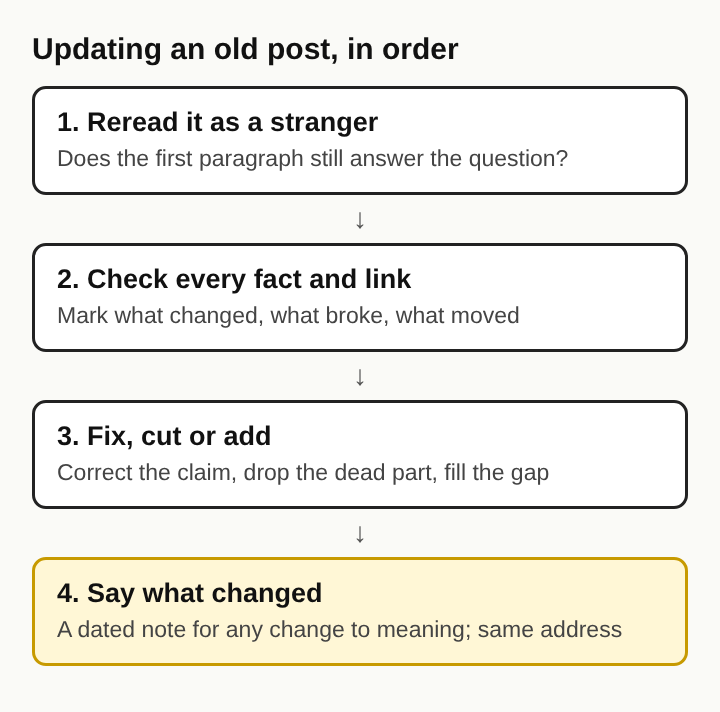
Read the post line by line and mark every statement that could have changed. Version numbers, menu names, limits, dates, statistics and anything a company said about its own product all count. For each one, find the current source and compare. If you cannot confirm a claim, rewrite it more carefully or cut it. A slower method for this is in how to fact-check your own blog post before it goes out, and it works just as well on a post that went out years ago.
Then click every link. Pages move and vanish over time, a problem known as link rot. One 2003 study found that about one link in every 200 on the web broke each week, a half-life of 138 weeks, so a post that is two or three years old has likely lost some of its links. For each broken link you have three choices:
- Replace it with the current page that holds the same information.
- Point to an archived copy if the original is gone and still matters.
- Remove the link and the claim that leaned on it, if nothing can back it up now.
Some sites build this check into publishing: every claim a guide makes about a product is matched to a source page before the guide is saved. Applying the same rule to an update means no claim in the refreshed post rests on a link nobody has opened this year.
In the email example, you open the provider's help page, find that the setting now lives under a different menu, and note the new path. One of your links points to a help article that now returns an error. You replace it with the current one.
Rewriting the opening so the old post answers the question first
Old posts often open with a warm-up: why security matters, a story about a hacked friend, a promise of what is coming. Readers arriving from a search want the answer. Move it to the first two sentences.
This is the inverted pyramid), a way of putting the basics in the first sentences that journalists use and that adapts well to blogs. There is a longer explanation in what is the inverted pyramid in writing.
For the email guide, the old opening might read: "Account security is something everyone should think about. Last year, a friend lost access to an inbox..." The new opening reads: "To turn on two-step sign-in, open your account settings, go to the security section, and choose an authenticator app as your second step. The whole process takes a few minutes." The friend's story can stay further down if it helps. It no longer stands between the reader and the answer.
Refreshing headings, examples and screenshots in an old post
Headings are what a skimming reader actually reads. Check that each one still names what its section says, and rewrite vague ones into plain questions or statements. "Getting started" becomes "Where to find the two-step sign-in setting." How to write headings that answer a question has more on this.
Next, check every example. One tied to an old interface or a retired feature makes the whole post feel stale, so swap it for one a reader today would recognise.
Screenshots age fastest of all. A picture of an old screen sends people looking for a button that is not there. Take new screenshots, or remove the old ones and describe the steps in words, and update the alt text to match.
Finally, add or refresh a short set of follow-up questions at the end. The comments on an old post are a good source for them: if three people asked the same thing, it belongs in the post.
Keeping the URL, slug and existing links intact during an update
Other sites link to the address of a post, your own posts link to it, and search engines have it on file. Change the address and all of that has to be rebuilt.
- Keep the slug, even if it is imperfect. A slug with an old year in it is a small cost. A new address that starts from nothing is a large one.
- If you must change it, redirect. Send the old address permanently to the new one, so anyone following an old link lands on the right page.
- Keep the subject. An update that quietly turns a guide about email into a guide about passwords no longer matches what people searched for. Write the new subject as a new post.
- Keep the internal links working. If you removed a section that other posts linked to by anchor, either keep a short version of it or update those links.
Showing the update date and a change note in public
Readers deserve to know a page has changed. Show an "Updated" date near the top, next to the original publish date. Two dates tell the reader the post has a history and that someone has looked at it recently.
Add a short change note at the top or bottom. Keep it specific:
Updated October 2026: new steps for the current settings menu, replaced a dead help link, removed a section on a feature the provider retired.
A note like that tells returning readers what to look at again, and it stops you from changing a date without changing anything else. Printed books have a name for this: an erratum is a correction of a published text, and for a single error it can be a slip bound in next to the page it fixes. A change note is the same idea, kept on the page itself.
Frequently asked questions
Should the original publish date change after an update?
No. Keep the original publish date and add a separate "Updated" date. Replacing the first date hides the post's history and can mislead readers about how long the advice has been around.
How often should an old blog post be updated?
Update when something in it stops being true, not on a fixed calendar. Guides about software and settings may need a look every few months, while a guide on a history question may stay accurate for years.
Is it better to update an old post or write a new one?
Update the old post if it answers the same question and its address already has links and visits. Write a new post if the subject itself has changed, then link to it from the old one.
Does updating an old blog post help it rank on Google?
It can, when the update makes the page more accurate and more useful for the question people search. Changing the date without changing the content does not make a page better.
Updating an old blog post that readers can comment on
When a post has comments, the comment thread is part of the update. Read every comment before you start. Mistakes readers flagged go on your list of fixes. Questions that come up more than once go into the follow-up questions at the end.
When the update is done, reply in the thread. A short line such as "Fixed in the October update, thanks for flagging the menu change" tells the person who reported it that it mattered, and tells later readers why older comments mention a problem they no longer see. Leave those older comments in place. They are an honest record of what the post said and how it changed.
Writing in public means people will find your errors, and updating in public means they can watch you fix them. Before the new version goes out, read it once more from the top as a stranger would, using the passes in how to edit your own writing before publishing. An old post with two dates, a clear change note and a thread showing its corrections is worth more than one that looks as if it was never wrong.
Electrified