To cite sources in a blog post, put a link on the exact words that make a claim, point it at the page where that claim first appears, and name the source in the sentence when it matters who said it. That is how to cite sources in a blog post for most writers: a descriptive link, a named author or organization, and quotation marks around any words that are not yours. Formal citation styles still have uses, but people reading on the web want to click once and see the evidence. One place where this habit is built into the work is a site where anyone can write notes and articles, where most of the posts are practical guides on AI safety, security, study skills, history and games.
How to cite sources in a blog post: link the original claim first
A citation has one job: to tell the reader where a claim came from so they can check it. On a blog, the fastest way to do that is a link placed on the words that carry the claim.
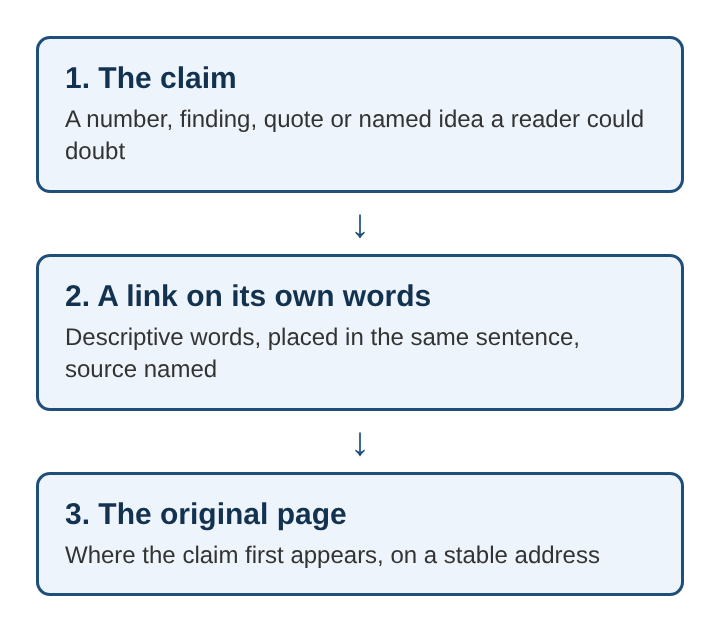
Here is a worked example. Say you are writing a study tips post and you write: "Spreading practice over several days helps people remember more than one long session." That idea has a name, the spacing effect, and it has a research history. So you link the words "spacing effect" to a page that explains it and lists the studies behind it. The reader can now follow the trail.
Three rules make this work:
- Link the original, not the echo. If a news story reports a study, link the study. If you can only reach a summary, link the summary and say it is a summary.
- Put the link on descriptive words. "The spacing effect" tells the reader where they are going. "Click here" tells them nothing.
- Cite at the point of the claim. A link three paragraphs later does not help a reader who doubts the sentence in front of them.
The same thinking applies to structure. Headings that state the answer, covered in how to write headings that answer a question, make it easy to see which section a source supports.
Which claims in a blog post need a cited source
Not every sentence needs a link. A useful rule comes from Wikipedia's verifiability policy: material that is likely to be challenged needs a source a reader can find. For a blog post, that usually means:
- Numbers. Any statistic, percentage, date range or count.
- Research findings. Anything phrased as "studies show" or "researchers found."
- Quotes. Every quoted sentence needs a named speaker and a place to read it.
- Claims about a product. What a tool does, what it costs, what it supports. These change, so link the product's own page.
- Named ideas. A term coined by a specific researcher or field deserves a link to where it is explained.
What usually does not need a source: common knowledge, your own experience told as your own, and opinions clearly marked as opinions. If you are not sure, ask a simple question: would a careful reader stop and say "how do you know that?" If yes, cite it.
Inline links versus footnotes for citing sources in a blog post
Inline links are the default on the web for good reasons. They cost the reader one click, they sit right next to the claim, and they do not interrupt the sentence.
Footnotes and endnotes) earn their place in a few cases:
- A long essay where inline links would crowd every line.
- A source that needs a comment, such as "this figure is from an older edition."
- Print or PDF versions, where links cannot be clicked.
Many blog platforms render footnotes poorly, so a common middle path is inline links in the text plus a short list of sources at the end for anything the reader may want to read in full.
Whichever you choose, plan for link rot: pages move or disappear, and a dead link turns a citation into a dead end. Prefer stable pages such as a journal's article page or an organization's own report page. Name the source in the sentence too, so a reader can still search for it if the link breaks.
How to quote and paraphrase a source in a blog post
Quote when the exact wording matters: a definition, a striking phrase, or a claim you are about to argue with. Keep quotes short. Use quotation marks for a sentence or two and a block quote for anything longer. Name the speaker, link the page, and do not cut words in a way that changes the meaning.
Paraphrase when the idea matters more than the wording. A real paraphrase uses your own words and your own sentence structure. Swapping a few words in someone else's sentence is not a paraphrase, and passing it off as your own is plagiarism. A paraphrase still needs a citation, because the idea is still theirs.
A practical method: read the source, close it, write the point from memory, then reopen the source to confirm you got it right. Add the link. If one phrase from the original is too good to lose, quote just that phrase inside your paraphrase.
How to cite images, data and charts in a blog post
Images need permission, not just credit. A link back to the photographer does not give you the right to use a photo. Use your own images, images you have permission for, or openly licensed ones. Creative Commons licenses ask you to credit the creator and name the license. Fair use is a legal doctrine in some countries, decided case by case, so do not treat it as blanket permission.
For data, link the dataset page itself, not a chart someone else made from it. Then add three details:
- The date you accessed the data, because datasets get updated.
- Any changes you made, such as filtering years or converting units.
- Who made the chart, if you built it yourself from someone else's numbers.
A caption such as "Chart made by the writer from the agency's 2024 dataset, accessed in March" tells the reader exactly what is original and what is borrowed. For screenshots, credit the product or page shown and link it.
Citing sources when you write in public
Writing in public raises the stakes on citations, because readers can answer back. The guide site from the opening shows what that looks like in practice. Each post shows who wrote it and links to the writer's page, so a claim always has a name attached. If something in a post is wrong, readers say so in its comments. A cited claim gives that conversation a starting point: the reader can point to the source and show where the post drifted from it.
Its guides follow a pattern worth copying. They open with the answer, then work through an example, which is the inverted pyramid applied to a how-to. Every claim a guide makes about a product is matched to a source page before the guide is saved. That is a strict version of the product rule from earlier: if you say what a tool does, you link the page that says so. The guides also end with 3 to 5 follow-up questions, each answered, a format covered in how to write an FAQ section for an article.
Posts there are also open to read as data: an Atom feed of every post, a feed for each writer, a sitemap, and every post in full as plain text at /llms-full.txt. Once writing travels into plain text copies, naming the source in the sentence matters as much as the link, because the name survives when the formatting is gone.
Frequently asked questions
Do blog posts need APA or MLA citations?
Usually not. APA style and similar formats are built for academic papers, and most blog readers expect a descriptive link instead. Use a formal style only if your readers or your field expect it.
Is a hyperlink enough to cite a source in a blog post?
For most claims, a link on descriptive words is enough, as long as it points to the original page. Add the source's name in the sentence for quotes, statistics and anything a reader might want to search for if the link breaks.
How many sources should a blog post cite?
There is no fixed number. Cite every claim a careful reader could doubt, and no more. A short opinion post may need two links, while a research summary may need a dozen.
How to cite sources in a blog post without breaking the flow?
Put the link on words that are already in the sentence, so the citation adds no extra text. Save longer notes about a source for a short list at the end, and keep quotes brief.
A source citation checklist for every blog post
Go over each draft with these questions before it goes live:
- Does every number, finding and quote have a link at the point where it appears?
- Does each link go to the original source, or is it clearly marked as a summary?
- Is each link placed on words that describe where it leads?
- Is each source named in the sentence where the name matters?
- Are quotes exact, short and attributed to a named person or organization?
- Are paraphrases written in your own words and still linked?
- Do images have permission or a license, with the attribution the license asks for?
- Do data and charts show the dataset, the access date and any changes you made?
- Do all links open, and do they point to stable pages?
- Is the answer to the reader's question still in the first paragraph, with sources supporting it rather than burying it? The method in how to write an article people can skim keeps the order right.
A post that passes these checks lets any reader trace each claim back to where it started. That traceability is what citing sources in a blog post is for.