If you want to know how to write headings that answer a question, start with one rule: a reader who reads only your headings should come away with the main answers. A heading that answers a question states the point of its section. The text under it then backs that point up instead of slowly revealing it. This approach suits practical guides, and Electrified, a site where anyone can write notes and articles, and where most posts are practical guides on AI safety, security, study skills, history and games, builds its guides around opening with the answer.
What a heading that answers a question looks like
Take one section of a security guide and write its heading three ways.
- Label: "Password managers"
- Question: "Should you use a password manager?"
- Answer: "Use a password manager for every account"
The label names a thing. The question names the reader's problem. Only the third version gives the reader the answer. Someone scanning the page gets the advice from that heading alone. If they agree, they move on. If they doubt it, they read the section, and the section now has one clear job: show why the heading is right.
This is the whole idea. Each heading carries a claim, and each section supports its claim.
Why headings that answer a question help readers skim
Most readers do not start at the top and read every line. They scan the headings to find the part they need. If the headings are labels, the reader has to open each section to learn what it says. If the headings are answers, the reader can stop the moment they have what they came for.
News writers solved a version of this problem long ago. The inverted pyramid) puts the most important facts first, so a reader who stops early still has the core of the story. Answer-first headings apply the same order to every section of a guide, not just its opening. Two related pieces go deeper on that structure: what the inverted pyramid is in writing and how to write an article people can skim.
Plain language guidance says the same about headings. The plain language movement advises informative headings, opening sentences and frequent summaries to orient the reader, and notes that headings help a reader skim a text to find what they are looking for. Plain words matter here too. Paul Graham argues in Write Simply that simple writing is easier to read, especially for people reading in a second language. A heading is the one line almost every reader sees, so it should be the plainest line on the page.
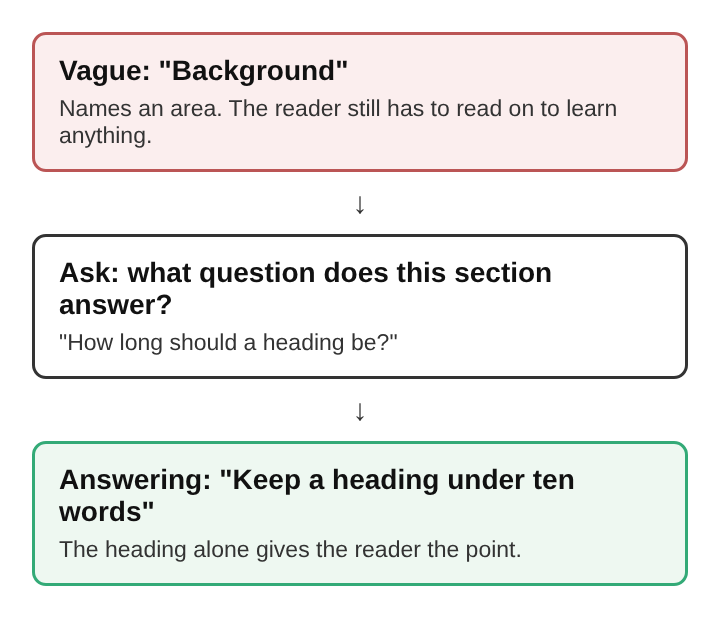
How to find the question each heading should answer
You cannot write the answer until you know the question. Work it out in this order.
- Write the reader's main question. Use their words, not yours. For a phone backup guide, the reader might ask: "How do I keep my photos if I lose my phone?"
- List the smaller questions inside it. Where do backups go? How often should they run? How do you know a backup worked? How do you get the photos back?
- Give each smaller question one section. If a section answers two questions, split it. If a section answers none, cut it or fold it into another.
- Put the sections in the order the reader needs them. Setting up comes before checking, and checking comes before restoring.
Now you have a plan where every section exists to answer one question. That plan is what makes answer headings possible. A section with no clear question will only ever get a vague label.
How to write headings that answer a question: put the answer in the heading
With the questions listed, write the answer to each one as a full sentence. Then trim it into a heading.
For the backup guide, the questions turn into headings this way:
- "How often should backups run?" becomes "Set backups to run automatically"
- "How do you know a backup worked?" becomes "Check the date of the last backup"
- "How do you get the photos back?" becomes "Restore from the backup when you set up the new phone"
A few habits keep these headings sharp:
- Start instructions with a verb. "Set", "Check", "Restore" tell the reader what to do.
- Start explanations with the fact. For a history guide, "Moats kept attackers away from the castle walls" works better than "The role of the moat".
- Keep one claim per heading. If you need "and" to link two answers, you probably have two sections.
- Keep the specific word. A name, a number or a setting the reader will look for belongs in the heading, not three paragraphs down.
- Drop teasers. "The surprising truth about backups" hides the answer to make people click. It costs the skimming reader time.
- Drop filler. Phrases such as "An overview of" or "A note on" add length and no meaning.
Then read the section under each heading. Every paragraph should support the heading's claim or explain how to act on it. A paragraph that does neither belongs somewhere else.
Question headings versus headings that answer a question
Question headings have a real place. They match the words a reader types into a search box, and they signal clearly what a section covers. They work best in three cases.
- An FAQ section. Here the question is the heading, and the answer sits in the first sentence under it. The piece on how to write an FAQ section for an article goes into keeping those answers short.
- Answers that depend on the reader. If the honest answer is "it depends on your phone and your plan", a short heading cannot hold it. A question heading followed by the conditions is clearer.
- Long answers. If the answer needs a list of steps, the heading can name the task, and the steps carry the answer.
The risk comes when every heading is a question. The reader then sees a page of questions and has to dig for every answer. Use answer headings for the body of a guide, and save question headings for places where the question itself helps the reader find their way.
Answer first headings in practical guides written in public
The site's guides open with the answer, then work through an example. That is the same order an answer heading creates inside a single section: claim first, support second. Its guides end with 3 to 5 follow-up questions, each answered, which is where the question form of heading fits best.
Answer headings also raise the stakes on accuracy, because a heading that states an answer is making a claim. On the site, every claim a guide makes about a product is matched to a source page before the guide is saved. A heading such as "Check the date of the last backup" needs the same backing as any sentence in the body.
Writing in public adds another reason to be specific. Each post shows who wrote it and links to that writer's page, and if something in a post is wrong, readers say so in its comments. A clear answer in a heading is easy for a reader to point at and question. A vague label gives them nothing to check. Guides are also filed under their subjects, such as AI alignment, study tips and castles, so a reader who finishes one answer can reach the next guide in a click.
Frequently asked questions
How long should a heading that answers a question be?
Short enough to read at a glance, usually one line. If the answer needs more than one line, the section probably covers more than one question and should be split.
Should every heading be phrased as a question?
No. Question headings suit FAQ sections and answers that depend on the reader's situation. Body sections usually work better with headings that state the answer directly.
Do headings that answer a question help search rankings?
Clear headings help both readers and search engines understand what each section covers, and they often contain the words people search for. No heading wording can promise a higher position, so write them for the reader first.
Do headings that answer a question suit writing in public?
Yes. A heading that states a clear answer gives readers something specific to agree with or correct. That makes feedback in comments more useful, because readers can point to the exact claim they doubt.
Checking headings that answer a question before publishing
Before you publish, go over the headings on their own. A short check catches most problems.
- Read only the headings, top to bottom. Do they give the main answers to the reader's question? If not, find the heading that hides its answer and rewrite it.
- Look for labels. Any heading that only names a thing, such as "Backups" or "Settings", needs a claim added.
- Count the claims. One per heading. Split any heading that holds two.
- Match each heading to its section. The text under it should support exactly what the heading says, no more and no less.
- Check the words. Use the terms a reader would use, keep specific names and numbers, and cut teasers and filler.
- Check the order. The headings should follow the order in which the reader needs the answers.
- Check each claim. If a heading states something as true, the section under it should show where that comes from.
When the headings pass this check, a reader in a hurry gets the answers from the headings alone, and a careful reader finds each answer explained and supported in the section that follows.