If you want to know how to write a title for a how-to guide, start with the words "How to", name the task the way a reader would type it, and add the one detail that makes it specific: the situation, the tool or the result. Then check two things. It should fit in under 70 characters, and the guide should deliver exactly what the title promises, no more and no less.
That is the whole method. A title is the first answer a guide gives, and often the only part a reader sees before deciding to open it. On a site where guides open with the answer and then work through an example, the title is where that answer starts. If the title is vague, the reader never reaches the first paragraph.
How to write a title that says what the guide does
A title has one job before any other: say what the page is about. A headline is the text that indicates the content or nature of the piece under it, a brief summary of what it contains. For a news story, that summary can be a statement of what happened. For a how-to guide, it is a task the reader wants to get done.
The same page notes that a headline's purpose is to draw attention to the story quickly and briefly. Both halves matter. Quickly means the reader understands it in one glance. Briefly means nothing in it is wasted. A guide's title is read in a list of search results, in a feed, in a link someone shared. In each of those places it sits next to other titles, and the reader picks the one that most clearly matches what they are trying to do.
So the check for any title is simple. Could a reader who has never seen the guide tell, from the title alone, whether it will solve their problem? If the answer is "probably" or "maybe", the title is not done.
Start with the task, in the reader's words
Most how-to titles work best when they begin with "How to" and a verb. That opening tells the reader at once that the page is a set of steps, not an opinion or a news item. The verb that follows should be the one a reader would use, not the one an expert would use.
Think about what someone types when their heating has a cold spot. They type "bleed a radiator", not "release trapped air from a hydronic heat emitter". The second phrase may be more precise, but nobody searches for it, and a reader who sees it in a list may not recognise it as the answer to their problem. Use the plain word for the action and the plain name for the thing.
A good way to find those words is to write down the question the reader is asking, exactly as they would say it out loud. "How do I bleed a radiator?" becomes "How to bleed a radiator." The title is the question turned into a task.
Add the detail that makes it specific
"How to bleed a radiator" is clear, but it is also what hundreds of other pages are called. What makes a title useful is the one detail that matches the reader's actual situation. There are three common kinds of detail to add:
- The situation: when or why the reader needs the guide. "When the top is cold."
- The tool or method: what the guide uses. "With a radiator key" or "without a key".
- The result: what the reader will have at the end. "So it heats evenly again."
Pick one. A title that tries to carry all three becomes a sentence nobody can read at a glance. The detail you choose should be the one the guide is really built around. If the whole guide is about the case where the top of the radiator is cold and the bottom is warm, say that. If the guide is mostly about doing it without the usual tool, say that instead.
The specific detail also does a second job: it tells the wrong readers to keep looking. Someone whose radiator is cold all over has a different problem, and a title that names the cold top saves them a wasted click.
A worked example: one title, four drafts
Here is how a single title improves in four moves, for a short guide on letting trapped air out of a home radiator.
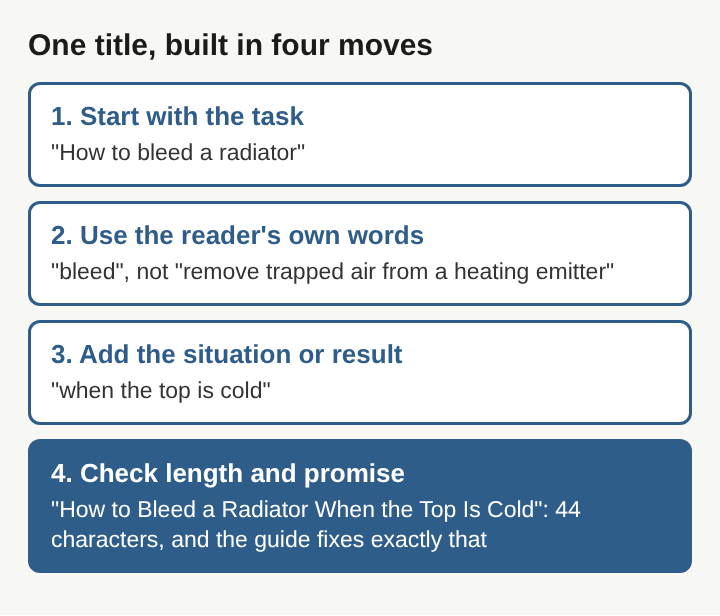
- First draft: "Radiator Tips". This is a label, not a title. It does not say what the reader will do, and "tips" promises a loose list rather than steps.
- Second draft: "How to Bleed a Radiator". Now it names the task with the verb a reader would use. A reader knows it is a set of steps.
- Third draft: "How to Bleed a Radiator When the Top Is Cold". The situation makes it specific. The reader with that exact symptom sees their own problem in the title.
- Final check. It is 44 characters, well under 70. The guide covers that case from the symptom to the fix, so the title promises nothing the page does not deliver. It is done.
Keep it short, and front-load the words that matter
Titles get cut off. Search results, browser tabs and social previews all trim long titles, usually at the end. That is why the task and its key word belong in the first few words, and why a limit of about 70 characters is a sensible habit. If the end gets trimmed, the reader still sees what the guide does.
Newspapers have long dealt with tight space. The style known as headlinese leaves out forms of the verb "to be" and picks short verbs over longer ones to fit a line. A how-to title does not need that clipped style, but the same habit helps: cut words that carry no meaning. "A Simple Guide on How You Can Easily Bleed Your Radiator" says less than "How to Bleed a Radiator" and takes twice the space.
Short also matters because of how people read. The same page cites a study which found that experienced newspaper readers spend most of their reading time scanning the headlines rather than reading the stories. Online, a title gets the same quick scan, much as a page people skim gets read in its headings first. It has a second or two to be understood.
Promise only what the guide delivers
The fastest way to lose a reader is a title the page does not live up to. A common definition of clickbait is a headline that intentionally overpromises and underdelivers. The same page describes the "curiosity gap": a teaser gives just enough to make a reader curious but holds back the answer until they click.
A how-to title should do the opposite. It should give the answer away. "How to Bleed a Radiator When the Top Is Cold" tells the reader exactly what they will get, and that is the reason they open it. There is no mystery to resolve, only steps to follow.
That does not mean a title has to be dull. The same page records a stricter definition: clickbait is a headline that is dishonest about the content of the page, and an eye-catching headline that accurately describes it does not count. Being clear and being interesting are not in conflict. The line is crossed only when the title claims more than the guide can back up. Watch for words like "every", "always", "instantly" and "in 5 minutes" unless the guide really covers every case or really takes five minutes.
Title shapes that suit a how-to guide
Research from 1980 sorted newspaper headlines into four broad kinds: questions, commands, statements and explanations, according to the same headline page. A how-to guide can use any of them, but some fit better than others.
- The explanation: "How to Bleed a Radiator When the Top Is Cold." This is the default for guides, because it matches the way people search.
- The command: "Bleed a Radiator in Four Steps." It is direct, and works well when the number of steps is part of the appeal.
- The question: "Why Is the Top of My Radiator Cold?" It fits when the reader starts from a symptom rather than a known task. The guide then has to answer the question in its first paragraph.
- The statement: "A Cold Radiator Top Means Trapped Air." It suits a short explainer more than a set of steps.
Frequently asked questions
Should a how-to title always start with "How to"?
Not always, but usually. "How to" tells the reader at once that the page is a set of steps, and it matches how many people phrase their searches. A command or a question can work when it fits the reader's starting point better.
How long should a how-to guide's title be?
Aim for under 70 characters. Long titles get trimmed in search results and previews, so keep the task and its key word near the start.
Is it fine to put a number in the title?
Yes, when the number is true and useful. "In Four Steps" helps if the guide really has four steps; a number that does not match the page breaks the title's promise.
Should the title match the first paragraph?
They should agree. The first paragraph should answer the exact task the title names, so a reader who clicked on the title finds their answer straight away.
A guide title as a promise the page keeps
A good how-to title is a small, exact promise. It names one task in the words a reader would use, adds the one detail that makes it theirs, and fits in a glance. Everything after it, from the first paragraph to the last step, exists to keep that promise. When the title is right, the reader knows what they are getting before they arrive, and the guide only has to deliver it.
Electrified