If you want to know how to write a troubleshooting section, start from what the reader sees, not from what broke. Each entry names one symptom in the reader's own words, gives the most likely cause, offers one fix to try, and ends with a check that shows the fix worked. Put the most common failure first and the rarest last, so a reader stuck halfway through your guide finds their problem in the first few lines.
A troubleshooting section is the part of a guide that earns trust after something goes wrong. A reader who followed every step and still got a bad result is already frustrated. If your section speaks to that moment plainly, they finish the job. If it reads as a list of error codes, they close the page. Writers on a site where guides open with the answer and then work through an example face the same question at the end of every guide: what happens when the example does not come out right?
Why a guide needs a troubleshooting section at all
Steps describe the path when everything goes well. Real readers have older tools, different settings and less patience than you had while writing. Somewhere a step will fail for someone, and the guide either helps them or abandons them.
Troubleshooting is described as a logical, systematic search for the source of a problem, done to make a product or process work again. That definition gives you the shape of the section. The reader is the one doing the search. Your job is to make it short by telling them where to look first.
The same page notes that any unexpected or undesirable behavior counts as a symptom, and that the most frequent symptom is no result at all: nothing prints, nothing loads, nothing happens. Write for that case early. "Nothing happened" is the most common report you will ever get, and it is the one most guides forget to cover.
How to write a troubleshooting section, one entry at a time
Every entry has four parts, always in the same order. Keeping the order fixed lets a reader scan a long section quickly, because they learn where each kind of information sits.
- The symptom. Write what the reader sees, hears or smells, in plain words. "The page stays blank" beats "Rendering failure."
- The most likely cause. One sentence on why this usually happens. The reader does not need every possible cause, only the one that explains most cases.
- One fix. A single action, written as an instruction with the verb first. If there are two fixes, write two entries or order them clearly.
- The check. What the reader should see once the fix worked, so they know whether to stop or keep going.
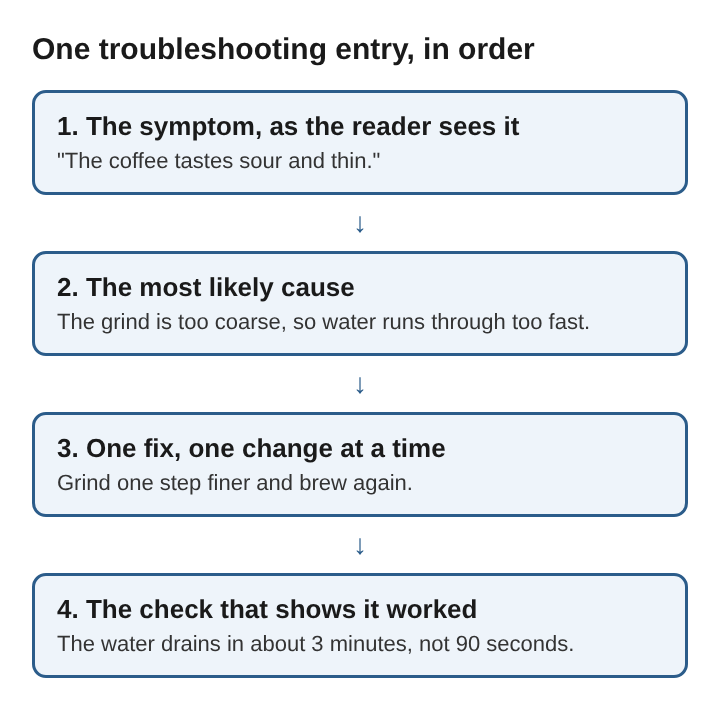
The check is the part most writers leave out. The Wikipedia page makes the point directly: troubleshooting requires confirmation that the solution restores the product or process to its working state. Without a check, a reader applies your fix, sees no obvious change, and cannot tell whether the problem is gone or simply hidden.
Writing symptoms in the reader's words
Readers search a troubleshooting section with the words already in their head. They think "my bread did not rise," not "insufficient fermentation." Name the symptom the way a beginner would describe it out loud, then name the cause in more exact terms if you need them.
Make each symptom specific enough to tell it apart from its neighbours. "It does not work" fits every problem and helps with none. "The app opens, then closes after two seconds" points to one cause. If two symptoms look the same to a reader but have different causes, add the one detail that separates them, such as whether an error message appears.
Plain words matter here more than anywhere else in a guide. Technical writing exists to convey complex information clearly and accurately to people who need it to complete a task, and modern procedural writing relies on simple terms and short sentences. A stressed reader reads less carefully than a calm one, so the short sentence is the kind one.
Ordering entries from common to rare
Put the problem most readers hit at the top. If you are not sure which one that is, think about which step in your guide asks the most of the reader: the one with an exact measurement, a hidden setting, or a wait. The failure usually lives there.
Some computerized troubleshooting services show the top 10 solutions most likely to fix a problem, and they update that order from reports of what actually fixed it. You can do the same by hand. When readers leave comments about a failure, move that entry up. When an entry never comes up, move it down or cut it.
Group entries by the step where they happen if the guide is long. A reader stuck at step 4 does not want to read about problems at step 9. A short heading per stage, such as "Problems while installing," lets them jump straight to their part.
A worked example: troubleshooting a pour-over coffee guide
Suppose your guide teaches pour-over coffee: 15 g of ground coffee, 250 g of water just off the boil, and a pour that drains in about 3 minutes. Readers will write back about four problems. Here is how to turn each into an entry.
The coffee tastes sour and thin. The grind is probably too coarse, so the water runs through before it pulls out enough flavour. Grind one step finer and brew again. It worked if the water now drains in close to 3 minutes instead of 90 seconds.
The coffee tastes bitter and harsh. The grind is probably too fine, so the water sits too long. Grind one step coarser. It worked if the drain time drops back toward 3 minutes and the bitterness fades.
The water barely drains at all. Very fine powder has likely clogged the filter. Stir gently once, then grind coarser next time. It worked if the water level drops steadily within the first minute.
The coffee is weak but not sour. There is probably too little coffee for the water. Weigh the grounds and use 15 g. It worked if the cup tastes fuller at the same drain time.
Notice what each entry does. The symptom is a taste or a sight, not a chemistry term. Each fix changes one thing, so the reader can tell which change helped. Each check uses a number the guide already gave, the 3-minute drain, so the reader measures against something they know.
Narrowing the problem when the cause is unclear
Some failures have no single likely cause. For those, teach the reader a short way to narrow it down instead of listing every possibility. The first principle is to be able to reproduce the problem, and the second is to reduce the system to its simplest form that still shows it.
Turn those principles into steps. Ask the reader to do the step again exactly as written and see whether the problem returns. Then ask them to remove extras: a plugin, a second ingredient, a custom setting. If the problem disappears, add things back one at a time until it returns. That last change is the cause.
The same page calls a related method half-splitting, or divide and conquer: start from the expected behaviour and the symptoms, guess at causes, and devise checks that rule each one out. In a guide, you can write this as a check at the midpoint. "If the result looks right after step 5, the problem is in steps 6 to 10." One sentence like that saves a reader from redoing everything.
Frequently asked questions
Where should a troubleshooting section go in a guide?
Put it after the last step, before any follow-up questions. For long guides, add a short troubleshooting note right after the step most likely to fail as well.
How many entries should a troubleshooting section have?
Cover the problems readers actually hit, usually three to six. Every extra entry makes the right one harder to find, so cut the rare ones that nobody reports.
Should a troubleshooting section include error messages?
Yes, quote an error message word for word when there is one, because readers search for it exactly. Then explain it in plain words in the same entry.
What is the difference between a troubleshooting section and an FAQ?
An FAQ answers questions a reader has before or after the task. A troubleshooting section answers one question during it: why did this go wrong, and what should be done now?
What a good troubleshooting section gives the reader
A good troubleshooting section turns a failed attempt into a second attempt. The reader sees their own problem named in their own words, learns the likely reason in one sentence, makes one change, and knows within a minute whether it worked. Ordered from common to rare, with a check after every fix and a way to narrow down the problems that have no single cause, it lets the reader finish the task the guide promised.
Electrified