What is malvertising, in plain words
If you have ever asked what is malvertising, the short answer is this: it is the use of online ads to spread malware. The word is a blend of "malicious" and "advertising". The person behind it does not need to break into a website. They slip an ad into a network that already places ads on thousands of pages, and the network carries the harm for them.
That is what makes it different from most attacks on the web. The site you trust is not the one at fault, and it may have no idea the bad ad ever ran. Small ad services that show a few hand-picked ads, such as vlvd ads, avoid much of this by keeping each ad short and plain and by having a person look at it first. Most of the web runs on much larger systems, where ads are bought and placed in fractions of a second, and that is where malvertising lives.
The Wikipedia entry on malvertising describes it as injecting malicious or malware-laden ads into legitimate advertising networks and webpages, so that they appear on reputable sites whose visitors might never meet the attacker any other way.
Why ad networks carry the harm so far
An ad network sits between two groups. On one side are advertisers who want their message shown. On the other are sites that rent out space on their pages. The network takes an ad from one side and places it on the other, often across many sites at once.
For an attacker, that reach is the prize. One bad ad, once accepted, can appear on news sites, recipe sites and game sites in the same hour. None of those sites was hacked. Each of them simply asked the network for an ad and showed what came back. The same Wikipedia entry notes that this is exactly why the method appeals to attackers: it spreads across a large number of legitimate websites without directly compromising them.
It also explains why malvertising is hard to stamp out. The site owner usually cannot see every ad before it appears, because the choice is made by the network at the moment the page loads. The network sees huge numbers of ads and checks them by machine. An ad that looks harmless when checked can behave differently later.
How malvertising spreads before you click
A common belief is that you are safe as long as you never click an ad. That is not quite true. Many ads are more than a picture and a line of text. They carry code that runs in your browser when the page loads, and that code is where a pre-click attack lives.
The Wikipedia entry lists the main forms. Harmful code can be tucked into the scripts the ad runs. The ad can send your page somewhere else on its own, an automatic redirect, so you land on a site you never chose. Or it can start a drive-by download.
A drive-by download is the unintended download of software, usually malicious. Sometimes the person approves it without knowing what it is, often after a deceptive pop-up dressed up as a system warning. Sometimes it happens with no approval at all. Either way, the starting point can be nothing more than visiting a page that showed the wrong ad.
There is one more twist. An ad can be clean in its own design and still be infected on its way to you, while it is being delivered through the chain of systems that place it. So a check on the ad itself does not always catch the problem.
How malvertising spreads after you click
The other route needs your click. The ad promises something: a prize, a fix for a problem, a deal that seems too good. You click, and instead of the page the ad described, you reach a page built to trick you.
That page may ask you to download a file that claims to be an update or a viewer. It may show a fake warning that your device is infected and give a phone number to call. It may copy the look of a bank or a shop and ask for a password or a card number. The ad was the bait. The page behind it does the damage.
This is why the match between an ad and its landing page matters so much. An honest ad describes the page it links to, which is one of the things checked when ad networks reject some ads. A malicious one says one thing and sends you somewhere else.
A worked example you can follow
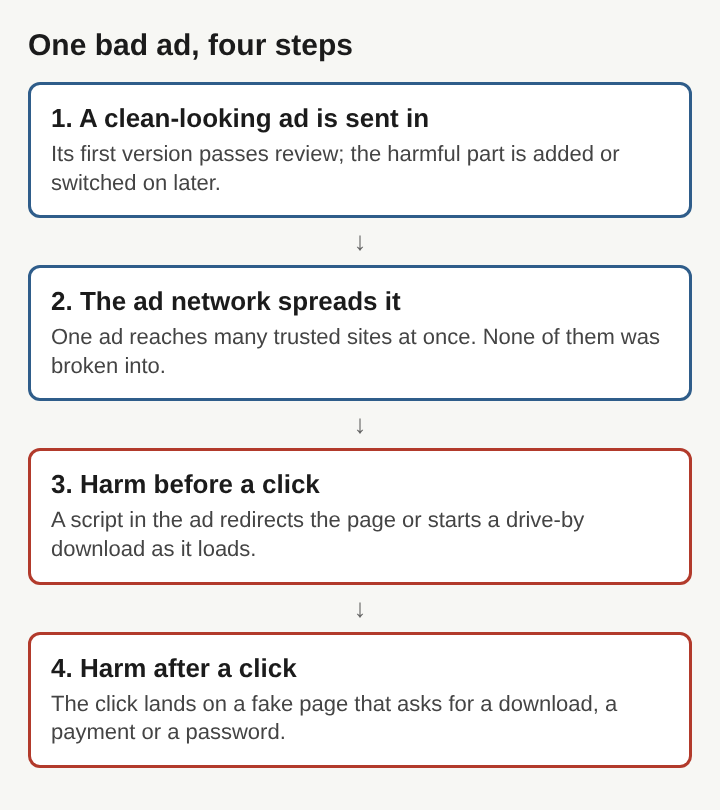
Take a reader on a cooking site late one evening. Here is how one bad ad could reach them, step by step.
- The ad is sent in. An attacker submits an ad for a new recipe app. The first version links to a plain, harmless page, so the network's automatic checks pass it.
- The ad is spread. The network places it on hundreds of sites that rent space through it, the cooking site among them. Nobody at the cooking site sees it in advance.
- The ad is switched. A few days later the attacker changes what the ad's code does when it loads. Now it runs a script that redirects some visitors.
- The reader is reached. The reader loads the recipe page. Without a click, the tab jumps to a page warning that their phone has a virus and urging them to install a "cleaner".
- The harm lands. If the reader installs the file, it is malware. If they close the tab, they are fine, but they now distrust the cooking site, which did nothing wrong.
Each step uses a weak point named in the sections before: the check that saw only the first version, the reach of the network, the code that runs on load, and the page behind the ad.
How ad services cut the risk
The defences follow from those weak points. Any one of them closes a step in the example.
- Keep ads simple. An ad with no code of its own cannot redirect a page or start a download on load. vlvd ads, for instance, limits an ad to a headline of up to 40 characters, one sentence of up to 90 and a button of up to 18, with the advertised page's own preview image as its picture.
- Serve everything from one place. When every ad, its picture included, comes from the ad service's own address, an advertiser cannot swap in a new file after the check.
- Have a person check each ad. A human checker can open the page an ad links to and ask whether the two match. A small service can do this for every ad, usually within two working days.
- Refuse the riskiest categories. Get-rich claims, crypto and trading offers, gambling and health claims are common bait. Turning them away removes many of the lures.
- Require a truthful ad. An ad must describe the page it links to. That rule is the direct answer to the bait-and-switch landing page.
Large networks use automatic scanners for the same reasons, but scale works against them: an ad seen once by a machine can still change later.
Frequently asked questions
Can you get malware from an ad without clicking it?
Yes. An ad that runs code can redirect the page or start a drive-by download as it loads, with no click from you.
Does malvertising mean the website was hacked?
Usually not. The bad ad arrives through the ad network that fills the site's ad space, so the site itself was never broken into.
Is malvertising the same as adware?
No. Adware is unwanted software on your device that shows ads. Malvertising uses ads on ordinary web pages to deliver harmful code or send you to a harmful page.
How can a reader stay safer from malicious ads?
Keep the browser and the device's system updated, never install a file that a pop-up or an ad urges on you, and close any page that claims your device is infected.
Malvertising and the trust behind every ad
Malvertising works because people trust the sites they visit, and those sites trust the networks that fill their pages. The attack slips in between the two. Each defence that works, from simple ads with no code to a person who reads each one, puts that trust back on firmer ground: an ad that is what it says, served from where it says, linking to the page it describes.
vlvd ads
Show your project to people who are already exploring. Visit ads.vlvd.net