The answer to how to end a how-to guide comes from where the reader is at that moment. They have stopped reading and started doing. They have a changed setting, a filled-in form or a saved file in front of them, and they want to know one thing: did it work? A good ending tells them. It names the finished result, gives one quick way to confirm it, covers the few problems that come up most, and points to the task that usually follows. It stops there.
That shape works for a company help page and for an open writing site, a place where anyone can write notes and articles. Most of what is posted there is practical guides on AI safety, security, study skills, history and games. A running example helps: a guide that walks the reader through turning on two-step sign-in for an email account.
How to end a how-to guide: the four jobs
The ending has four jobs, in this order:
- Finish the task. The last step is a real action, and the reader knows when it is done.
- Confirm the result. One check proves the task worked.
- Rescue the stuck reader. A short set of fixes covers the usual failures.
- Hand off. One pointer leads to the next related task.
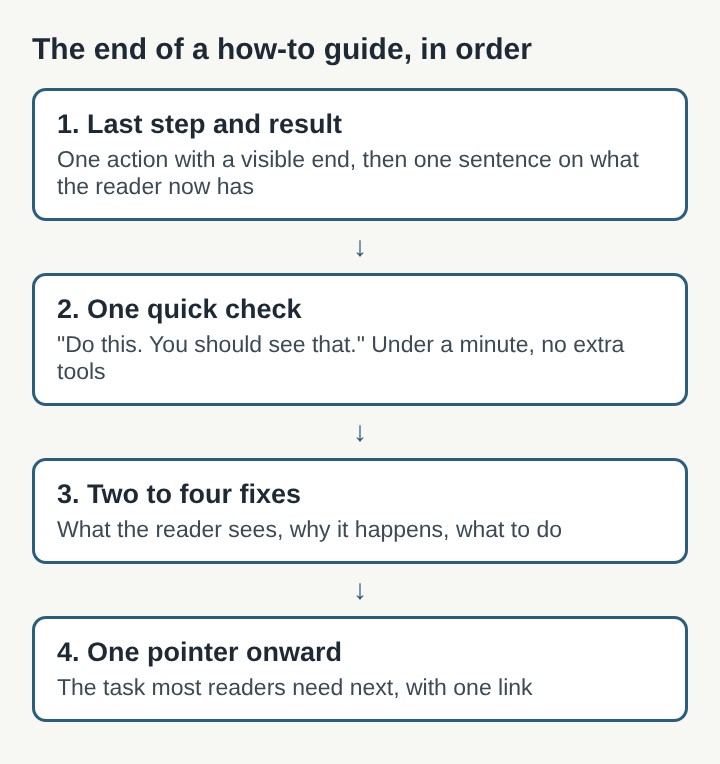
Each job serves someone. The reader whose task worked needs the check. The reader whose task failed needs the fixes. The reader who is ready to move on needs the hand-off. An ending that covers all three readers in a few short paragraphs is doing its work.
Finish a how-to guide on the last step and the finished result
Many guides trail off. The last numbered step says "Click Save," and then a paragraph begins with "And that's it!" The reader has no idea what "it" looks like. Make the final step a complete action with a visible end point, then state the result in one plain sentence.
In the two-step sign-in example, a weak final step reads: "Enter the code." A strong one reads: "Type the six-digit code from your phone into the box and select Verify. The page reloads and shows two-step sign-in as On." Then add the result: "Your account now asks for a code from your phone each time you sign in on a new device."
That result sentence should match the promise the guide made at the top. Guides that lead with the answer follow the logic of the inverted pyramid) from news writing, where the most important fact comes first. In a how-to guide, the opening says what the reader will have when they finish. The ending confirms they have it. If the two do not match, one of them is wrong. For more on putting the answer at the top, see how to write an article people can skim, answer first.
Add a quick check so readers know the how-to guide worked
A check is a single action plus the thing the reader should see after it. Write it as two short sentences: "Do this. You should see that." Keep it to something the reader can do in under a minute without extra tools.
For the email example: "Sign out, then sign back in. After your password, you should be asked for a code from your phone." If the reader sees the code prompt, they are done. If they do not, they know right away that something went wrong, and they know where to look next.
Some tasks have several parts that can each fail. A guide to setting up a home backup might involve a drive, a schedule and a folder list. For tasks like that, a short checklist works better than one check. Give three to five lines the reader can tick off: the drive shows up, the schedule is set to daily, the folder list includes the photos folder. Each line is one fact the reader can confirm by looking.
Avoid vague checks. "Make sure everything is working" gives the reader nothing to do. "Open the backup drive and find today's date on a folder" gives them one clear thing to find.
Close a how-to guide with fixes for common problems
Right after the check, add a short set of fixes for the reader whose check failed. Troubleshooting starts from a symptom and works back to a cause, so write each fix the same way: what the reader sees, why it happens, what to do.
For the two-step sign-in example, three fixes cover most failures:
- The code is rejected. The code may have run out of time. Wait for a fresh one and type it straight away.
- No text message arrives. Check that the phone number in the account settings is correct, including the country code.
- The phone is lost. Use one of the backup codes saved during setup. If none were saved, start the account's recovery process.
Keep the list short. Two to four fixes is enough. If a guide needs ten, the steps themselves probably have a gap, and the fix belongs earlier as a clearer step or a warning. A warning that arrives after the reader has already made the mistake helps nobody. For writing the steps so fewer fixes are needed, see how to write clear instructions for beginners.
Point to the next related task at the end of a how-to guide
The last element is a pointer to the task that usually comes next. One link, one sentence that says why. The reader who just turned on two-step sign-in for email most often needs to do one of two things: store the backup codes somewhere safe, or turn on two-step sign-in for the other accounts that matter most. Pick the one most readers need and say so: "Next, save your backup codes somewhere offline, so a lost phone does not lock you out."
Resist the urge to list every related page. A row of eight links gives the reader a choice to make at the moment they wanted to be done. One clear pointer gets clicked. If two tasks are equally likely, two pointers are fine. Beyond that, the guide's category pages or tags can do the work.
Ending how-to guides written in public
Writing a guide in public changes the ending a little, because readers can answer back. The open writing site from the first section is one working example of that shape. Its guides open with the answer, then work through an example. They end with three to five follow-up questions, each answered. Each guide is filed under its subjects, such as AI alignment, problem solving, study tips, browser games and castles, so the next guide a reader needs is a click away. That filing does the hand-off job without a long list of links at the bottom.
Two more habits there affect how an ending holds up over time. Every claim a guide makes about a product is matched to a source page before the guide is saved, which matters most in the fixes, where a wrong setting name can send a reader in circles. And if something in a post is wrong, readers say so in its comments. Each post shows who wrote it and links to their page, so a reader knows whose guide they are correcting.
For a public guide, those comments become part of the ending. If several readers report the same failure, add it to the fixes. If the checks before publishing caught most claims, fewer comments will be corrections. For that step, see how to fact-check your own blog post before it goes out. For writing the follow-up questions themselves, see how to write an FAQ section for an article.
Frequently asked questions
Does a how-to guide need a conclusion?
No. It needs a clear last step, a way to confirm the result and a few fixes for common problems. Those do the work a conclusion is supposed to do, and they help the reader more.
How long should the ending of a how-to guide be?
Usually a few short paragraphs: one result sentence, one check, two to four fixes and one pointer to the next task. If the ending runs longer than the steps, some of it probably belongs inside the steps.
Should a how-to guide end with a summary of the steps?
Rarely. The steps are already on the page, and a recap pushes the check and the fixes out of view. A short checklist of results is more useful than a list of repeated steps.
How do you end a how-to guide?
Finish on a final step with a visible end point, then state the result in one sentence. Add one quick check, a short set of fixes for common failures and one pointer to the next related task.
What to cut from the ending of a how-to guide
Some habits from school essays and marketing copy end up at the bottom of how-to guides. Most of them can go.
- A "Conclusion" heading. The reader is not looking for a conclusion. Give the last section a heading that names what it contains, such as "If the code is rejected."
- A recap of every step. The steps are already on the page. Repeating them pushes the check and the fixes further down.
- Filler sign-offs. "Hopefully this helped" and "Happy configuring!" take space and say nothing.
- New information. A setting the reader should have changed in step two does not belong at the end. Move it to step two.
- Sales pitches. A reader who came to finish a task does not want to be sold something when they finish.
Paul Graham's essay "Write Simply" notes that most readers' energy flags part way through a piece, and that more of them keep going to the end when reading takes little effort. The ending is where that flagging shows, so it should be the plainest part of the guide. Read the ending out loud. Any sentence that does not finish the task, confirm it, fix it or point onward can usually be cut.
Electrified