How to troubleshoot a problem without guessing
Knowing how to troubleshoot a problem saves you from the most common mistake people make when something breaks: changing three things at once, seeing the trouble fade, and never learning which change mattered. When the problem comes back a month later, you start from nothing again.
Troubleshooting is an ordered search, not a burst of fixes. You name the symptom, make it happen on purpose, cut the system down to the part that fails, change one thing, and then check that the fix really held. A record of each attempt and its outcome keeps the search honest. Tools such as Problem Graph keep that record as a journal, with each problem in one line and every solution tried attached to it, marked worked, partly or failed. A notebook does the same job.
The Wikipedia entry on troubleshooting calls it a form of problem solving: a logical, systematic search for the source of a problem so that the thing works again. It has three parts. You identify the symptoms, you find the most likely cause, often by ruling other causes out, and you confirm that the fix brings back the working state.
The same entry defines a symptom in a useful way. Every system has an expected behaviour, and any unexpected or unwanted behaviour is a symptom. That definition matters because it forces you to say what should happen before you say what is wrong. "The printer is broken" is a complaint. "I press print and no page comes out, though the queue says it was sent" is a symptom you can work with.
The method is not only for machines. A bank balance that falls short every month, a plant that keeps dying on the same shelf, or a morning routine that always runs late all have an expected behaviour, a symptom and a cause you can narrow down.
Step 1: write the symptom against what should happen
Write two short lines. The first says what should happen. The second says what happens instead, with when and how often. Keep both lines factual. Leave out any guess about the cause, because a guess written at the start tends to steer every later step.
If you already have a cause in mind, put it in a separate line marked as a guess. That keeps it in view without letting it pass for a fact. For a deeper look at how to phrase the first line, the guide on writing a problem statement covers the gap between where things are and where you want them.
Step 2: make the problem happen on purpose
The first basic principle of troubleshooting, in the Wikipedia entry's words, is to be able to reproduce the problem at will. A problem you can trigger is a problem you can check. Each time you change something, you trigger it again and see whether the symptom still shows.
Look for the conditions that bring it on: a time of day, a certain load, one person, one room, one step in a routine. Write down the recipe that triggers it and how many times out of how many it worked.
Some problems will not come on cue. The entry quotes Steven Litt's definition of an intermittent: a problem for which there is no known procedure to reproduce its symptom consistently. Knowing it tends to happen "within an hour" of some event is not yet a recipe. For these, keep a dated log of every time the symptom shows and what was going on, until a pattern gives you a trigger.
Step 3: cut the system down and split it in half
The second principle in the same entry is to reduce the system to its simplest form that still shows the problem. Take away every part you can while the symptom stays. Each part you remove without losing the symptom is one fewer place the cause can hide.
Then split what is left. The entry describes half-splitting: a binary search across the chain of parts the result depends on. You check the middle of the chain first. If the result is good at the middle, the fault is in the later half; if it is already bad, the fault is in the earlier half. Each check halves the search, so a chain of 16 parts needs about 4 checks instead of up to 16.
Half-splitting is a form of the process of elimination, and it carries the same limit. Elimination can only narrow down the options you know about. If the true cause is not on your list, ruling out the others will not find it. When every part checks out and the symptom stays, the list is incomplete, so widen it before you go on.
Step 4: change one thing, then check again
Once the search has narrowed to one part, change one thing about it. Then trigger the problem with the same recipe from Step 2. If the symptom is gone, you have a strong lead. If it stays, undo the change before you try the next one, so that changes never pile up.
Write each attempt down as you go, with what you changed and what happened. A change that did nothing is still a result: it rules a cause out, and it stops you from trying the same thing again next time. The guide on tracking what you tried shows a simple layout for that list.
A worked example: wifi that drops every evening
Here is the whole method on one home problem.
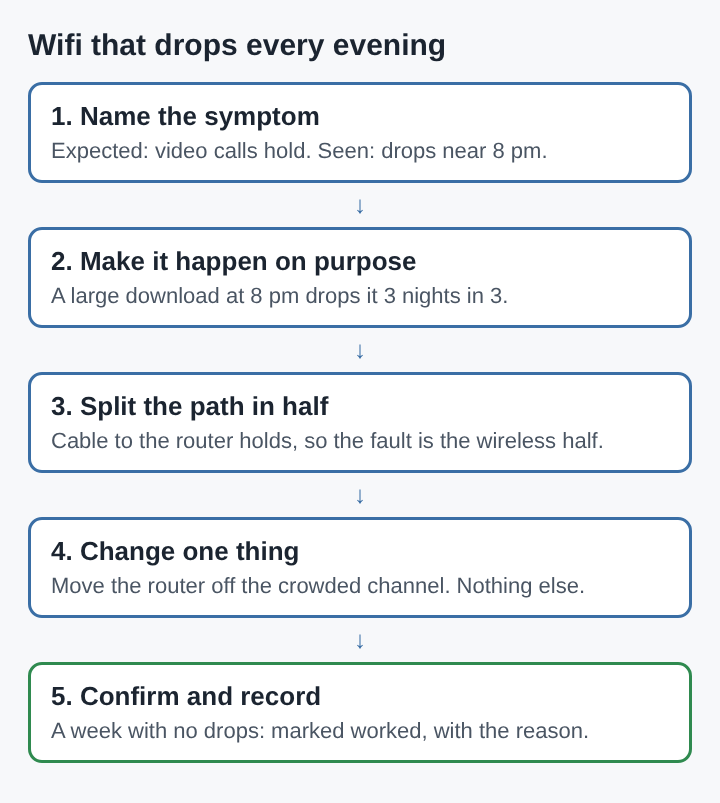
- Symptom. Expected: video calls hold all evening. Seen: the connection drops for a minute or two, most nights, around 8 pm.
- Reproduce. You start a large download at 8 pm. It drops the connection 3 nights out of 3. At 2 pm, the same download runs clean. You now have a recipe.
- Cut down. You turn off every other device in the house and run the recipe again. It still drops, so the other devices are not the cause.
- Split in half. The path runs from the provider's line to the router, then over wireless to the laptop. You plug the laptop into the router with a cable and run the recipe. The cable holds. The fault sits in the wireless half.
- Change one thing. In the evening, many neighbours are online, and their routers may share your wireless channel. You move your router to a quieter channel and change nothing else.
- Confirm and record. You run the recipe each evening for a week. No drops. You mark the channel change as worked, with the reason, and you keep the earlier attempt that did nothing, rebooting the router, marked as failed.
The last step is the one most people skip. The Wikipedia entry ends its outline of troubleshooting with confirmation that the fix restores the working state, and a week is a fairer check than one good evening. To decide how long is long enough, see the guide on how to know if a solution really worked.
Mistakes that slow the search
- Changing several things at once. The symptom may go, but you will not know why, and you cannot undo the changes that did nothing.
- Skipping the recipe. Without a way to trigger the problem, a fix that seems to work may only mean the problem has not shown up yet.
- Trusting the first guess. A strong early hunch can make you check only the parts that fit it. Write it as a guess and let the half-splitting decide.
- Stopping at the first good day. One clean run is not confirmation, above all for a problem that only shows some of the time.
- Throwing away the failures. The fixes that did not work are the cheapest map of where the cause is not. Keep them with a line on why they failed.
Frequently asked questions
What is the first step in troubleshooting a problem?
Write what should happen and what happens instead, then find a way to make the problem happen on purpose. A problem you can trigger is one you can check after each change.
What is half-splitting in troubleshooting?
Half-splitting means checking the middle of a chain of parts first, then the middle of whichever half still shows the fault. It is a binary search, so each check rules out half of what is left.
How do you troubleshoot a problem that only happens sometimes?
Keep a dated log of every time it shows, with what was going on at that moment. Once a pattern gives you a way to trigger it, use the normal steps.
Why should you change only one thing at a time?
If you change several things and the problem goes, you cannot tell which change fixed it. Changing one thing, then checking, ties each result to one cause.
Troubleshooting as a record of what was ruled out
Each step of troubleshooting turns a guess into a result: the symptom is written against what should happen, the recipe shows when it appears, the split shows where it lives, and the single change shows what removes it. The fixes that worked and the ones that failed together form a record of the problem's shape. Kept in one place, that record means the next time the same symptom shows, the search starts from what was already ruled out instead of from nothing.
Problem Graph
Every problem you carry, on one map. Solved together. Visit problemgraph.vlvd.net