A buffer overflow attack sends a program more data than the space it set aside for that data, so the extra bytes spill into the memory next to it. If you have asked what is a buffer overflow attack, the short answer is this: the attacker uses that spill to change what the program does next, sometimes to the point of running code the attacker supplied. It is one of the oldest ways a worm or other malware breaks into a machine without anyone opening a file. The browser game Tank City Reboot sets a fight around a CPU core under attack by worm, trojan, spyware and rootkit tanks, and every stage opens with a true fact about how computers work. A buffer overflow is the kind of fact that sits under all four.
What a buffer is in memory
A buffer is a fixed block of memory a program reserves to hold data for a moment: a name someone typed, a packet that arrived from the network, a line read from a file. The program decides the size in advance. Sixteen bytes for a username, 512 bytes for a message, and so on.
Memory itself has no walls. The bytes for one buffer sit right next to the bytes for whatever comes after it. Nothing in the hardware stops a write from running past the end of one block and into the next. The only thing that keeps data inside its buffer is the program checking the length before it copies.
That check has a name. Bounds checking means confirming that an index or a length falls inside the space that was reserved, before the data is written.
What is a buffer overflow attack, step by step
According to the Wikipedia page on buffer overflows, an overflow happens when data written to a buffer also corrupts data in the memory addresses next to it, because the bounds checking was missing or not enough. A common cause is copying data from one buffer to another without first checking that it fits.
A plain bug becomes an attack once someone shapes the extra bytes on purpose. The memory next to a buffer often holds something the program relies on: another variable, a pointer, or the place it should go back to when the current function ends. Overwrite that with chosen values, and the program carries on using them as if nothing happened.
The result depends on what got overwritten. It might be a crash. It might be a flag flipped from "not allowed" to "allowed". In the worst case, the attacker takes over where the program runs next.
The stack and the return address
The best known form targets the call stack, the area of memory where a running function keeps its local variables and the address to return to when it finishes. The Wikipedia page on stack buffer overflows describes the classic move: overwrite the return address in the stack frame so it points to code the attacker chose. That code is usually called shellcode. When the function returns, the processor jumps to the attacker's address instead of back to the caller.
The attacker often places the shellcode inside the very data that caused the overflow. One request both delivers the code and redirects the program to it.
A worked example with 16 bytes
Take an invented server program that greets each visitor by name. Follow it step by step.
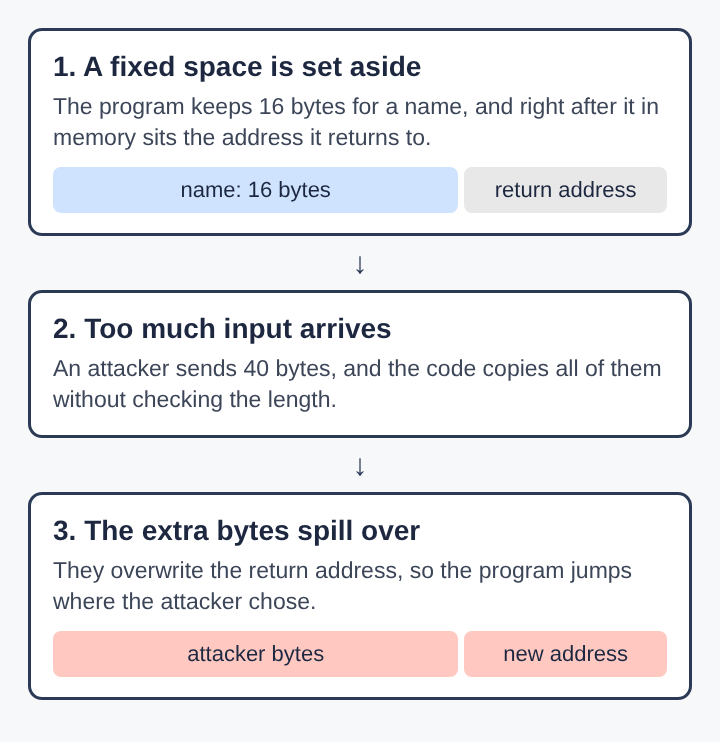
- The function reserves 16 bytes on the stack for the name. Right after those 16 bytes, the stack holds the return address.
- The code copies whatever name arrives into those 16 bytes, with no check on its length.
- A normal visitor sends "maria", 5 bytes. It fits, the greeting goes out, and the function returns where it should.
- An attacker sends 40 bytes. The first 16 fill the buffer. The rest keep going and land on the return address and beyond.
- The attacker built those 40 bytes so the overwritten address points back into the data just sent, where a short piece of shellcode waits.
- The function ends, reads the return address, and jumps into the attacker's code, which now runs with the server's permissions.
The fix is one line: refuse or cut any name longer than 15 bytes plus its end marker, or use a copy function that takes the size of the destination. That missing length check is the whole flaw. A security patch for a bug of this kind often changes only that line, which is why the article on software patches treats installing updates as the step that actually closes the hole.
Why some languages are more exposed
The buffer overflow page names C and C++ as the languages most often tied to the problem. They give direct access to memory, offer no built-in protection against writing over any part of it, and do not check bounds on their own. That makes them fast and close to the hardware, and it puts every length check in the programmer's hands.
The same page says that strongly typed languages without direct memory access, such as Java and Python, prevent buffer overflows in most cases. They check every index at run time and stop the program with an error instead of letting the write go through. A great deal of the software in an operating system, a router or a browser engine is still written in C or C++, so the risk has not gone away.
Worms that spread through buffer overflows
The buffer overflow page records the earliest documented hostile use of one in 1988, as one of several tricks the Morris worm used to move across the early internet. Its target was finger, a Unix service that answered questions about users on a machine. Because the worm sent its overflow over the network, a computer could be taken over without anyone on it doing anything.
The same page lists two later worms that did the same at scale. In 2001 the Code Red worm) used a buffer overflow in Microsoft's IIS 5.0 web server, and in 2003 SQL Slammer took over machines running Microsoft SQL Server 2000. Both reached huge numbers of servers because one flaw in one widely used program was enough. The difference between a virus and a worm matters here: a worm needs no host file and no click, and a remote buffer overflow is one of the ways it gets in.
How computers defend against overflows
Since a single missed check can be enough, modern systems stack several defences so that one overflow rarely turns into a full takeover.
- Stack checks. Buffer overflow protection checks that the stack was not altered when a function returns, and ends the program if it was. StackGuard and ProPolice are two such add-ons for the gcc compiler.
- Memory that cannot run code. The NX bit lets the operating system mark areas such as the stack and the heap as readable and writable but not executable, so shellcode placed there will not run.
- Random addresses. Address space layout randomization, described on the buffer overflow page, places the stack, the heap and the libraries at random positions each time a program starts. The attacker no longer knows which address to write, which makes an attack harder but not impossible.
- Checked code. Length checks, copy functions that take the destination size, and languages that check bounds for you stop the overflow before it starts.
None of these is complete on its own. Together they turn many would-be takeovers into a crash, and a crash is far easier to recover from.
Frequently asked questions
Is a buffer overflow a virus?
No. A buffer overflow is a flaw in a program, and malware such as a worm is what can use that flaw to get in. The flaw stays until the program is fixed.
Can a buffer overflow happen on a phone?
Yes. Any device that runs code written in C or C++ can carry the same kind of flaw, and a phone runs a great deal of it.
What is the difference between a stack and a heap overflow?
A stack overflow writes past a buffer in the call stack, where return addresses live. A heap overflow writes past a buffer in memory a program asked for while running, and usually corrupts other data or pointers instead.
Does updating software stop buffer overflow attacks?
It stops the ones that use flaws the update fixes. A known overflow stays open on every machine that has not installed the fix.
Why buffer overflows still matter
A buffer overflow comes down to one missing question in the code: does this data fit? More than three decades after the Morris worm, that question is still skipped somewhere in software that handles network data. Stack checks, memory that cannot run code and random addresses make each slip harder to use, and careful copying stops it outright. Knowing how the extra bytes travel makes it easier to see why a single length check and a prompt update carry so much weight.