People often call any harmful program a "virus," but security writers keep two words apart. If you are asking what is the difference between a virus and a worm, the short answer is this: a virus needs a host file and a person to run it, while a worm is a complete program that copies itself across a network on its own. Tank City Reboot rebuilds the Family Computer tank classic inside a computer, and you play it in a browser on a computer or a phone. Its basic enemy is a worm tank: slow, and destroyed in one hit. The game's site describes a worm as code that copies itself from computer to computer over a network without anyone opening a file. That one line captures most of the difference.
How a computer virus infects host files and programs
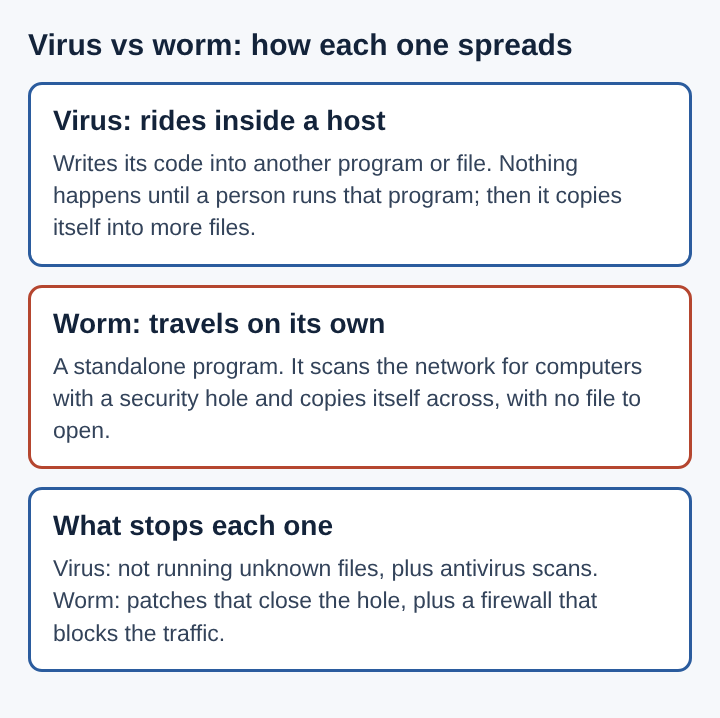
A computer virus is a piece of code that attaches itself to something else: a program, a document with macros, or the boot area of a disk. It cannot run alone. It waits until someone runs the host, then runs too, and then looks for more hosts to infect. The Wikipedia entry on computer viruses defines one as code that, once run, copies itself by changing other programs and inserting its own code into them. It also notes that in 1984 Fred Cohen wrote the first paper to call a self-reproducing program a "virus", a word suggested by his mentor Leonard Adleman.
Here is a typical case. A coworker emails you a spreadsheet. It contains a macro virus. You open the file and allow macros. The virus copies itself into your default document template. From then on, every new file you create carries the virus. You send one of those files to a client, and the client opens it. The virus has moved, but only because two people opened files and one person sent a file.
That reliance on people is the defining trait. A virus spreads only as fast as people share and open infected files.
How a computer worm spreads across networks without help
A worm is a standalone program. It does not need a host file, and it does not wait for anyone to click. It finds other computers on a network, looks for a weakness it knows how to use, and sends a full copy of itself to each machine it can reach. The new copy starts and does the same thing. The Wikipedia entry on computer worms describes this self-contained, self-spreading behavior.
A well-known early case is the Morris worm of 1988. It spread across the early internet by using weaknesses in common network services and by guessing weak passwords. Machines got infected again and again, slowed down, and stopped working.
Now take a modern situation. Your laptop sits on office Wi-Fi. A network service on it has a known security hole, and the update that fixes it has not been installed. A worm on another machine in the building scans nearby addresses, reaches your laptop, uses the hole, and drops a copy. You never saw an email or opened a file. Your laptop is now scanning for the next target.
What is the difference between a virus and a worm
- Host: a virus lives inside another file or program. A worm is its own program.
- Trigger: a virus runs when a person runs the infected host. A worm starts itself once it lands on a machine.
- Path: a virus travels in shared files, drives and attachments. A worm travels over network connections.
- Damage pattern: a virus mostly harms the files it infects. A worm also eats network capacity and processor time, because every copy is busy scanning and sending.
- Cleanup: removing a virus means cleaning or replacing infected files. Stopping a worm means closing the hole it used, often while cutting infected machines off the network.
Why worm outbreaks spread faster than virus infections
The speed gap comes from the human step. A virus moves when someone opens a file, and that can take hours or days. A worm skips that step. Each infected machine becomes a new source, so the number of copies can double again and again in a short time.
Work through the numbers. Say one worm copy infects two new machines every minute, and each of those does the same. After ten minutes, the count is over a thousand. A virus that needs a person to open each file never grows at that rate.
The SQL Slammer worm of 2003 shows what this looks like in practice. According to its Wikipedia entry, it infected most of its 75,000 victims within ten minutes, and the flood of traffic slowed large parts of the internet. No one had to open anything for that to happen.
How viruses and worms relate to trojans, spyware and rootkits
"Virus" and "worm" describe how malware spreads. Other names describe how it gets in, what it does, or how it hides. One program can fit more than one name.
In Tank City Reboot, four kinds of malware tanks attack a CPU core, and each one stands for a real idea. The worm is the basic tank: slow, and destroyed in one hit. The trojan moves twice as fast as a worm. The game describes a trojan as something that hides inside a program that looks useful and does its harm once it runs. Spyware fires fast shots, and the game describes it as code that watches what a person does on a computer and reports it to someone else. The rootkit is armored and takes four hits, because it buries itself deep in the operating system, where it is hard to find and remove.
Those short descriptions line up with the general picture:
- A trojan horse gets in by tricking a person. It does not copy itself, which separates it from both viruses and worms.
- Spyware is defined by its goal, collecting information, not by how it travels. A worm or a virus can deliver it.
- A rootkit is about hiding. A worm can install one so the infection survives longer.
For a wider map of these families and how each one moves, see types of malware and how they spread between computers.
Defences that stop both viruses and worms
Because viruses and worms spread in different ways, the defences overlap but are not identical. A good setup covers both paths.
Install updates
Worms depend on known holes in software. A patch) is a software update that closes a security hole, and once the hole is closed, the worm has no way in. The game names a shield power-up "Patch" for this reason. In the laptop example, an installed update would have stopped the worm cold.
Filter network traffic
A firewall) checks network traffic against rules and blocks traffic that breaks them. It can stop a worm's scans from reaching services that never needed to be open. Dividing a network into separate zones also limits how far one infected machine can reach.
Treat files with care
Viruses need you to open something. Leave macros turned off unless you know why a file needs them. Be wary of unexpected attachments, even from people you know, since their machine may be infected.
Scan and keep backups
Antivirus software looks for known malicious code in files and memory, and it can catch both viruses and worms. A backup is a copy of data kept somewhere else, so you can restore it after a loss. If a virus damages your documents, a clean backup lets you recover. Keep at least one copy disconnected from the network so a worm cannot reach it. Encryption protects a different thing: it keeps stolen data unreadable, as covered in how encryption keeps data private from malware.
Frequently asked questions
Is a worm more dangerous than a virus?
Not always. A worm usually spreads faster and wider because it needs no person to act, but a virus can still destroy files or carry a harmful payload. The danger depends on what the code does once it runs.
Can antivirus software remove worms as well as viruses?
Yes, modern antivirus tools detect and remove many kinds of malware, worms included. Removal alone is not enough for a worm, though: the hole it used must be patched, or it can return.
Can a single program act as both a virus and a worm?
Yes. Some malware spreads over networks by itself and also infects files on each machine it reaches. Security writers often call these hybrids or blended threats.
What is the main difference between a virus and a worm?
A virus attaches to a host file and spreads when people run or share that file. A worm is a standalone program that copies itself across networks with no human action.
Virus versus worm in summary
The split comes down to two questions. Does the code need a host? Does it need a person? A virus answers yes to both: it hides in a file and waits for someone to open it. A worm answers no to both: it carries itself and moves over the network by using a weakness in software.
That difference shapes everything else. Viruses spread at human speed and stay mostly in files. Worms spread at network speed and can choke whole systems within minutes. Careful habits with files slow viruses down. Installed updates and filtered traffic stop worms. Backups and scanning help against both. Once you know which question to ask, you can read any malware report and tell how the threat moved and what would have stopped it.