A software patch is a piece of code that changes a program that is already installed, to fix a flaw, close a security hole or adjust how the program behaves. When people ask what is a software patch and why does it matter, the short answer is this: a patch closes a hole only on the computers that install it, and malware keeps finding the ones that did not. The idea also shows up in a browser game, an antivirus tank defending a CPU core from malware tanks. Tank City Reboot runs on a computer or a phone, and one of its power-ups is called Patch.
What Is a Software Patch and Why Does It Matter to the Code
A program on your computer is a set of files: compiled instructions, libraries and data. A patch replaces some of those files, or parts of them, with corrected versions. The Wikipedia entry on patches in computing) describes a patch as data that modifies an existing program or file, often to fix bugs and security vulnerabilities, and says it is commonly made by a tool that compares two versions and records how to turn one into the other.
Here is an invented case to follow step by step. A program has a function that copies text a user types into a fixed block of memory. The function never checks how long the text is. If someone sends text longer than the block, the extra bytes spill into nearby memory, and a careful attacker can make that spill run code of their choosing. The patch adds one check: if the text is too long, cut it or reject it. The program looks the same to you. Its version number goes up by a small step, and the flaw is gone.
Most patches are small in exactly this way. They change a few lines that handle input, memory or permissions, and leave the rest of the program alone.
How Security Holes Are Found, Reported and Fixed
A vulnerability is a flaw that someone can use to make a program do something its makers never meant it to do. These flaws get found in three main ways: by the vendor's own engineers, by outside security researchers, and by attackers.
When a researcher finds one, the usual path is coordinated vulnerability disclosure. The flaw is made public only after the people responsible have had enough time to patch it. Publicly known flaws are listed in the Common Vulnerabilities and Exposures system, which gives each one a reference ID, so administrators everywhere can track it by one name.
The vendor then writes the fix, checks that it closes the flaw without breaking other features, and publishes the patch with an advisory that explains which versions are affected.
There is a catch in this process. Once a patch is announced, the flaw it fixes is public too. The Wikipedia page on Patch Tuesday notes that the day after Microsoft's monthly release is informally called "Exploit Wednesday", when attacks on unpatched machines using the newly announced flaws may appear. The days between release and installation are the dangerous ones.
How Worms, Trojans, Spyware and Rootkits Exploit an Unpatched System
Each main kind of malware uses missing patches in its own way.
- Worms. A worm copies itself from computer to computer over a network without anyone opening a file. It needs a flaw in software that listens on the network. In May 2017 the WannaCry attack spread through a Windows flaw, using an exploit called EternalBlue, and was estimated to have affected more than 300,000 computers in 150 countries. Microsoft had published a fix for that flaw on 14 March 2017, and much of the spread came from organizations that had not applied it or ran old Windows versions past their end of life. The difference between a virus and a worm comes down to this ability to spread without a person's help.
- Trojans. A trojan hides inside a program that looks useful and does its harm once it runs. Usually a person runs it. A flaw in a browser or document reader can give it another way in: a page or file built to use that flaw, with no install step the person notices. More detail sits in the piece on how a trojan horse works.
- Spyware. Spyware watches what a person does on a computer and reports it to someone else. It can arrive through the same kinds of browser and plugin flaws that trojans use.
- Rootkits. A rootkit buries itself deep in the operating system so it is hard to find and remove. To get that deep, it needs high levels of control, and one road there is privilege escalation: using a bug, a design flaw or a setting mistake to gain access that is normally protected. Patching those flaws keeps rootkits out in the first place, which matters because removing a rootkit is hard once it is in.
Types of Software Patch: Security Fixes, Bug Fixes and Feature Updates
Not every patch does the same job.
- Security fixes close vulnerabilities. These are the urgent ones.
- Bug fixes correct mistakes that cause crashes, wrong results or slow performance, with no security angle.
- Feature updates add or change what the program can do. They are often larger and are more likely to change how the program looks or behaves.
Vendors also bundle patches in different ways. A hotfix is a single quick fix for one serious problem. A cumulative update rolls every earlier fix into one package, so a computer that missed several months can catch up in one step. Some vendors release on a fixed schedule. Microsoft, Adobe, Oracle and others release patches on the second Tuesday of each month, a day known as Patch Tuesday, which Microsoft formalized in October 2003. A fixed schedule lets administrators plan time to install, and critical fixes are occasionally released outside it, as out-of-band releases.
How a Software Patch Is Delivered and Installed on a Computer
On most computers today, patches arrive through an update service built into the operating system, an app store, or a package manager on Linux. The steps are usually the same:
- The computer asks the vendor's server whether newer versions exist.
- It downloads the patch.
- It checks the patch's digital signature, which proves the vendor made it and nobody changed it on the way.
- It replaces the old files with the new ones.
- It may ask for a restart.
The restart step is the one people put off. It exists because a running program, or the operating system itself, holds its files open, and those files cannot be swapped safely while in use. Until the restart happens, the old, flawed code is often still the code that runs. So a laptop that downloaded a security patch on Tuesday and has not restarted by Friday has been exposed the whole time.
Patch, Firewall and Backup as Game Power-Ups
In the game, the player's antivirus tank guards the CPU core at the bottom of a circuit board. Twenty malware tanks attack each stage, four at a time, and the goal is to destroy all twenty before any reaches the core. The enemies carry the names of real kinds of malware: the Worm is slow and goes down in one hit, the Trojan moves twice as fast as a Worm, Spyware fires fast shots, and the Rootkit is armored and takes four hits.
The Patch power-up gives the tank a shield for ten seconds, and the game describes a patch as a software update that closes a security hole. Two other power-ups match real computer defences. Firewall rebuild turns the wall around the CPU core to silicon for fifteen seconds. Backup grants one extra life, and the game describes a backup as a copy of data kept somewhere else so it can be restored after a loss. Every stage also opens with a true fact about how computers work.
The ten second shield points to something real. A patch protects against the flaws it fixes, not against the next one someone finds. Protection depends on installing patches again and again, not once.
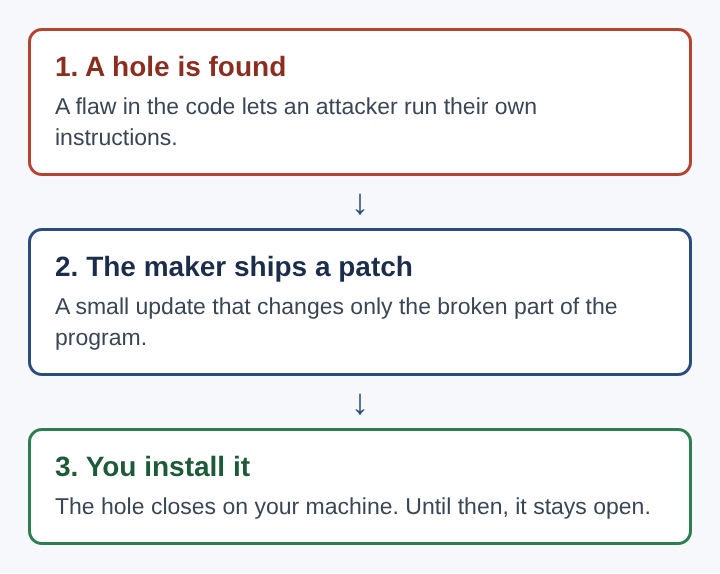
Every patch follows the same short path, and the last step is the one that belongs to you.
Frequently asked questions
What is a zero-day vulnerability and can a software patch stop it?
A zero-day vulnerability is a security hole unknown to the developers or anyone able to fix it. No patch exists yet, so other defences such as firewalls and limited user permissions have to carry the load. Once the vendor ships a patch, installing it quickly closes the flaw.
How often should a software patch be installed?
Security patches should go in as soon as possible after release, ideally within days. Turning on automatic updates and restarting when asked handles most of this without any extra effort.
Can a software patch break a working program?
Yes, occasionally a patch changes behaviour another program depends on, or contains a new bug. Organisations often roll patches out to a small group of machines first, and keeping a backup means a bad patch can be undone.
Does a software patch remove malware already on a computer?
Usually no. A patch closes the way in, but malware already running stays there until antivirus software or a clean reinstall removes it.
Why a Software Patch Matters for Every Computer
Attackers do not need new tricks when old ones still work. Each published patch is also a public record of a flaw, and every computer that skips it stays open to anyone who reads that record. That is why patching sits at the base of almost every security plan, ahead of more advanced tools.
The habits are simple. Leave automatic updates on. Restart when the system asks. Update the browser and anything that opens files from the internet first, because those face the most attacks. Keep backups, so a bad patch or an attack does not cost your data. The ways malware spreads between computers keep changing, but most of them still rely on a flaw someone already fixed and someone else never installed.