What Is Spyware and How Does It Work
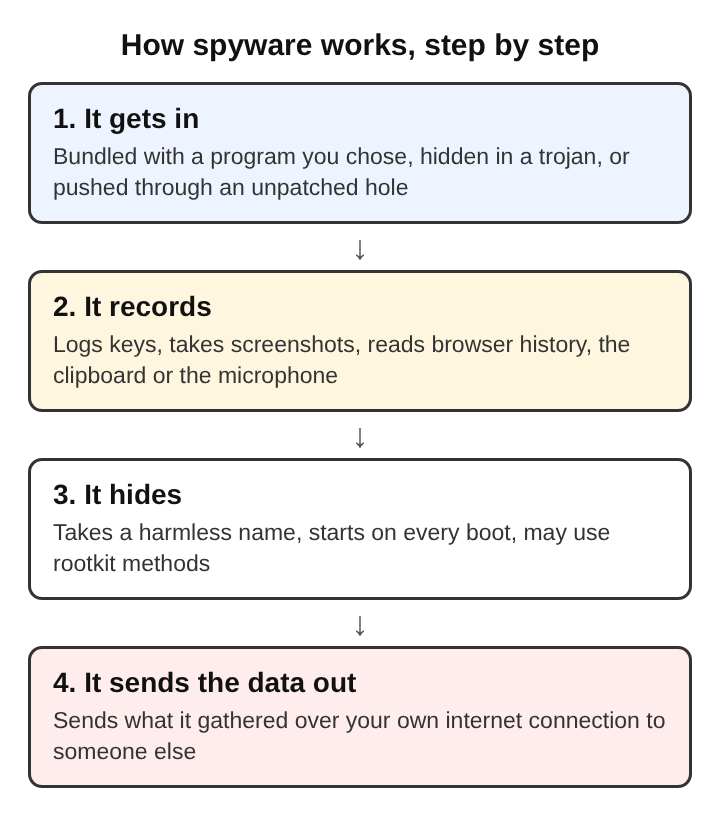
Spyware is software that watches what a person does on a computer or phone and reports it to someone else, without that person knowing. The answer to what is spyware and how does it work comes in four steps. It gets onto the device. It records activity. It hides. Then it sends what it records out over the network. Each step uses its own tricks, and each one has its own defences. The Wikipedia entry on spyware covers the history of the term and its many forms, from advertising trackers to tools built for targeted surveillance.
The same idea appears in a browser game that rebuilds the Family Computer tank classic inside a computer. In Tank City Reboot, the player's antivirus tank guards the CPU core from malware tanks. Its spyware tank is the one that fires fast shots. The game describes spyware with the core definition: it watches what a person does and reports it to someone else.
How Spyware Gets Onto a Computer
Spyware rarely installs itself out of nowhere. Unlike a virus or a worm, it usually does not try to copy itself to other computers. It gets in by fooling the user or by using a flaw in software, as the Wikipedia entry puts it. There are only a few common routes.
- Bundled with a program that looks useful. A person downloads a PDF converter from a search ad. The installer runs, the converter works, and a second program quietly installs during setup. This is the trojan pattern: the harm rides inside something the person chose to run.
- Through an unpatched flaw. A drive-by download uses a bug in a browser or plugin to run code when a page loads, with no click needed. Updates close these bugs, which is why software patches matter so much here.
- Email attachments and links. A document asks the reader to enable macros, or a link leads to a fake update page.
- Browser extensions. An extension allowed to read and change data on every website can see every page, including forms with passwords in them.
- Someone with the device in hand. A partner, employer or relative installs a monitoring app directly. This kind is often called stalkerware.
What Spyware Records: Keystrokes, Screens and Browsing
Once it is running, spyware collects whatever its author wants. The most common target is typing. A keystroke logger asks the operating system to pass it a copy of every key press. A keylogger can be software or a small piece of hardware, and most keylogger software can also capture the screen.
Here is a made-up worked example. A person opens a bank's website and types a username and password. The connection to the bank is encrypted, so nobody on the network can read the password. The keylogger, though, sits on the computer itself. It sees each key before the browser encrypts anything. So it records the password in plain text.
Other things spyware commonly records:
- Screenshots, taken at intervals or when certain windows open, such as a banking page.
- The clipboard, which often holds copied passwords and account numbers.
- Browser history, saved passwords and session cookies. A stolen session cookie can let an attacker act as a logged-in user without ever knowing the password.
- On phones: messages, contacts, location, and sometimes the microphone and camera.
How Spyware Hides From the User and the Operating System
Spyware only works while it goes unnoticed, so hiding is part of the design. The simplest method is a harmless name: a process named close to a real system service, or a folder tucked among genuine program files. To survive a restart, it adds itself to startup entries or scheduled tasks, so the system launches it on every boot.
More serious spyware borrows rootkit methods. A rootkit changes how the operating system reports what is running, so a file list or task list simply leaves the spyware out. If the tool that lists processes has itself been altered, the user and some security programs see a clean system. That is why rootkits are hard to find and remove, and why spyware that uses them can stay in place for a long time.
How Spyware Sends Stolen Data Out
Recorded data is useless to the attacker until it leaves the device. Most spyware stores what it collects in a small hidden file. Then it sends that file in batches to a server the attacker controls. It usually uses ordinary web traffic over HTTPS, because nearly every program on a computer sends that kind of traffic, so it blends in. Some spyware sends small amounts at a time, or only when the device is idle, so there is no noticeable spike.
Here, encryption helps the attacker. HTTPS hides the stolen data from anyone watching the network, including the victim's own monitoring tools. Encryption protects data in transit and in storage. It cannot protect data from a program on the same device that reads it before it is encrypted or after it is decrypted. That split is covered in more depth in how encryption keeps data private from malware.
Signs That Spyware Is Running on a Computer
Well-made spyware may show no sign at all. Cruder kinds often do. Things worth checking:
- A browser home page, search engine or toolbar that changed without the user doing it.
- Extensions or apps nobody remembers installing.
- On a phone, an unknown app with accessibility or device administrator permissions. These let an app read the screen or resist removal.
- Network activity while the device should be idle, or a phone battery that drains much faster than before.
- Login alerts from accounts, or password changes the owner did not make.
A heavy infection can also cause unwanted processor activity, disk use and network traffic, along with freezes and crashes. Some spyware switches off firewalls and antivirus software, which opens the door to more infections.
None of these proves spyware on its own. A slow computer is usually just a slow computer. But two or three signs together are a reason to look closer.
Defences Against Spyware: Patches, Permissions and Scanners
Each step in the spyware chain has a matching defence.
Patches close the way in
Keeping the operating system, browser and apps updated removes the bugs that drive-by downloads rely on. The game nods to this with its Patch power-up, a ten-second shield named for the software update that closes a security hole.
Permissions limit what spyware can reach
The principle of least privilege says each program and account should have only the access it needs. If people do their daily work from a non-administrator account, a bundled installer cannot write deep into the system without asking. On phones, checking which apps hold accessibility, location, microphone and camera access limits what any one app can record. The same goes for browser extensions: fewer extensions with narrow permissions means fewer programs reading every page.
Scanners find known and suspicious code
Security scanners compare files against signatures of known spyware. They also watch for suspicious behaviour, such as a program hooking keyboard input or contacting an unknown server at regular intervals. A firewall checks network traffic against rules and blocks what breaks them, so it can flag an unknown program trying to reach out.
Account protections reduce the damage
With two-factor authentication, a stolen password alone is not enough to get into an account. A password manager that fills in logins cuts down what a keylogger can capture. Spyware that can read the screen or browser memory may still reach some of it. If a phone or computer is badly infected, especially with rootkit methods, a full reset and reinstall is often the only reliable fix.
Frequently asked questions
Is spyware the same as a virus?
No. A virus is defined by how it spreads, by attaching itself to other files. Spyware is defined by what it does, which is watch and report, and it usually arrives inside a program the person installs.
Can spyware run on a phone as well as a computer?
Yes. Phone spyware often arrives as an app with broad permissions, or someone who had the phone in hand installs it. It can read messages, track location and use the microphone.
Does encryption protect data from spyware?
Only partly. Encryption stops people on the network from reading data in transit. Spyware on the device itself can still read data before it is encrypted or after it is decrypted.
Can a security scanner remove every kind of spyware?
No. Scanners catch most known spyware, but new or targeted spyware may not match any signature. Spyware that uses rootkit methods can also hide from the system the scanner relies on, and in those cases a full reinstall of the operating system is the safer route.
Spyware and the Layers of Malware Defence
One trait separates spyware from most other malware and shapes every defence against it: it wants to stay quiet. A worm makes itself visible by spreading. Ransomware makes itself visible by locking files. Spyware succeeds only as long as nobody notices it, so the defences that matter most are the ones that work before anyone sees a symptom. Patches block the entry. Permissions shrink what can be recorded. Scanners and firewalls watch for the recording and the sending. Two-factor login limits what a stolen password is worth. No single layer catches everything. Together they make each of the four steps harder, and spyware needs all four to work.
Tank City Reboot
The Family Computer tank classic, rebuilt inside a computer. Visit tankcityreboot.vlvd.net