How does antivirus software detect malware? It uses several methods at once. It compares files with a database of known bad code. It looks for suspicious traits in files it has never seen. It watches what programs do. It can also run a doubtful file in a closed space before it reaches the real system. Each method catches threats the others miss, which is why scanners combine them. One browser game rebuilds the Family Computer tank classic inside a computer and puts the player in an antivirus tank that defends the CPU core from malware tanks. Behind that game sits a real question: how does defence software tell harmful code from harmless code?
How does antivirus software detect malware the moment a file arrives
Most of the work happens in the background. The Wikipedia entry on antivirus software calls this real-time protection, also known as on-access scanning. It checks files as they are opened or run and scans apps as they are installed. It also steps in when you open an email or browse the web.
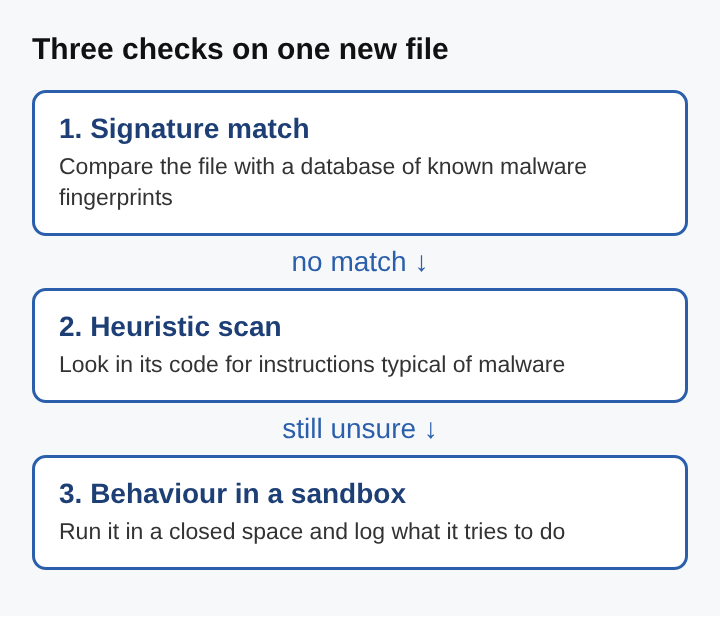
Follow one file through it. Say you download an installer for a photo editor. The moment you run it, the scanner reads it first. If it does not recognise the file, it looks harder at the code. If the code still looks doubtful, some tools watch what the program does when it runs. One file can pass through several checks in a few seconds, and each check asks a different question.
Signature-based detection and malware fingerprints
The oldest method is signature matching. When a malware sample reaches an antivirus firm, researchers or automated analysis systems study it. Once it is confirmed as malware, a signature of the file is extracted and added to the signature database. Your scanner downloads those updates and compares the files it checks against them.
A match is strong evidence: the file is the known threat. The weakness is plain. A signature only exists after someone has found and studied the sample, so brand new malware has none yet.
Malware authors also fight back. Polymorphic code changes with each copy, so every version has different bytes while doing the same job. That makes it hard for a scanner to recognise. To catch the many small variants of one family, researchers find the parts every member shares and write one generic signature for the whole family.
Heuristic analysis for catching unknown malware
Heuristic analysis uses rules of thumb instead of exact matches. It works in two ways. In the first, the scanner runs the doubtful program's commands inside a small virtual machine and sees what they would do. In the second, called static analysis, it takes the program apart and reads its machine code without running it.
Either way, it looks for instruction patterns typical of malware: searching for certain files, altering the Windows registry, or injecting code into other processes. No single trait proves anything. Plenty of honest programs touch the registry. When enough suspicious traits add up, the file is flagged.
The cost is accuracy. Heuristics can still miss a new virus that uses a trick no known virus used, and they raise more false alarms than signatures do. Each time researchers study a new virus, what they learn goes back into the heuristic engine.
Behaviour monitoring and watching malware at work
Some malware looks clean on disk and only shows itself once it runs. Real-time protection keeps watching for suspicious activity after a program starts, not only when the file is read. Since about 2013, the industry has moved toward methods that need no signature, such as behavioural detection and machine learning, so it can catch attacks nobody has seen before.
Back to the photo editor installer. Suppose it passes the signature check and the heuristic scan. Then it starts injecting code into another running program and changing system settings it has no reason to touch. A behaviour check sees actions, not bytes, so it can stop the process even though the file itself matched nothing.
Sandboxing suspicious files before they run
A sandbox) is an isolated space where untrusted code can run without reaching the rest of the system. Sandbox detection runs a program in a virtual environment and logs every action it takes. Based on that log, the scanner decides whether the program is malicious. Only if it looks safe does it run on the real computer.
The method works well, but it is heavy and slow. For that reason it is rarely used in antivirus for home computers. It shows up more in security tools that study samples in bulk, where waiting a little longer is acceptable.
How antivirus software handles worms, trojans, spyware and rootkits
Different kinds of malware call for different checks. A worm copies itself from computer to computer over a network without anyone opening a file. Because it spreads on its own, a firewall that checks network traffic against rules matters as much as file scanning. The difference between a virus and a worm shapes which defences work.
A trojan hides inside a program that looks useful and does its harm once it runs. Signatures catch known trojans, and behaviour checks catch the moment a useful-looking program starts doing something it has no reason to do. Spyware watches what a person does on a computer and reports it to someone else, often quietly for a long time, which how spyware works on a computer covers in more depth.
A rootkit buries itself deep in the operating system so it is hard to find and remove. The hard part is that a rootkit can subvert the very software meant to find it. The most reliable check is to shut the computer down and inspect its storage from a separate, trusted operating system. Other methods include difference scanning, which compares what the system reports with what is really there, and memory dump analysis. When a rootkit sits in the core of the operating system, reinstalling the system may be the only cure.
Antivirus defence in Tank City Reboot
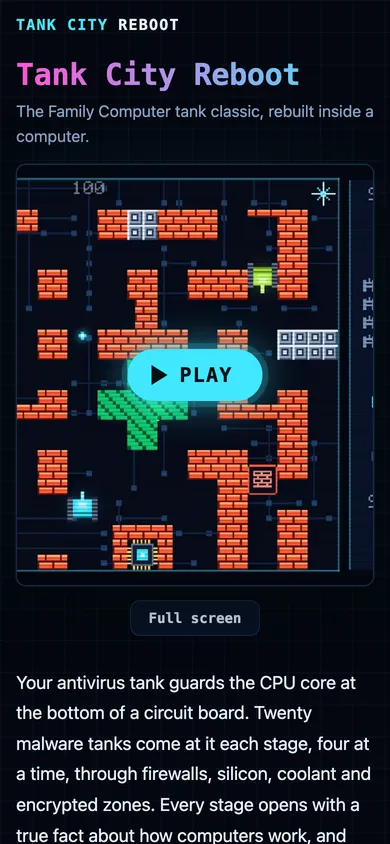
Tank City Reboot turns these ideas into a tank game that plays in a web browser on a computer or a phone. The player's antivirus tank guards the CPU core at the bottom of a circuit board. Twenty malware tanks come at it each stage, four at a time, and the goal is to destroy all 20 before any of them hits the core.
The four enemy types are the same threats a real scanner faces. The worm is the basic tank, slow and down in one hit. The trojan moves twice as fast. Spyware fires fast shots. The rootkit is armored and takes four hits, in line with how hard real rootkits are to remove. Encrypted zones hide any tank inside them, and the site notes that encrypted data looks like random noise to anyone without the key. Power-ups borrow real defences: Patch gives a shield for ten seconds, Firewall rebuild turns the wall around the core to silicon for fifteen seconds, and Backup adds an extra life. Every stage opens with a true fact about how computers work.
Frequently asked questions
Can antivirus software detect every type of malware?
No. New malware, code that changes with each copy and rootkits that hide from the operating system can all get past a scanner. That is why antivirus works alongside patches, firewalls and backups.
What is real-time protection in antivirus software?
It is the automatic checking that runs in the background. It scans files as they are opened or run, apps as they are installed, and content from email and the web.
Why do antivirus programs need regular signature updates?
A signature can only match malware that researchers have already found and studied. A scanner with an old database misses threats a current one would catch.
How does antivirus software detect malware it has never seen before?
It uses heuristic analysis to weigh suspicious patterns in a file's code, behaviour checks to catch harmful actions as they happen, and sometimes a sandbox to watch a file run in isolation. None of these needs a prior signature.
Why antivirus detection can never be perfect
In 1987, as the history of antivirus software records, Fred Cohen wrote that no algorithm can perfectly detect every possible computer virus. Every method trades one error against another. A false positive is a clean file flagged as malware. A false negative is real malware that slips through. Push heuristics harder and more unknown threats get caught, but more honest software gets blocked too. Even machine learning needs careful tuning, because clean files far outnumber malicious ones and the false alarm rate can climb.
The same history notes that using several layers of defence can still reach a good detection rate. A software patch closes the hole malware would use. A firewall filters network traffic. A backup lets data be restored after a loss. Antivirus detection is one of those layers, and each one covers part of what the others miss.
Tank City Reboot
The Family Computer tank classic, rebuilt inside a computer. Visit tankcityreboot.vlvd.net