A one-hour recording usually holds five minutes that matter: a decision on a call, a bug on the screen, a good answer in an interview. Knowing how to mark moments in a recording lets you go straight to those minutes instead of dragging the playhead back and forth. Marking takes a second while you record. Finding an unmarked moment later can take far longer. Cheap Recorder, a screen recorder that runs in Google Chrome, records the screen, microphones, the webcam and the other side of a call into one MP4 saved to a folder on your own computer, with a live transcript, and it marks a moment with a single key.
Why a marked moment is faster to find
Memory fades fast. During a call you are sure you will remember that the budget came up "around the middle." A week later, the middle of a 50 minute file is hard to pin down. You end up playing ten second slices and listening for the right voice.
A mark made at the moment itself removes most of that search. The value is highest in three situations:
- Long calls. Meetings, interviews and support sessions run long, and the useful part is short.
- Screen demos. When you walk through a product or a bug, the exact second an error appears is what a developer needs.
- Recordings you will edit. A mark at each mistake or retake shows where to cut.
Where marking moments comes from
Film and video crews have done this for a long time. On a shoot, the camera assistant logs the start and end timecode of each shot and sends the list to the editors, so they can find any shot again. For years that log was written by hand with pen and paper.
The clapperboard does a related job. It shows the scene and the take in front of the camera, and its sharp clap is easy to spot on the sound track, so picture and sound can be lined up later. Both habits share one idea: note the moment when it happens, because that is when you know it matters.
A recording made at a desk works the same way. Every mark is a point in time with a reason behind it. The reason is the part you forget, so it pays to capture it at the same second.
How to mark moments in a recording of your screen
Say you are recording a short product walkthrough with your face in the corner. In Chrome, the recorder asks what to capture: Whole screen, A window, A browser tab or Webcam only, and a switch turns the webcam on or off. Pick the tab or window that holds the product, turn the webcam on, and start.
During the recording, press M or the Add marker button whenever something worth finding happens. In the walkthrough, that could be:
- The moment you open the settings page.
- The moment a form shows an error.
- The moment you start the part you want to reuse in another video.
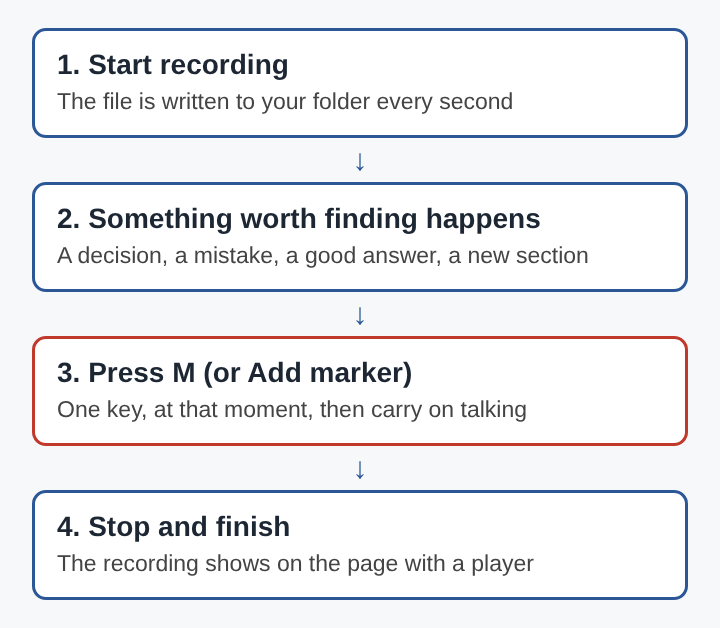
When you are done, press Stop and finish. The recording shows on the page with a player, and it is already in the folder you picked. The file was written every second while you recorded, one MP4 per recording, and nothing was uploaded. If you are pairing a face camera and a screen for the first time, the setup is in how to record your screen and webcam at the same time.
Marking the key moments of a video call
Calls are where marks earn the most, because two or more people talk and the key line can come from anyone. To catch the other side, use the Call audio tile: choose Pick the call tab, select the Meet or Teams tab, tick Share tab audio (some versions of Chrome say Also share tab audio) and press Share. Only the sound of that tab is kept, mixed into the recording with your microphone.
That box matters. Chrome gives a web page the sound of another tab only when that tab is shared with its tab-audio option ticked. If you share a window or the whole screen instead, or leave the box unticked, the Call audio tile says the tab had no audio. Setting this up takes about a minute, so do it before the call starts. For the Teams version of these steps, see how to record a Microsoft Teams meeting in Chrome.
Before you press record, tell everyone on the call, because the law on recording calls differs from place to place. Wear headphones too, so the other voices do not come out of your speakers and back into your microphone. If voices still echo or sound twice, how to stop an echo when recording a video call walks through the causes.
Once the call is running, these are the moments worth a mark:
- A decision ("the launch moves to Friday").
- A number or date someone gives.
- A question nobody answered.
- Anything you promised to follow up on.
Pressing M takes less attention than writing a note, so you can keep listening.
Finding a marked moment with the transcript
A mark tells you that something happened. A transcript tells you what was said and when. The live transcript works in one of 25 languages and gives you captions as an SRT file.
SRT is plain text. Each caption is a number, the time it appears, an arrow, the time it disappears, the words, and then a blank line. Times are written as hours, minutes, seconds and milliseconds, such as 00:23:10,400. You can open the file in any text editor and search it.
That makes one small habit very useful: say the reason out loud as you press the key. "Marker, deadline." Your words go into the transcript at that second.
Here is a worked example. You record a 40 minute call with the transcript on. At four moments you press M and say "marker" followed by a word: "marker, budget," "marker, deadline," "marker, bug," "marker, follow up." After Stop and finish, you open the SRT file and search for "marker, deadline." It sits in the caption that starts at 00:23:10. You move the player to 23 minutes and 10 seconds and hear the full exchange. Searching for "marker" alone lists all four moments in order, with their times.
One privacy point: while the live transcript is on, Chrome sends the microphone audio to Google to turn it into text. If a call should not leave your computer in any form, leave the transcript off and keep a written log instead.
Keeping marked recordings easy to search
A folder of recordings stays useful months later with a few habits.
Write a short log
Right after Stop and finish, write one line per moment in a text file: "12:40 error on save," "31:05 budget agreed." Save it in the same folder as the MP4. It takes two minutes while the call is fresh.
Name the recording clearly
Recordings go to a folder you choose on your own computer. A name with a date and a subject, such as "2026-10-28 client kickoff," lets a file search find it without opening anything.
Mind the start time on separate tracks
If you tick Also save every source separately under Options before you start, each microphone and the other side of the call is saved as its own file in a Separate sources folder inside the recording's folder. Each microphone file is named after the microphone and starts with audio_. The sources open one after another, so these files can begin a fraction of a second apart, and a time read from the main recording may be slightly off in a single track. One sharp clap just after you start gives every file the same point to line up on, and a thirty second trial run shows whether every track caught it. The full setup is in how to record a podcast with separate tracks in the browser.
Frequently asked questions
Can a moment be marked after the recording ends?
The marker key works during a recording. After it ends, the simplest way to note a moment is to play the file and write the time from the player into a text log kept next to it.
Why say the reason out loud when marking?
A mark on its own does not say why it was made. A spoken word such as "marker, budget" lands in the transcript and its SRT file at that second, so a text search finds both the moment and the reason.
How many moments are worth marking in one recording?
There is no number to aim for. Mark each moment someone will want to find again, because forty marks on a short call are almost as slow to sort as none.
Does an SRT file show the exact time of a moment?
Each caption in an SRT file has a start time and an end time down to the millisecond. The caption that holds a spoken word gives the time to jump to in the player.
Marking moments as a recording habit
Marking works best as a routine rather than an afterthought. The capture and the call audio are set before the session, headphones go on, and one finger stays near the marker key. Decisions, errors, numbers and promises get a mark and a spoken word. A short log follows while the details are fresh, and the SRT file answers any search by word and time. A recording handled this way can be searched in seconds a year later, by the person who made it or by someone who was never on the call.